



Feature Focus: Text Animation of Character Offset with Preserve Case & Digits now supports Hebrew
Text Animation of Character Offset with Range Type Preserve Case & Digits has been enhanced in After Effects Beta 22.5 (19) to include the Hebrew character set.
You can read more about this particular character set here: https://www.unicode.org/charts/PDF/U0590.pdf
Just to review, the Range Type Preserve Case & Digits defines a set of Unicode range groups whereby when After Effects adds a positive or negative offset to the base character it is animating the resulting Unicode character is wrapped around so it stays within the same Unicode range group as the base character.
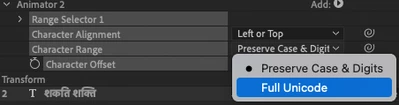
For example, consider the upper case Latin letter "Z" which is part of a Unicode range group for upper case Latin letters that spans from "A" to "Z". When we add one with the Character Offset we generate an upper case Latin "A" instead of getting the next Unicode character after "Z" which is the Left Square Bracket "[". Neat, eh?
With Character Offset Range Type Full Unicode there is no constraint so with the right starting base character and a big enough Character Offset one can end up with some pretty unusual characters most of which are probably not even supported by the applied font.
Having no Hebrew language expertise I had to make some educated guesses based on the Unicode table and the constraints of our Text Animation implementation so if YOU have that experience please study the following table to validate my assumptions.
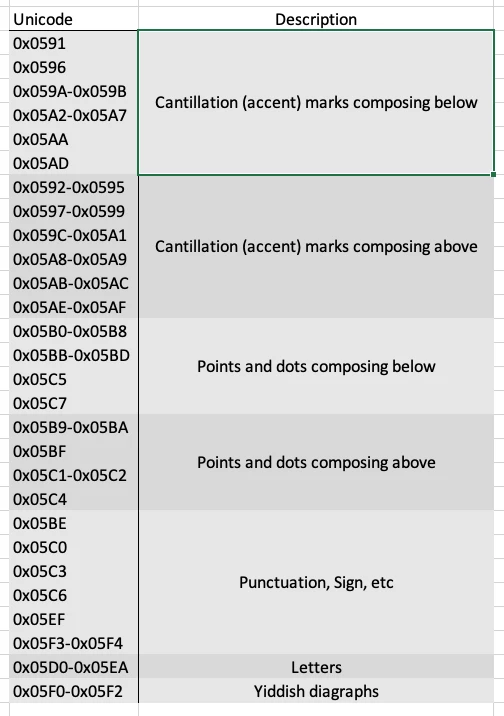
Note that because we do not do a full recomposition of the Text during Text Animation we are effectively constricted to animating/replacing like with like. Thus we group Letters together so that only a Letter will be replaced with another Letter. An Accent which was replaced with a Letter would look pretty messy.
Accents could have been grouped as one but I made a guess that visually (which I feel Text Animation really is) Accents composing above the base character should only be replaced with an Accent that also composes above the base character - again happy to be informed by an expert opinion.
The Character Alignment setting is rather important if you want the animated Hebrew Text to look at all useful - choose Adjust Kerning for uniform visual layout.
During my testing of the change I unfortunately (or perhaps fortunately depending on how one looks at it) revealed long standing limitations with how After Effect's Text Composer composes Accents - it does it poorly with the default vertical alignment relative to the base character either overlapping on the top or detached from the base character below.
I have filed a bug on this with the relevant team but it suggest to me that nobody can have been using Accents very effectively.
Finally, the Text Animation of Accents remains unsuable as well in the current build because of another bug just discovered which cause the code to become confused about which is the base character and which is the Accent (another one of these combining character situation) resulting in the base character being animated as if was an Accent created an entirely unusable outcome. I have filed a bug on this as well.
So the good news is that at least the basics of Letters and Punctuation are working and by discovering where we have problems with Composition there is a path forward to addressing them.
Douglas Waterfall
After Effects Engineering
 AdChoices