



Question
Gradient adds random opacity stops
Steps to reproduce:
Add a layer style > Outer Glow to a layer
Set it to “Gradient”
Edit the gradient, moving the colour and opacity stops independently (I want white at location 0%, then cyan at location ~25% and opacity 100% at 35% and 0% at position 100%), so it set it thus and click OK.
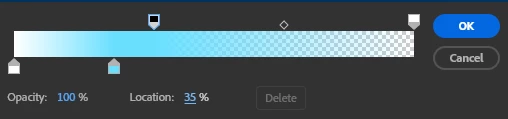
Click Edit Gradient again, and see how AE has added random opacity stops hither and thither:

Can AE not have a colour stop without an opacity stop?
System info
Application: After Effects (Beta) v26.5.0.76
OS: Windows v10.0.26200, RAM: 127.91 GB GB, CPUs (logical): 32
 AdChoices