Known Participant
June 15, 2023
Answered

import 3d AE. 23.6

  • June 15, 2023
  • 3 replies
  • 2025 views

when I import the obj file to after effect this message & object are hidden from the preview panel I upload screenshots 

This topic has been closed for replies.
Correct answer TimKurkoski

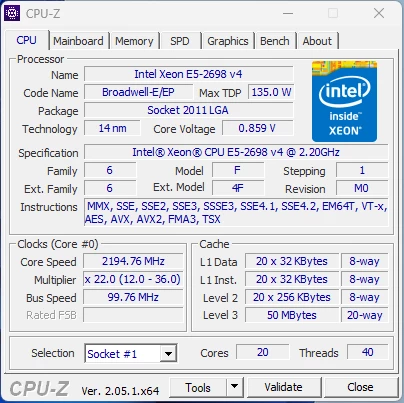
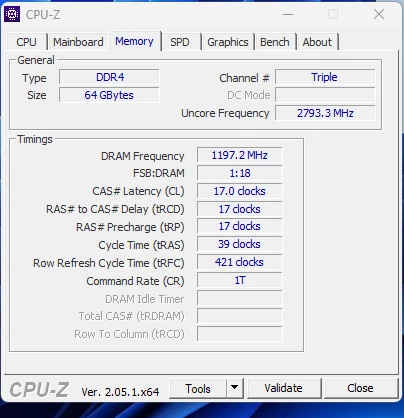
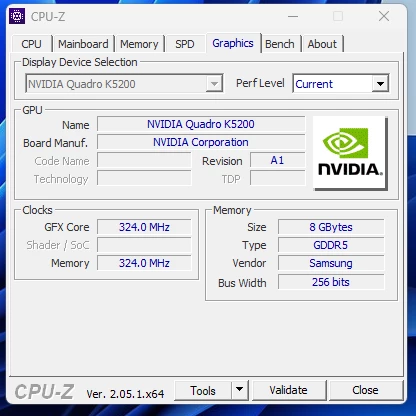
that's my machine spec.

 I am making an update when it is available, and I do not know how many versions this is, and also when I try the file, it does not appear.


Thank you for the screenshots of your system specifications, @Mohamed5CB0 .


Your computer's GPU does not meet the minimum requirements for the Mercury 3D renderer.


For Nvidia GPU's, Mercury 3D requires a Maxwell GPU. (Roughly, Nvidia GPU's from 2015 and later.) Your K5200 GPU is from 2014 and uses the previous Nvidia microarchitecture, Kepler. This is not supported by Mercury 3D.


Apologies, but you will need to upgrade the GPU in your computer in order to use the Mercury 3D rendering, including 3D model import and rendering, in After Effects Beta.


We are investigating a solution to notify when the GPU doesn't meet minimum requirements. Our apologies for the confusion.


3 replies

Known Participant
June 16, 2023


TimKurkoski
Community Manager
Community Manager
June 19, 2023

@Mohamed5CB0,


Which specific build of After Effects Beta are you using? Choose Help > About After Effects Beta.


In order to render 3D model layers, the Composition must be set to the Mercury 3D renderer. That renderer is not appearing in your list of composition renderers, so we need to troubleshoot why that is. Let's start with the specific build number you're using.


Also, what are your system specifications, including GPU? The Mercury 3D renderer requires a physical GPU with at least 4GB of VRAM.


You may want to try some general troubleshooting, like starting in safe mode and/or resetting the preferences. Edit > Preference > Startup & Repair.

Known Participant
June 22, 2023

that's my machine spec.

 I am making an update when it is available, and I do not know how many versions this is, and also when I try the file, it does not appear.

Known Participant
June 16, 2023

how change to mercury 3d?

I change between cinema 4d & classic 3d nothing happened

VictoriaNece
Community Manager
Community Manager
June 15, 2023

Hi there! Looks like your composition is set to the wrong renderer -- as it says in that first dialog box, you need to be using Mercury 3D for models to be visible.