



New OpenColorIO CDL Transform Effect in After Effects
Introduction:
After Effects introduced a native OpenColorIO/ACES workflow in our 23.2 release (details here).
As part of this release, we included OCIO File Transform Effect which gives users an option to use LUTs or CDL for color correction/grading.
We have feedback that users want to use a CDL file (e.g. .ccc files containing a list of color corrections) directly and choose the effect from the list as per requirement. Users should not have to break a .ccc file into .cc files to apply the effect.
We are introducing a new OCIO CDL Transform effect under the Color Correction category to cater to this request, starting in the Beta build 24.0 build 14.
OCIO CDL Transform Effect:
This effect aims to apply a CDL transform or its inverse to a layer or composition.
The UI for the effect is as follows:
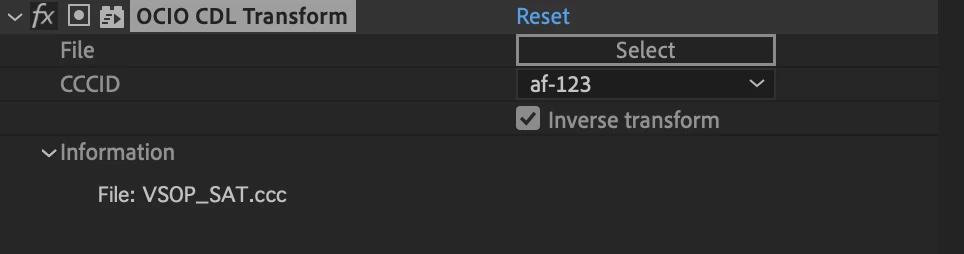
The effect includes the following UI elements:
- Select - Select a supported CDL file (e.g., a .ccc file) using the "browse/finder" dialog.
- CCCID Popup List - The list of all the ccc (color correction collection) nodes as a ccc-id list in the popup. You will be able to select any one of them, by default, the first in the list will be selected.
- Inverse Transform - Invert the transform.
- Information - The information section will provide information/errors just like any other effect's Information section.
 AdChoices