Participant
April 27, 2022
Answered

Plugins AE 2022

  • April 27, 2022
  • 1 reply
  • 10010 views

"To run After Effects in a compatible mode, choose "Get Info" in the application
context menu and enable "Open using Rosetta"."


What does that even mean? Where should I go? 

Adobe team > come on, make an effort... 

Correct answer JohnColombo17100380

Hi @YnnHlr,


The application context menu can be found in the Finder by right-clicking the "Adobe After Effects 2022.app" which is located in the Applications folder if After Effects has been installed in the default location. From that right-click menu, choose "Get Info" to see the Get Info dialog where you can enable "Open using Rosetta":
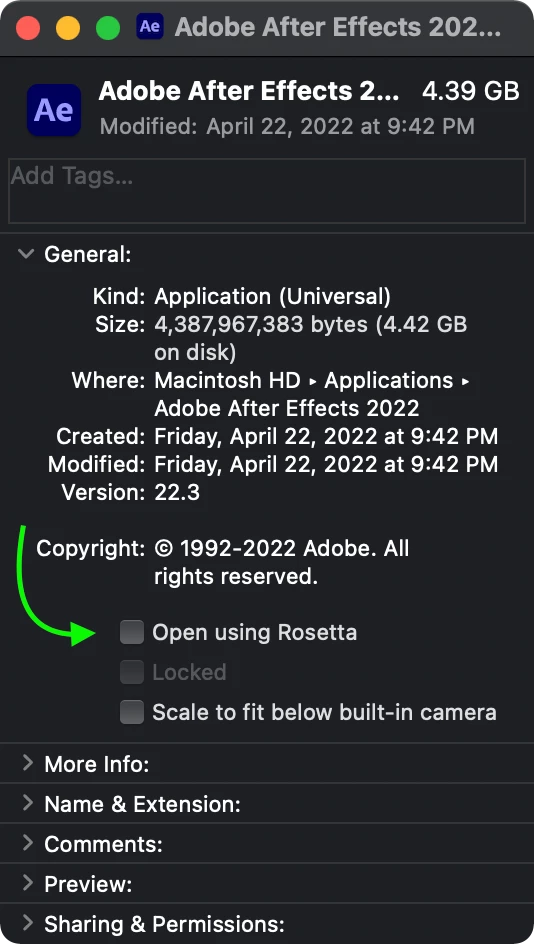


Are you running the release version of After Effects, or After Effects (Beta)? The latest release of After Effects 22.3 includes native support for Apple silicon, but it can be run under Rosetta in order to load third-party plug-ins that haven't yet been ported to Apple silicon by their developers.


Cheers,

- John, After Effects Engineering Team 

1 reply

JohnColombo17100380
Community Manager
JohnColombo17100380Community ManagerCorrect answer
Community Manager
April 27, 2022

Hi @YnnHlr,


The application context menu can be found in the Finder by right-clicking the "Adobe After Effects 2022.app" which is located in the Applications folder if After Effects has been installed in the default location. From that right-click menu, choose "Get Info" to see the Get Info dialog where you can enable "Open using Rosetta":


Are you running the release version of After Effects, or After Effects (Beta)? The latest release of After Effects 22.3 includes native support for Apple silicon, but it can be run under Rosetta in order to load third-party plug-ins that haven't yet been ported to Apple silicon by their developers.


Cheers,

- John, After Effects Engineering Team 

kiselevserj@gmail.com
Participant
November 16, 2022

There is no option to run under Rosseta.

kiselevserj@gmail.com
Participant
November 16, 2022

never mind. found it. thank you!
