



JohnColombo17100380
Community Manager
Community Manager
September 13, 2021
Question

Scene Edit Detection available in After Effects (Beta) build 22.0x88 and later

  • September 13, 2021
  • 4 replies
  • 6267 views

Hi everyone! We are very pleased to announce that Scene Edit Detection is now available in After Effects (Beta) starting in build 22.0x88.


Powered by Adobe Sensei, Scene Edit Detection automatically detects scene changes in an edited clip and creates scenes as markers or layers for a faster project setup. This makes it much quicker and easier to reuse part of an edited video clip, or apply motion graphics and visual effects to specific scenes. This feature was first released in Premiere Pro last year and now it has been brought to After Effects.

Using Scene Edit Detection

After adding footage to the Timeline in After Effects (Beta), select one or more footage layers and go to Layer > Scene Edit Detection or right-click and select Scene Edit Detection. You'll be shown a dialog with options to determine how the detected edits will be applied to the footage:
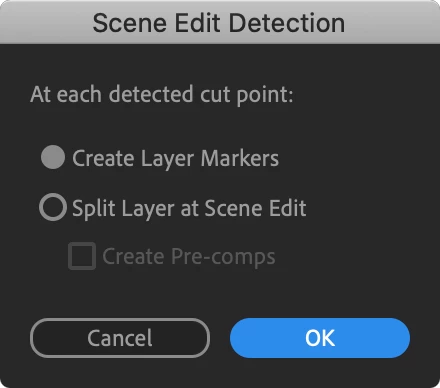


  • If you choose "Create Layer Markers", the selected footage layers will have numbered Segmentation markers applied at each scene edit.
  • If you choose "Split Layer at Scene Edit", the selected footage layers will be split so that each scene will be on a separate layer in the Timeline. When using this option, you can also choose "Create Pre-comps" to have each resulting layer pre-composed. In the Project panel, these new pre-comps will be placed in a folder matching the footage layer's name, which will be nested inside a "Scene Edit Detection" folder to help keep your project organized.

Click OK after choosing an option to run Scene Edit Detection on the selected layers.


Additional Changes

  • Layer Markers now can be assigned a type, either Comment or Segmentation. Each type has a default label color associated with it. The default label color for each type can be customized in Preferences > Labels... Markers created by Scene Edit Detection are created as Segmentation markers.


Limitations

  • Scene Edit Detection can only be run on video footage; it cannot be run on pre-comps or other layer types.
  • Scene Edit Detection cannot be run on Time-Remapped footage.

Providing Feedback

Any and all feedback is welcome. It would be particularly great to hear your thoughts on the following:

  • Please try out as much real-world footage as possible. Are there any clips that we fail to detect cuts on? If so, would you be willing to share the footage with us?
  • Are the given options for applying cuts useful? Are there any additional options you would like provided for applying detected cuts?
  • Scene Edit Detection also works with Time Stretched/Time-Reversed footage. Is this useful? Are the results what you expect?

Thank you all in advance for any feedback you can provide!

This topic has been closed for replies.

4 replies

Participant
February 24, 2023

I'm wondering if something has changed with this tool. A few months ago, Scene Edit Detection worked like magic. I even had videos where I only cut out a few frames, same angle, barely even a perceptible edti, but After Effects could still find it. I haven't changed my workflow, only updated AE to the most recent edition. Now Scene Edit Detection does not function. A shot can cut to black, and AE won't consider it an edit. This tool used to be a huge time saver, but now I'm back to searching for cuts and it wastes a lot of valuable time. Any idea if this is a common problem that will be patched soon?

Known Participant
July 4, 2022

using a pproj as my footage so that it's still editable - doesn't work, analysizes but creates no markers anywhere. It works for me with exported mp4, so it's Ok as a feature, but disappointing it doesn't see the cuts from pproj via dynamic link, as thought that be easier for it, as it could check the pproj for the edits.

Participant
March 30, 2022

Does anyone know when this will be available in the full AE suite? Or how I can access it now? 

Participant
May 19, 2022

I don't know when they added it but I just tried it for the first time with the latest official version (no beta). Rightclick any video and choose the option on the very bottom. Worked like a charm in my case (had no transitions in the video).

Rene Andritsch
Community Expert
Community Expert
September 17, 2021

Hi @JohnColombo17100380, I tried some clips one of which was an animated movie with clearly differentiated scenes. Does this feature not work on ilustrated/animated clips?

JohnColombo17100380
Community Manager
Community Manager
September 17, 2021

Hi @Rene Andritsch,

In general, yes, scenes in animated or illustrated content should be detected, with the caveat that the scenes must be separated by hard cuts. Dissolves or other smooth scene changes will not be detected since there isn't usually a specific frame that can be considered the scene change. Are the scenes separated by hard cuts? Would you be able to share the problematic clips with us?

Thanks for any further info,

- John, After Effects Engineering Team

Rene Andritsch
Community Expert
Community Expert
September 18, 2021

@JohnColombo17100380 yes I could share the clip as it has hard cuts in my opinion that are not recognized. Which e-mail address should I send it to as the clip should not be seen by the public.

I think it would be good for users to get a note by AE that no cuts could be detected in the analyzed video instead of getting no feedback at all after the analysis. Especially for longer clips if you leave your workplace and come back and seemingly nothing has happened.