


SUGGESTION: Anchor Points For Shape "Size" Property
The Problem
In Shape Layers, the “Anchor Point” in the Shape Transform group only affects Scale and Rotation, but not Size.
When animating the Size property (e.g., of a Rounded Rectangle), the shape grows or shrinks symmetrically from the center, regardless of where the anchor point is.
This makes it impossible to do natural-looking directional growth (e.g., “expand downwards from the top edge”) unless you hack around it.
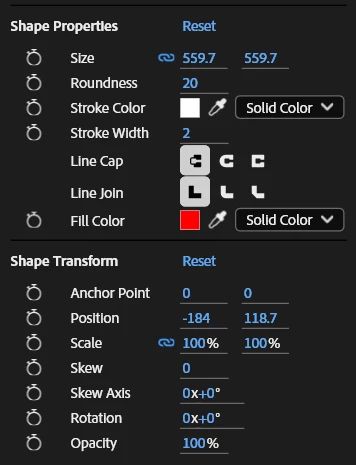
Here's an example:I have a Rounded Rectangle.
I move its Shape Transform anchor point to the top edge.
If I animate Scale, it respects the anchor point, but the rectangle gets distorted (stretchy look) instead of staying proportional.
If I animate Size, the proportions are preserved, but the anchor point is ignored — it always expands outward evenly in all directions.
Why I think the anchor point should affect the "Size" property:Motion designers often want shapes to “grow from” or “shrink into” a specific edge or corner (like buttons, UI panels, progress bars, apple style dynamic island animations, etc.)
Right now, the only workaround is offsetting position keyframes to fake the directional growth, which is tedious and unintuitive.
Breakdown/how this can be easily implemented:Make Size respect the Shape Transform Anchor Point.
If a designer moves the anchor point inside the Shape Transform, Size animations should expand/contract relative to that anchor, not always from the center.
This would unify behavior with Scale, Rotation, and Position — making the system more predictable and powerful.
 AdChoices