



Christine Goldby
Known Participant
May 6, 2022
Question

Welcome to Keyframe Color Labels in AE!

  • May 6, 2022
  • 19 replies
  • 28910 views

We are very happy to bring a new feature to the Beta. As of today’s build (22.5.0 Build 18) you can now color your keyframes with one of AE's label colors. This has been a huge customer request, and we know users that saw the sneak-peek at MAX have been anxious to get their hands on it.


Right-click on any keyframe(s), select ‘Label’, and choose the color you want assigned. You will also notice an option to ‘Select Label Group’, where you can use that color label as the basis for a selection. We have a few more features coming very soon, including scripting hooks and additional selection options. So stay tuned…


The new color labels led us to realize we needed a better keyframe selection UI. We wanted to allow you to see the label colors even while selected, and to make sure the selection didn’t disappear if that label was blue. This release includes the new selection UI that we would like you to experiment with. To show the difference, in the example images below I want to select the yellow keyframes, which sit next to the blue ones:
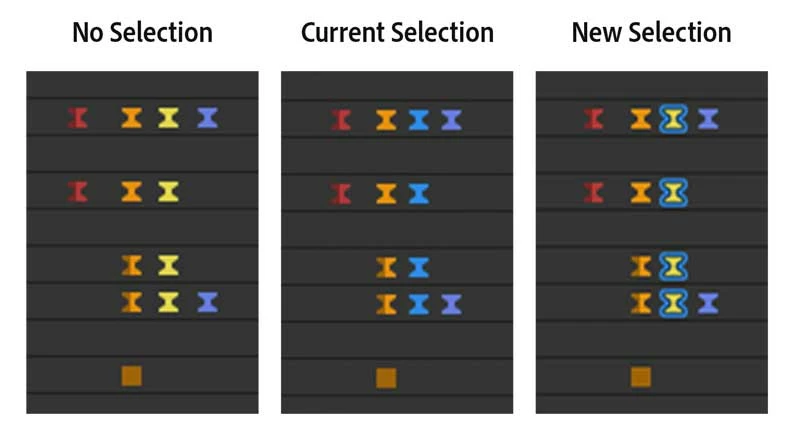


Give it a spin for a few days and let us know what you think. As mentioned above, we will have a few updates coming quickly so you can dig in even further.


Enjoy!

19 replies

fredBerria
Participant
May 7, 2022

Hi Christine!


amazing update!

Quick question : may keyframes be colored by dafault by type?

I know that we can identify the type easily, but adding a color would be awesome.


Many thanks,


best,

Fred.

Christine Goldby
Known Participant
May 9, 2022

@fredBerria - thanks for checking it out!
That's a feature request we've been wondering about as well. I'll add your vote to the discussion.

Christine Goldby
Known Participant
May 9, 2022

actually - @FrankAE added it as a feature where you can add your vote directly in User Voice: https://adobe-video.uservoice.com/forums/911311-after-effects/suggestions/45149746-preferences-default-keyframes-colours

dbDavideBoscolo
Legend
May 7, 2022

Can you add the incoming and outgoing influence as a number right before and after every keyframe?

Christine Goldby
Known Participant
May 9, 2022

@dbDavideBoscolo - can you give me more guidance on what you are looking for here?

Inspiring
July 15, 2022
Participant
May 7, 2022

This is awesome. Love the (semi) final implementation? The only other thing I can think of is possibly lasso selecting keyframes. I remember discussing this something like 8 years ago. Although that would be a great tool for anything, not just keyframes.

zsaaro
Inspiring
May 6, 2022

Ramiz and everyone involved: Thank you. I love this.

To me the new selection type is actually easier to see. There is something about an outline that feels fun.

zsaaro
Inspiring
May 6, 2022

I have found that sometimes when deselecting using Shift, the selection outline can be a little buggy, showing half selected keyframes. Video below.

TimKurkoski
Community Manager
Community Manager
May 6, 2022

Thanks for sending the video! We are aware of this bug. It's actually not a new problem with the new selection highlights. If you look very, very closely at previous versions of After Effects where the keyframe selection highlight is the blue overlay you can see it happen there as well. It's just more difficult to see due to the blue-over-gray result. The new outline highlights make it much more apparent.

FWIW, this bug only occurs on the 2nd + later selected keyframes on the same property row during a horizontal marquee drag. Dragging a marquee vertically, i.e. keyframes on multiple properties, does not induce the problem.

Inspiring
May 6, 2022

This is awesome! 


Hoping we will still get the FPS up on box selecting many keyframes as well.  

TimKurkoski
Community Manager
Community Manager
May 6, 2022

I presume you mean the problem where, when you select a lot of keyframes by dragging a marquee selection box around them, the After Effects UI slows down.

Unfortunately the keyframe color labels don't have any impact on this. Please rest assured that we're very aware of this problem and it's on the list for our developers working on UI infrastructure.

Inspiring
May 6, 2022

I was secretly hoping that "better keyframe selection UI" would kill two birds with one stone! Hopefully that UI infrastructure brings back some responsiveness! 

jackthegiantkiller
Inspiring
May 6, 2022

I get this lovely message when trying to boot the freshly updated Beta, then it quits out. Great start!

JohnColombo17100380
Community Manager
Community Manager
May 6, 2022

Hi @jackthegiantkiller,

That looks like a possible issue with the installation. Try uninstalling and reinstalling the latest After Effects (Beta) and let us know if you still encounter that error.


Thanks,

- John, After Effects Engineering Team 

jackthegiantkiller
Inspiring
May 6, 2022

Ugh. Just did the reinstall, and the same message as it forces the app to quit. I'm going to try to reinstall without the preferences etc retained.

Taylor Jon Peters
Known Participant
May 6, 2022

THANK YOU! 

Kes Akalaonu
Inspiring
May 6, 2022

Love it and downloading now

FrankAE
Participating Frequently
May 6, 2022

Great feature, works like a charm! It's nice that you can pick color fast e.g. "right click" and keys "l, r" will turn selected keyframes red.

Will there be an option in the future to select keyframes by color?

TimKurkoski
Community Manager
Community Manager
May 6, 2022
quote

Will there be an option in the future to select keyframes by color?

It's already there! Right-click on a keyframe > Label > Select Label Group.

This is also available under the Edit menu > Label > Select Label Group. (This Edit menu version of the Label menu is contextual, it also works if layers or project items are the active selection. So keep context in mind when you go to the Edit menu.)


Note that Select Label Group even works with the None label, which is the default for new keyframes. That's right, "None" is considered a label color!


All that said: as @Christine Goldby mentions above, we're working on some additional commands for selecting keyframes in a label group, so keep your eye out for future updates to After Effects Beta.