
natural_criticB837
Legend
February 27, 2019
Answered

Android App cut off on top and bottom

  • February 27, 2019
  • 1 reply
  • 3577 views

Hello,

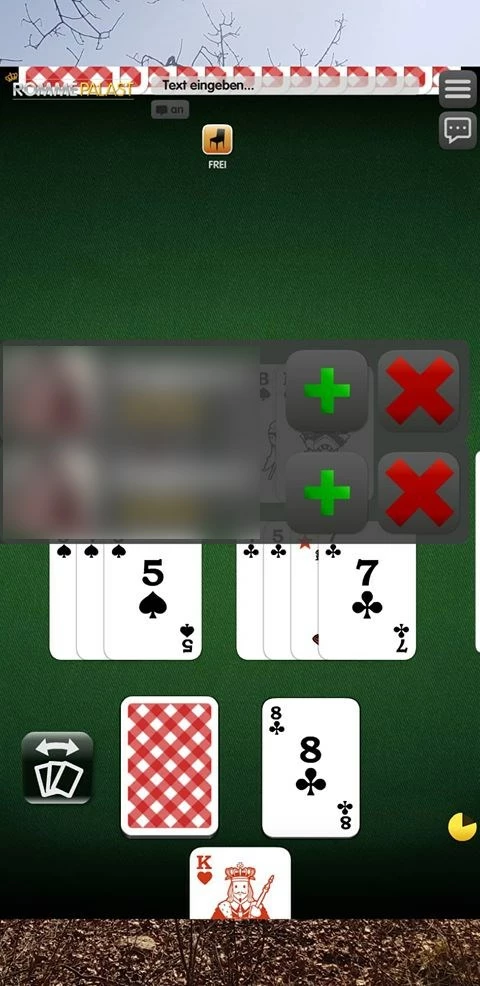
a user sent us this screenshot, where the app is transparent on the header and footer area and the desktop is visible. Has anyone seen anything like this before and can explain what is happening? The device is a Samsung Galaxy S9. It is the first report of this kind for a fairly popular app, so it seems not to be a widespread issue and we can not reproduce it locally. The user claims they have reinstalled the app a couple of times to no extent.

Thanks in advance
This topic has been closed for replies.
Correct answer Flipline

That's strange, I've seen apps having black bars on the top and bottom for ultra-widescreen devices, I've never seen the home screen wallpaper peeking through.

Do you have android.max_aspect set in your application XML to handle screens larger than 16:9 ratio?

1 reply

Flipline
FliplineCorrect answer
Inspiring
February 27, 2019

That's strange, I've seen apps having black bars on the top and bottom for ultra-widescreen devices, I've never seen the home screen wallpaper peeking through.

Do you have android.max_aspect set in your application XML to handle screens larger than 16:9 ratio?

natural_criticB837
Legend
February 28, 2019

Thanks, no we do not set android.max_aspect. I did a bit of research since it could look like our app is being letterboxed in this case (content is not cut off, the rendering area is just smaller than the display size). I found this part of the documentation:

Note: You do not need to set a maximum aspect ratio if an activity's android:resizeableActivity attribute is set to true. If your app targets API level 24 or higher, this attribute defaults to true. For more information, see Configuring your app for multi-window mode.

Since we use <uses-sdk android:minSdkVersion="14" android:targetSdkVersion="27"/> I do not see how maximum aspect ratio would make a difference. However I calclulated the aspect ratio of the above screenshot and the whole display is about 2.05 while the rendered area is 1,775, which is roughly 16:9, so it might be related to the max aspect ratio after all. I will try and see if I can replicate the behavior on a Galaxy S8 in the simulator.

natural_criticB837
Legend
March 5, 2019

We can reproduce the black letterbox on Samsung Galaxy S8 and adding android.max_aspect to our application.xml does indeed fix the problem on our test device. I still do not know why the screenshot from the user shows desktop background instead of the letterbox but I will assume this is bug will be fixed by supporting the aspect ratio of the device:

<!-- this lets you support devices larger than 16:9 ratio -->

<meta-data android:name="android.max_aspect" android:value="2.50" />