

dolldivine
Inspiring
November 19, 2018
Answered

At what point are app thumbnails attached?

  • November 19, 2018
  • 1 reply
  • 1687 views

Okay, I'm working between two computers, both with thumbnails in two different folders each and I'm SO confused right now.

I've gotten to one of the final stages.. I'm trying to upload my IPA to the App Store.  But it keeps complaining that there's missing thumbnails.  But I have a tonne of thumbnails.. I'm just not sure at which stage they are actually, like, attaching to the .ipa or being pulled into it etc, so I don't even know where to start troubleshooting.  Which of these points actually attach the thumbnails:

- I used a generic online thumbnail generator.  It created a folder which contains an assets.car file but also all the thumbnail images.  Are the images already in the asserts.car file there, and are they redundant?  Or do ALL the files have to be moved to the root, meaning, both assets.car and all the pngs?  I initially had everything in the root just in case.  I think I still do.  But I'm still curious if this is necessary because it really clutters my dev folder.

..but this said there were missing files, and I had no idea how to check inside of assets.car that I had the proper versions uploaded (because I didn't want all the images made from the 1024, I had hand-made custom ones for each side and preferred to use those), plus my husband was back home so I could finally download Xcode so...

- On the Mac, using Xcode, I also used the new project type instructions.  Opened the contents of my project, copy/pasted my assets.car from there to the root.  But in the folder (or whatever it is.. wherever Xcode was showing my assets.car file.. I don't really understand how Macs work), there were also two loose png thumbnails.  Was I supposed to copy/paste those into my root folder too?  The instructional tutorial I was following only said to copy/paste the assets.car file so that's all I did...

- Since no matter what I did, I still got errors, I noticed the step in the tutorial for adding some thumbnails in an xml.  I don't know how to attach an xml to an Animate file, so I tried also using the thumbnail upload thing inside Publish Settings and uploaded all the thumbnails I could there.  But when I compiled the IPA and emailed it to myself and transferred it back to a Mac (I've only been able to get the IPA to compile on the PC, not on the Mac), and tried to upload it, it's complaining about thumbnails more than ever.  So did it not pull in the extra thumbnails at time of compiling the IPA?  At what point are these frickin thumbnail PNGs actually pulled into another file???
This topic has been closed for replies.
Correct answer Colin Holgate

Ayyy, really?  But an icon that's 20x20 requires a different composition than one that's 1024x1024.. First the launch images, now this.. I hate cutting corners.  BUT.. I believe you, so, okay, I'll re-try running with the generator.

Okay, so once an assets.car is made, the icons are inside of it and their position in their folder is irrelevant, is what you're saying?  Thank you, that's helpful.  And once I "publish" the IPA, is assets.car inside of that?  Or does that still have to sit in the root folder?

What *is* an XML file?  Just a code file?  Does Animate create it or do I have to make it, and if so, do I add that to the assets?  And if I'm also adding thumbnails with the xml file, at what point do those png's get added?  When the IPA is compiled?

Thanks Colin!!!


You're right that ideally you would create a different icon for the 20x20 use case, but try to live with not being perfect, and have a 1024x1024 icon that will still be ok at the smaller sizes. Don't forget to have it be a full square, the rounded corners are done by the system.

The Assets.car file ends up inside the IPA. An IPA file is just a zip file, if you rename it to .zip and expand it, then on a Mac right-click on the .app file to look at its contents, you'll see all of the splash screens, icons, and the Assets.car file, are inside the .app. They also will all have the correct file names.

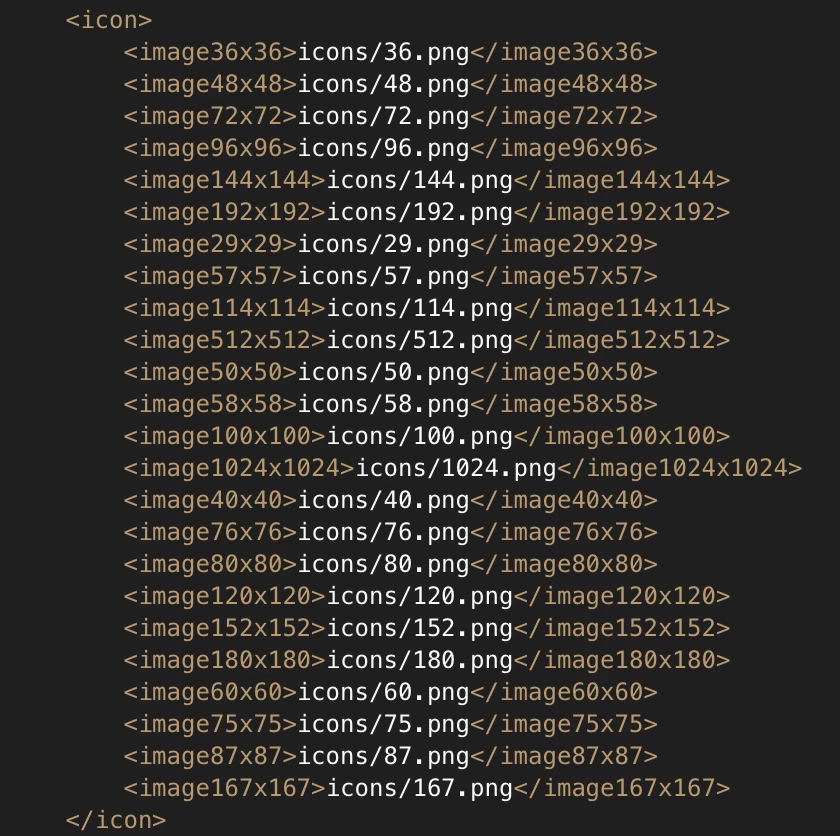
The XML file is just a text file, and ADT uses it to know how to compile the IPA. If you're not using Adobe Animate, which has a section for adding the icons, you would use a text editor to edit the XML to add the icons. The file names of the icons doesn't matter, just that they are inside the right tags in XML. I'll put a screenshot of that section of the XML from one of my apps, you'll see that I just name the file after the icon size.

1 reply

dolldivine
Inspiring
November 19, 2018

Okay so...

Let's say I use Xcode to make assets.car.  Forget the generic online generator.

How long do my thumbnails have to stay in the root (or specified relative location?)?
During the creation of assets.car?during the import of assets.car when publishing the ipa?  (or is the assets.car not even pulled into the .ipa and should also still hang out in the root with the ipa?)

And when I transfer the IPA back to the Mac for upload to the App Store/or TestFlight, do the locations of assets.car and the pngs matter then too, or are they incorporated into he files then?  Am I making sense lol?  I feel like I've gone completely insane..

Colin Holgate
Inspiring
November 19, 2018

DO use the generic online generator. I spent ages trying to fix the one made by Xcode, the online one worked right away.

You add the Assets.car file into your package, it doesn't depend on any of the original icons. But, also include all of the icon files, and their entries in the app descriptor XML, because they're needed for older versions of iOS.

The splash screens are a separate thing, Assets.car is jus the app icons. You still need to have added the 28 different types of splash screens.

dolldivine
Inspiring
November 19, 2018

Ayyy, really?  But an icon that's 20x20 requires a different composition than one that's 1024x1024.. First the launch images, now this.. I hate cutting corners.  BUT.. I believe you, so, okay, I'll re-try running with the generator.

Okay, so once an assets.car is made, the icons are inside of it and their position in their folder is irrelevant, is what you're saying?  Thank you, that's helpful.  And once I "publish" the IPA, is assets.car inside of that?  Or does that still have to sit in the root folder?

What *is* an XML file?  Just a code file?  Does Animate create it or do I have to make it, and if so, do I add that to the assets?  And if I'm also adding thumbnails with the xml file, at what point do those png's get added?  When the IPA is compiled?

Thanks Colin!!!