mattr8755445
Known Participant
December 7, 2018
Answered

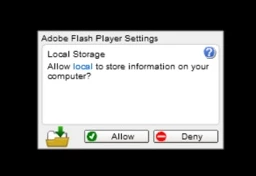
Frozen Flash Settings Window

  • December 7, 2018
  • 1 reply
  • 575 views

Hey guys, I've just launched a Flash game on Steam/Windows.

It uses an old version of AIR (21) to run an old captive version of Flashplayer (21). The reason for this is that AIR for desktop does not support Stage quality settings otherwise.

Everything works fine and the game's launch went well, but a small number of users are finding that this Flashplayer pop up is completely frozen for them - they can't click on it and can't resume the game. I know this problem has been around for years - has a reliable and simple solution ever been found? Can I as a developer do anything?

Most users don't have a Flash plugin installed, so they don't have Flash settings in their Windows control panel. Is there any other way to allow Flash storage?
I may need to reprogram the saving system to avoid using .sol files altogether.

Thanks!

This topic has been closed for replies.
Correct answer jeromiec83223024

I moved this to the AIR forums.  I'm actually surprised that we throw a prompt in the context of AIR, but I guess that you could theoretically load a third-party SWF into a WebView in your AIR app, and you'd want the end-user to be able to see and control that behavior.

The reason that clicks get ignored is because we're checking to ensure that the dialog is not obscured (at least in Flash), and we sample pixels from the screen (in modern browsers with hardware compositing, there's more complexity) and compare them to a buffer of what we *think* we're rendering, in order to evaluate whether or not we're on top.  Things moving around the edges of the settings window like video and gameplay will often confuse it, but we may run into platform-specific issues that cause these checks to fail.  Because Flash is running as plug-in inside of the browser (and in modern browsers, outside the host process and restrictively sandboxed) there's really just no better way to do resilient clickjacking protection in a way that minimizes false-positives.


Because of the privacy implications, we can't really kill off the dialog.  In Flash, I'd love to see it moved into the browser chrome, but it would require support from every browser vendor, and it's not going to happen at this point.

The easiest thing to do is probably to just avoid having it ever pop in the first place.  Off the top of my head, I'm thinking that EncryptedLocalStore() is probably a better choice for local storage in AIR, just because you're not carrying around that Flash legacy.  I don't do enough AIR development to remember off the top of my head whether or not ELS throws it's own prompt, but my guess is that it doesn't, since you can't call it from Flash...

1 reply

jeromiec83223024
Community Manager
jeromiec83223024Community ManagerCorrect answer
Community Manager
December 11, 2018

I moved this to the AIR forums.  I'm actually surprised that we throw a prompt in the context of AIR, but I guess that you could theoretically load a third-party SWF into a WebView in your AIR app, and you'd want the end-user to be able to see and control that behavior.

The reason that clicks get ignored is because we're checking to ensure that the dialog is not obscured (at least in Flash), and we sample pixels from the screen (in modern browsers with hardware compositing, there's more complexity) and compare them to a buffer of what we *think* we're rendering, in order to evaluate whether or not we're on top.  Things moving around the edges of the settings window like video and gameplay will often confuse it, but we may run into platform-specific issues that cause these checks to fail.  Because Flash is running as plug-in inside of the browser (and in modern browsers, outside the host process and restrictively sandboxed) there's really just no better way to do resilient clickjacking protection in a way that minimizes false-positives.


Because of the privacy implications, we can't really kill off the dialog.  In Flash, I'd love to see it moved into the browser chrome, but it would require support from every browser vendor, and it's not going to happen at this point.

The easiest thing to do is probably to just avoid having it ever pop in the first place.  Off the top of my head, I'm thinking that EncryptedLocalStore() is probably a better choice for local storage in AIR, just because you're not carrying around that Flash legacy.  I don't do enough AIR development to remember off the top of my head whether or not ELS throws it's own prompt, but my guess is that it doesn't, since you can't call it from Flash...
mattr8755445
Known Participant
December 11, 2018

Thanks for the advice!
I'm using HTMLoader to run the swf inside AIR. I was hoping the browser-style pop-ups would never appear, but oh well.

I'm currently changing my save system to use plain old text files instead of .sol files.