

Frozen Flash Settings Window
(I'm sorry if this is in the wrong forum, as this is more of a Flashplayer question.)
Hey, I've just launched a Flash game on Steam/Windows.
It uses an old version of AIR (21) to run an old captive version of Flashplayer (21). The reason for this is that AIR for desktop does not support Stage quality settings otherwise.
Everything works fine and the game's launch went well, but a small number of users are finding that this Flashplayer pop up is completely frozen for them - they can't click on it and can't resume the game. I know this problem has been around for years - has a reliable and simple solution ever been found? Can I as a developer do anything?
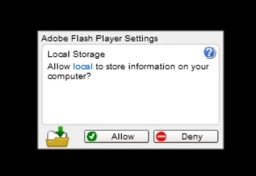
Most users don't have a Flash plugin installed, so they don't have Flash settings in their Windows control panel. Is there any other way to allow Flash storage?
I may need to reprogram the saving system to avoid using .sol files altogether...
Thanks, and sorry for this very outdated question!


 AdChoices