
Participating Frequently
June 26, 2025
Question

Actionscript 3.0 timline control

  • June 26, 2025
  • 2 replies
  • 372 views

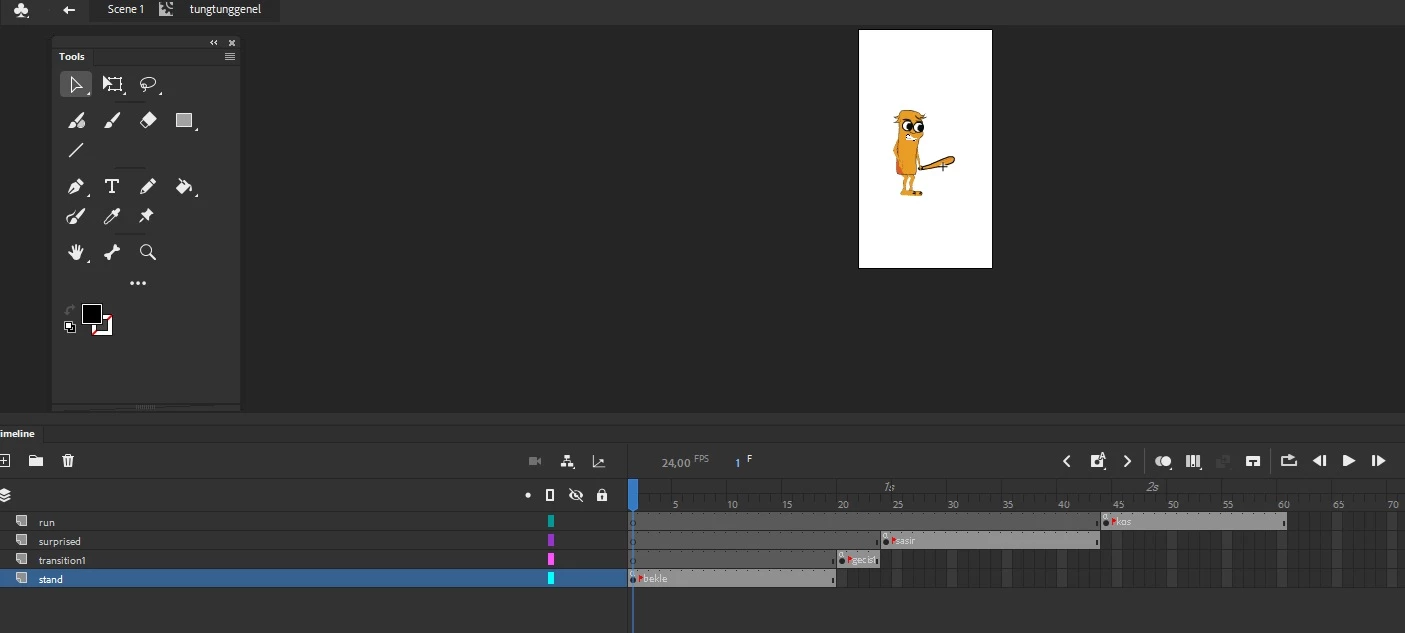
Hi, I'm learning character animation. I'm going to try coding for the first time. I looked at many tutorials but they were all interactive and with buttons. I collected all the movements of a character in a single movie clip. My aim is to call some of these movements to the main scene with code. However, when I opened a new scene, I could not call the movement I wanted in the same movie clip. Am I on the right track? For example, how can I call only the running and stopping movement from the movements in the image to the main scene with code? Thank you very much in advance
 

    2 replies

    JoãoCésar17023019
    Community Expert
    Community Expert
    June 26, 2025

    Hi.


    In the main timeline, select this Movie Clip instance containing your animations, open up the Properties panel (Ctrl + F3) and give it an instance name. Then you can call methods on it to play an animation/label. For example: character.gotoAndPlay("jump").

    As for the animations/labels inside of the Movie Clip, you can add a stop call or a gotoAndPlay("someIdleAnimation") to the end of each animation/label spam if you want that to play only once (a punch, for example). Or you can add a gotoAndPlay(currentLabel) call to the end of a label/animation spam that you want to be played in a loop.

    Please let us know if you need an example.


    Regards,

    JC

    Participating Frequently
    June 26, 2025

    hello, as you mentioned, I added gotoAndPlay() to the first frame in all movie clips, and stop(); to the last frame of each one.

    I went back. I opened a new layer in the scene, right clicked and selected actions. then I typed the scene I wanted to bring, but there was no change in the layer. how and where should I do the order of these scenes? my question is very novice, but I couldn't find it in any tutorial, so sorry 😞

    Participating Frequently
    June 26, 2025

    I mean, I understood the logic of this as follows: let's collect all the movements of the character in one place in a movie clip. and call the necessary ones in the scene according to their place. for continuity. I thought I could call similar movements of the same character from this movie clip in different animations. so I thought this movie clip was actually a library. for example, I want to use only two of these movements in the scene consecutively. is it possible to organize this? or is my logic wrong from the beginning?

    kglad
    Community Expert
    Community Expert
    June 26, 2025

    don't use scenes.  they add little and cause extra complications with code.


    use gotoAndPlay() etc to do what you want, at least, while starting.

    Participating Frequently
    June 26, 2025

    Thanks. but it still feels too complicated. my goal was to be faster because I saved each movement in different .fla files (as a graphic symbol), but in a scene with many characters, using such a code for each character's movement is not very effective, do I think I'm right? should I continue to do it the same way?

    kglad
    Community Expert
    Community Expert
    June 26, 2025

    and you need to add stop() on the at the end each action (eg, "jump").  and it's easiest to disable character changes until the current change is completed.  otherwise, you have a character in the middle of a jump animation immediately changing to a "crouch" animation with no transition.