
Known Participant
May 11, 2018
Answered

Adobe Animate - use GPU

  • May 11, 2018
  • 2 replies
  • 9005 views

Can anyone help please!


In Photoshop, Premiere, and other Adobe software - you can change the settings to use GPU.


In Adobe Animate - there is no way to change the software to use GPU.

I cant find a way in the Nvidia control panel to force the use of GPU either.
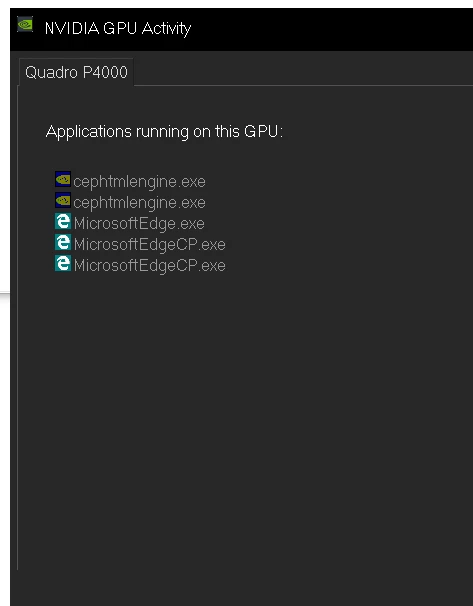
Even Edge is using the GPU - but Adobe Animate will not.

I have a 27" 4k monitor - and a Nvidia Quadro graphics card.

But working with Animate is terrible. You cant move movieclips around the stage smoothly, and its just so laggy.

I had same problem on my other pc a year ago. Also a 4k device.

Please can anyone help - or Adobe offer an answer!

    This topic has been closed for replies.
    Correct answer Typhin13

    Hate to necro a thread, but I found a fix that works with my surface pro 7 running windows 10
    The app worked mostly perfect, except for when I would try to shift-drag or ctrl-drag anything, then there would be about a full second delay between pen input and display.
    I'm not sure what performance issues you have exactly, but I changed animate's high-dpi settings in compatibility settings to use application control, instead of windows control. The app looks exactly the same, but it runs perfectly now.

    (Find the animate.exe file > properties > compatibility > "change high DPI settings" > check "Override high dpi scaling behavior. Scaling performed by:" and select "application" from the drop down)


    It doesn't seem to have been solved, but maybe someone using the app today might see this and hopefuly it helps some?
    This may also help with other apps running laggy on high res screens, especially smaller high res ones like a surface pro or 4k pc monitors.

    2 replies

    Typhin13Correct answer
    Participant
    April 7, 2021

    Hate to necro a thread, but I found a fix that works with my surface pro 7 running windows 10
    The app worked mostly perfect, except for when I would try to shift-drag or ctrl-drag anything, then there would be about a full second delay between pen input and display.
    I'm not sure what performance issues you have exactly, but I changed animate's high-dpi settings in compatibility settings to use application control, instead of windows control. The app looks exactly the same, but it runs perfectly now.

    (Find the animate.exe file > properties > compatibility > "change high DPI settings" > check "Override high dpi scaling behavior. Scaling performed by:" and select "application" from the drop down)


    It doesn't seem to have been solved, but maybe someone using the app today might see this and hopefuly it helps some?
    This may also help with other apps running laggy on high res screens, especially smaller high res ones like a surface pro or 4k pc monitors.

    xmc44942280
    Participant
    June 6, 2021

    Wow, thank you Typhin13.  This immediately improved performance.  I have a pretty beefy studio rig, only use about 8% of my system resources for Animate, and it was running like I was on a TI83!  Hopefully Adobe can learn from this and optimize their software function on higher-end machines.

    Colin Holgate
    Inspiring
    May 11, 2018

    Although you can have an AIR mobile application use the GPU, Animate itself doesn't. There is a View/Preview Mode option where you can set it to different amounts of detail, which will help with performance while you're working.

    LeeBowAuthor
    Known Participant
    May 11, 2018

    It's just for performance when I'm working - not the actual output files.


    The Adobe Animate software itself seems to not work great on 4k monitors - even with great graphics cards. It doesn't seem to take advantage of the GPU.

    Colin Holgate
    Inspiring
    May 11, 2018

    I don't know if Windows has something like this, but I have Animate set to open in low resolution. That is, it doesn't take advantage of my Mac's Retina display. It's still fine for working on, and it only has to move 1/4 of the number of pixels. You could see if there is a non-HiDPI option when opening apps in Windows.