

Mario, CS
Participant
September 13, 2017
Answered

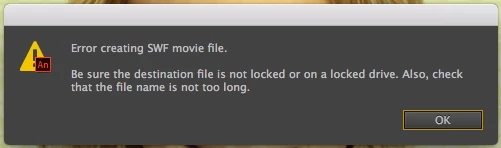
Animate can not create SWF movie file
  • September 13, 2017
  • 3 replies
  • 6582 views

This happened out of nowhere!?

I want to export the animation as video and Animate needs to create a SWF in advance, but can't. 😞

I was able to do this several times, but now Animate fails. I tried a restart but it keeps failing. The path is short, the file is writeable etc.

Any help available?

Maybe a log file that might help to find the source of this issue?

Thx

This topic has been closed for replies.
Correct answer Colin Holgate

I'll alert the Animate team about that. The first part of exporting MOV is that Animate makes a SWF, even if you don't need one. As you can't set a valid location for the SWF, you run into the problem you saw.

There are a few reasons why you should use an ActionScript 3 FLA when doing animation for video, and there are no reasons to use HTML5 Canvas. When you copied into a new FLA I'm guessing that it happened to be an AS3 one.

The Commands menu has a Convert to Other Document Formats, which you can use to convert the FLA to AS3, without having to copy and paste the layers. Then you will be able to set the SWF publish location.

3 replies

IMPACT Crew
Participating Frequently
August 4, 2021

None of the selected solutions worked for me.


In the end I copied the .fla to a new folder on my desktop. For some reason Animate just doesn't like the file being on an external drive (mine is APFS Encrypted). This solved the "error creating swf movie file" issue.


Next problem I had was Media Encoder not firing to convert the swf to mp4. That was solved by opening Media Encoder then exporting to Video/Media again.

Adobe Employee
September 15, 2021

Hi @IMPACT Crew 

The issue with auto launch of Media Encoder is addressed in latest Animate update 21.0.9 released today. Kindly update to the latest version of Animate & Media Encoder to avail the fix.

Thanks, Sukhesh

Colin Holgate
Inspiring
September 13, 2017

I have seen that before. You need to go into Publish Settings and check where the SWF is going to be published. If you're working on an FLA that has never been saved the location may not be one that can be written to.

Mario, CS
Mario, CSAuthor
Participant
September 13, 2017

Thank you Colin for taking the time to answer.

My project is a video animation project and I do need to export the whole animation as video. I do not need a SWF and I have no SWF related options in my preferences. (screenshot attached)

What I do is this: Export > Export video…

Right after clicking Export I get the error.

Colin Holgate
Colin HolgateCorrect answer
Inspiring
September 13, 2017

I'll alert the Animate team about that. The first part of exporting MOV is that Animate makes a SWF, even if you don't need one. As you can't set a valid location for the SWF, you run into the problem you saw.

There are a few reasons why you should use an ActionScript 3 FLA when doing animation for video, and there are no reasons to use HTML5 Canvas. When you copied into a new FLA I'm guessing that it happened to be an AS3 one.

The Commands menu has a Convert to Other Document Formats, which you can use to convert the FLA to AS3, without having to copy and paste the layers. Then you will be able to set the SWF publish location.

Mario, CS
Mario, CSAuthor
Participant
September 13, 2017

I did not find a solution and ended up copying all layers to a new file. Animate can export the data of the new file to the same destination. Weird stuff …