
Known Participant
April 24, 2016
Answered

Animate CC Error Importing MP3 Files (Mac & Win)

  • April 24, 2016
  • 6 replies
  • 90168 views

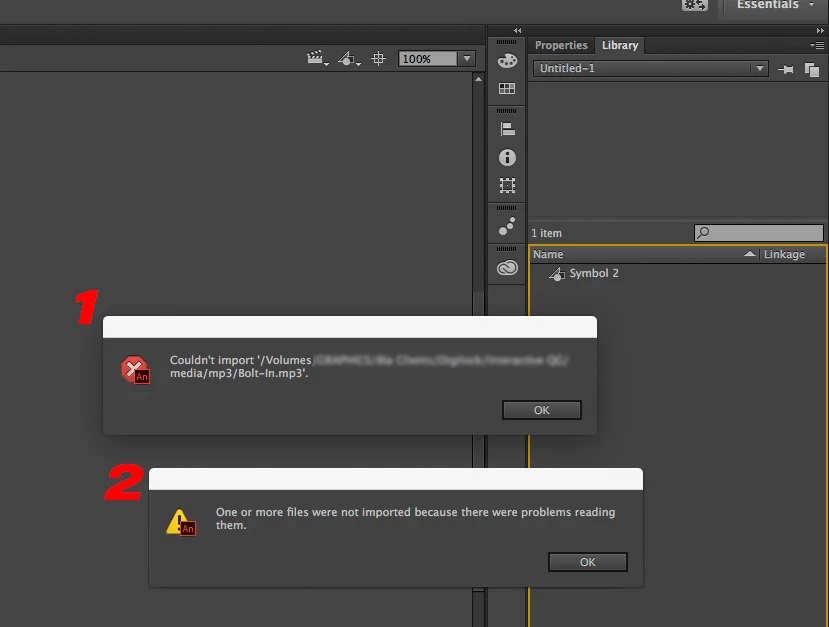
I tried importing & dragging an MP3 file into Animate CC and I would get this message (see image) "Couldn't Import *.mp3…" "One or more files were not imported…". I tried this on both Mac & Win10 (everything is to up to date), installed QT on Win10, Reset my settings, tried it on another mac with a fresh install.

I used a stand alone media converter from a raw recording (mac & Win), tried to fiddle with the compression etc. The last step is to open an old Flash file with an mp3.
Correct answer Colin Holgate

If you mean how do you make a 44.1 kHz, 16 bit sound file, if you have Creative Cloud you could use Audition or Adobe Media Encoder. Same if you have Flash Pro CS6, AME has audio only presets. In both of those is a 48 kHz preset that you could change to be 44.1 kHz, and Save a Copy. It will then appear in the user presets list.

If you don't have access to Audition or AME there are free/donate applications such as Audacity:

http://www.audacityteam.org/

On Mac I also use this cheap batch compression tool:

Audio-Converter on the Mac App Store

It's $2, and well worth having. Very handy too if you're doing HTML5 Canvas and need to support Ogg-Vorbis audio.

6 replies

Participant
June 28, 2025

I had the same issue, i tried converting it to a wav file, it suddenly worked. Convert it to a wav file.

Sketchaloova
Participant
June 9, 2023

Though this question was asked a few years ago, but those who are just getting started with Adobe Animate today might still find this useful.
- You can resolve this by creating a new audio file and exporting it as a WAV in the program Audacity. To do this, you must import the mp3 file into the program and crop it wherever you want the audio to begin or end. Upon completion, if the file or audio is larger than that amount, change the kHz to 44100. When you export this to WAV, the audio file is finished and fixed. You may now import them into your animation and animate! 

Even though I'm a beginner, I sincerely hope that this aids the other newbies this year!

kglad
Community Expert
Community Expert
June 9, 2023

thank you @Sketchaloova (though we tend to favor audition over audacity...)

stijill2Author
Known Participant
April 26, 2016

Thanks Colin your "16 bit" worked. I had to use "Audition" to find the settings it was't in "Media Encoder" I have not used Flash in a while. I was using Edge Animate for it's HTML5 compatibility across platforms, but it only published to suede HTML5 with proprietary .js scripts. So I started porting over legacy EA assets (mp3). GOD I remember how I hated Flashes "frame by frame" based timeline.

stijill2Author
Known Participant
April 24, 2016

Animate actually converts the wav to an mp3 when publishing to HTML5. I try to keep all images vector base. All the shapes are actually all encoded in the .js file. Yes I'm going to test. Really I'm just annoyed that the Adobe FAQ guide basically says you can drag any of the listed audio file to the library "No Problem" ya…  Well thanks for the help so far.

Colin Holgate
Inspiring
April 24, 2016

The problems I've seen are not to do with the published version, but while you're working inside the FLA. It could be that I was working with a converted FLA, where the WAVs were set to Stream in the AS3 version, I'm not sure.

stijill2Author
Known Participant
April 26, 2016

Hay Thanks

stijill2Author
Known Participant
April 24, 2016

I am already using a wave file, but I'm primarily publishing to HTML5 which uses mp3's. I guess I'm too being picky.

Then again you should be able to drop several audio formats and so far non work (AIFF, MOV, MP4, ACC)

I reposted it as "Adobe Animate CC" CS6 is a little dated plus Flash CS6/CC14 does not support HTML5

Colin Holgate
Inspiring
April 24, 2016

You will have problems using WAV in an HTML5 Canvas FLA. I can't remember what those problems are, but it took me a while to realize it was the fact that they were WAV that caused issues.

It looks like your Untitled FLA is an AS3 one. If you're going to be ending up with a Canvas FLA you should start that way. There are a lot of things you can do in an AS3 FLA that won't translate to a Canvas FLA, best to stay within the limitation of Canvas.

Colin Holgate
Inspiring
April 24, 2016

You posted this question in another thread. As I mentioned there, make sure your MP3 files are 16 bit.

Colin Holgate
Inspiring
April 24, 2016

By the way, if you're doing AS3 FLAs you should use WAVs, not MP3, it helps with scrubbing Stream audio. You can use the publishing settings to set what MP3 compression happens when you make the SWF.

If you're making HTML5 Canvas FLAs, you need to use MP3.