
Animate Corrupt files/symbols when using Warped Asset Tool.
First off, this is the first time I have ever used the warped asset tool for animating purposes. I've been animating them using classic tweens, but I'm encountering some corruption issues.
For example, when I reopen files I'm receiving the following message:
"Could not load scene into memory. Your document may be damaged."
The FLA will still open and I can see all of my animations, but the warped assets are either missing completely or they're not animating at all. In the image below you can see that the warped asset has defaulted back to its original positioning. If I duplicate the layer or copy and paste everything into a new file, it will snap back into place.
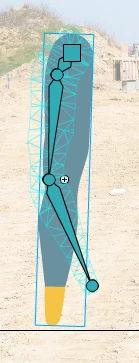
This is happening A LOT with any files that use the warped asset tool. I've found one other post about this issue and it claims to have been a bug that's been patched, but I'm using the most current version of Animate and still experiencing the issue. It's making it almost impossible for me to do my job.
In addition to that it seems to have just straight-up corrupted several other files. When I open those files the main timeline displays as a single blank slide, but I can still see some items in the Library. Those library items are hit and miss as to whether or not there is anything physically viewable in them. Sometimes they're blank and sometimes they're just missing certain elements, usually warped assets.


 AdChoices