

AS3 Windows Projector Exe Playback Issues
Hey guys!
Looking for some advice. I have an actionscript 3 document I've been putting together for a few months, which has been an excellent exercise in learning Animate. I unfortunately cannot post the files due to the sensitive nature of the work, but I had some questions pertaining to a few of those problems. I've attempted to address them and show as much as I am able.
First, I'm noticing when I combine Actionscript 3.0 and the Timeline, if I use a loop function which utilizes an incremental variable to determine when to continue (think x=0, increment until x=5, then gotoandplay @ frame following loop), I will often find that the output exe will sort of 'stutter' or continue barreling through the timeline while the next portion of the animation appears to either still be loading or isn't 'ready' to move. This ends up skipping a few frames usually. 
In this limited info example, the user interacts with a button which causes the knob to rotate and allows the ball to travel along the path. However following the interaction, the knob rotates in a quick motion and the ball sort of jitters before it begins traveling along the line. Does anyone have any recommendations for helping to smooth this out?
Here is the code I'm using for these loop interactions with a list of frames for reference:
//First Frame of example (2432)

//Set up variable for incrementing
var loopCount:int = 1;
//Increment variable accordingly when context is run
function context(){
		loopCount = loopCount + 1;
}
//Give a button a click which plays a demonstration
showcase.addEventListener(MouseEvent.CLICK, demo);
//The actual function, which, when the button is clicked, jumps the user in the timeline to the location of the demonstration
function demo(e: MouseEvent) {
	showcase.removeEventListener(MouseEvent.CLICK, demo);
	gotoAndPlay(2459);
}

//Second frame of example (2433)

//Run function 'context'
context();

//Third frame of example (2458)

//Function loopTest to check if the frames have looped 5 times without a click. If so, jump beyond the demonstration
function loopTest() {
	if (loopCount == 5 ) {
		this.stop();
		this.gotoAndPlay(4875);
} else {
	this.stop();
	this.gotoAndPlay(2433);
	}
}
//Run loopTest
loopTest();
Second, I have a good feeling that what I'm experiencing across all three problems are issues with the program loading. In this second example, I'm attempting to reveal a black line from a red line using a motion tween and alpha color effects. This red to black line is done using a fade in animate, however upon exporting the file using a windows flash 32 projector, the exe seems to force the red line to flicker
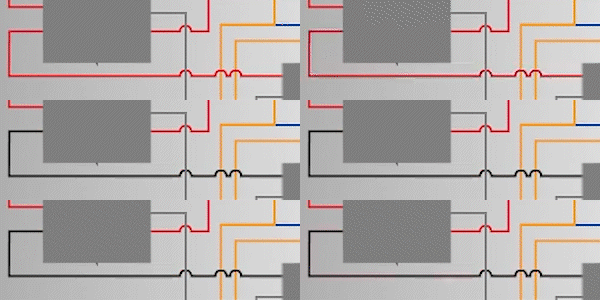
out of existence instead of the applied fade. I have also tried converting the motion tween to individual keyframes, in which Animate applied the advanced color effects filter with descending alpha values for each frame. This also resulted in the flicker. Is there a possibility of actionscript handling this fade better than the alpha values?
Third, in a section which features a lot of movie clips and graphics moving all at once (and within a loop), there is quite a slow fade/transition of these masked lines (among a ton of other things happening such as overlays fading in, some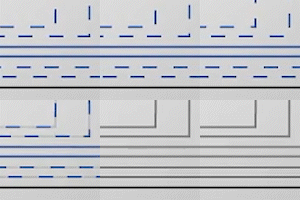 rotating/moving clips fading out, and a user interaction with a button and the knob taking place). These masked lines have a tendency to give me visual display problems in the exe where they will occasionally pop in and out of view despite their spans being identical in length and the masking lines changing positions over time. For context, I'm going with the masked lines due to the limited nature of Animate's dashed line capabilities.
To add some context, for a first project this one is kind of hefty. It is 9749 frames in the main timeline, 189 layers, 152 symbols, 36 megabytes compressed, and features 34 mp3 clips. So this, to me, feels like the file can't keep up. My jvm.ini is set to -Xmx2048m... I've looked into the loader/preloader functions in as3, but they seem to focus or specialize in bitmaps/pngs/mp3s/swfs and most of my content is generated as shapes in the viewport after having been imported from illustrator. I have tried optimizing the file by removing unnecessary keyframes and extra, unused symbols, but those revisions didn't seem to change the file size or assist much in the way the program executed. Does anyone know what I might be able to look into in order to fix some of these problems?
Thank you in advance for your assistance! If you have any other questions, I'll be happy to answer them to the best of my ability, but I am limited in what I can show. If anyone's got ideas on where I might want to go from here, it would be greatly appreciated!


 AdChoices