Inspiring
February 28, 2023
Answered

Audio glitch when playing exported movie

  • February 28, 2023
  • 4 replies
  • 1711 views

It plays fine in the editor and everywhere else. When I export or Test movie, I get what's in the video.
https://youtu.be/v1vuHdObahw


why?

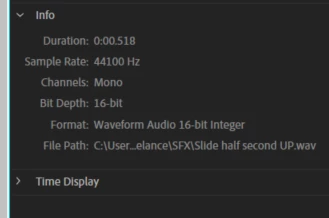
It's already 16 bit. What am I missing?

 

This topic has been closed for replies.
Correct answer Mario_CR

Hmm yeah I just tried that and same for me. It works fine when converted to mp3. I even tried re-encoding as a wav in encoder, and still got the glitch although it sounded a bit different. Do you think it's because it was an mp3 to begin with and I converted it to a wav?


I think it has to do with the conversion Animate does internally. When it comes to WAV audio in Canvas, Animate converts these files to MP3 when you hit publish, but the conversion is really bad it seems, regardless of the settings you choose.
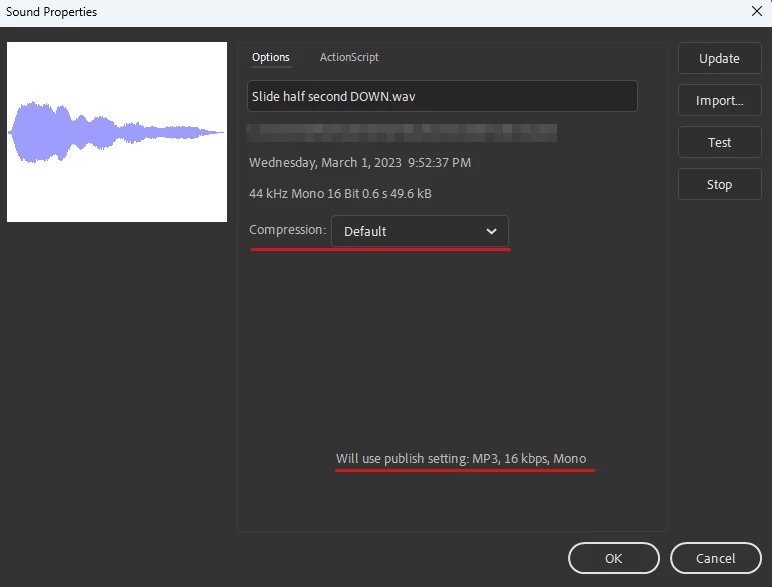
 

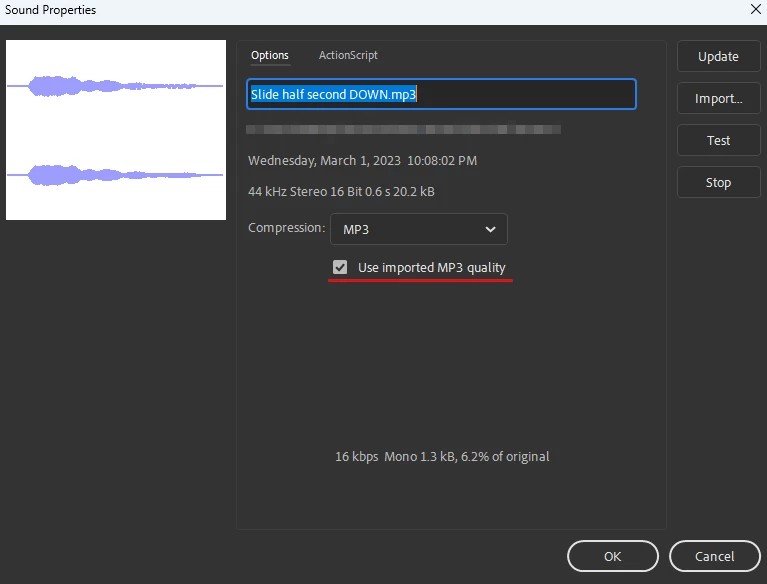
If you use MP3 audio instead, it does a better job at it, using the original file quality by default. 
 

4 replies

Community Expert
March 10, 2023

Did you ever get this figured out?


beatbumAuthor
Inspiring
March 10, 2023

I am just doing what @Mario_CR suggested, importing mp3s instead of wavs. Works fine.

Mario_CR
Community Expert
Community Expert
March 2, 2023

Hi, could you provide one of those WAV files with a Google Drive link so we can test it out?

beatbumAuthor
Inspiring
March 2, 2023
Mario_CR
Community Expert
Community Expert
March 2, 2023

Thank you, looks like there is indeed a problem with WAV audio in Canvas. It's strange that no matter the compression settings, the cut-off noise still appears when publishing. After trying a few things I went to Media Encoder and converted the WAV files to MP3, that seems to fix the issue. Not an ideal solution but should get you by; try it out and let us know if it works on your end.


If you have the time, please report the bug here:

https://www.adobe.com/products/wishform.html


Community Expert
March 1, 2023

Check your audio publish settings. I have provided you with the best quality settings. 

beatbumAuthor
Inspiring
March 2, 2023

thanks but I tried that already.

kglad
Community Expert
Community Expert
February 28, 2023

why is duration ~.5 sec.

beatbumAuthor
Inspiring
March 1, 2023

um that's the length of the audio I'm using.


btw, this is not the only instance where I hear these glitches. This is the third module that I'm working on and it has happened on all of them. It's also random. Some sounds don't do the glitch, some do. They all have the same specs.


Note: I tried placing the sounds in different places in the timeline and now, the second sound (whistle down) does not do the glitch. I tried reimporting the whistle up sound, moving it to a new layer, adding a blank keyframe after it, still does it.

kglad
Community Expert
Community Expert
March 1, 2023

is this a canvas/html5 project?  if so, user interaction is required before initializing a sound.