Participating Frequently
January 18, 2024
Answered

Camera frame skipping issue

  • January 18, 2024
  • 2 replies
  • 1334 views

I don't know if you can really see it in the file preview, But the camera is skipping frames and it seems low framrate, While all the other symbols and drawn objects are moving relatively fine like the should be. I have no idea how to fix the camera frame skipping 
    This topic has been closed for replies.
    Correct answer Mario_CR

    Yeah of course
     https://drive.google.com/file/d/140Tr9vXaQdZObDDz9SYgjAhgU3aUiQ5A/view?usp=sharing


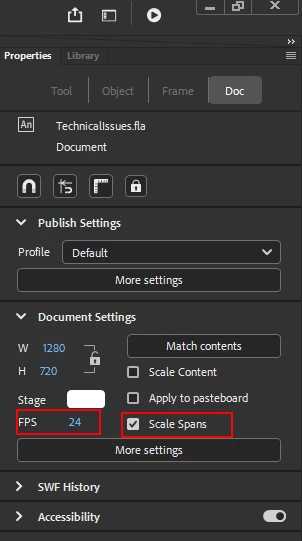
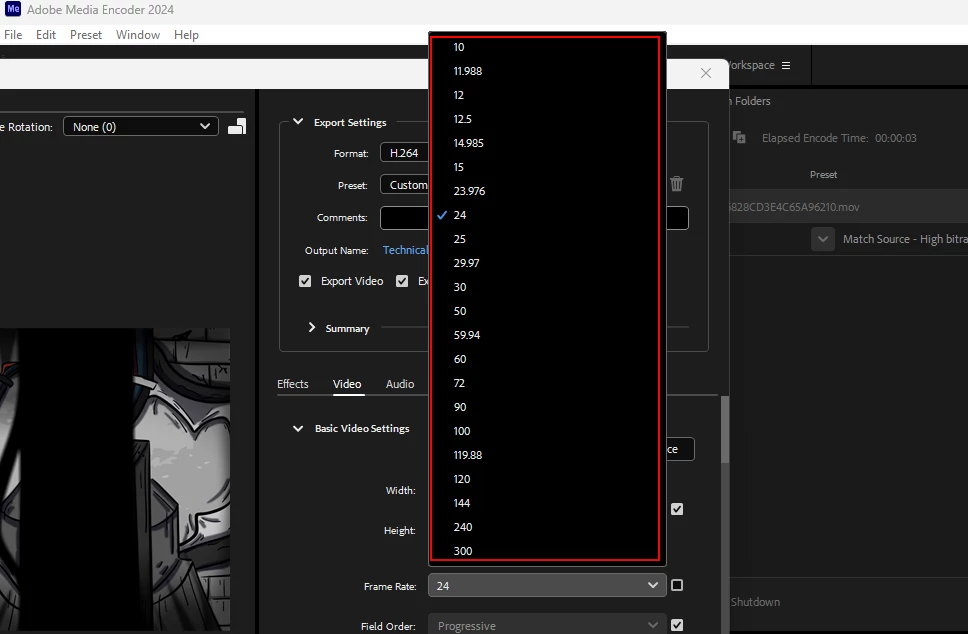
    Thanks, looks like the problem isn't the camera but your framerate. Your document is set to a non-standard fps of 18. This is not supported by Media Encoder so the video is being rendered to the closest one available which is 15fps, and that's whats causing the frame skipping.


    Fyi, these are the supported framerates in AME:


    Solution: Go to Animate and change your document's framerate to a more standard value (like 24fps). If you want to preserve the timing/speed, check the "Scale Spans" option beforehand.


    2 replies

    Mario_CR
    Community Expert
    Community Expert
    January 18, 2024

    What version of Animate?

    Is this the camera tool or are you using an Actionscript v-cam?

    Does the frame skip happens when you render it to video?

    FriedFlyAuthor
    Participating Frequently
    January 18, 2024

    The version is the latest one, 32.1 as far as I rememeber. Are there settings for the camera tool? 

    FriedFlyAuthor
    Participating Frequently
    January 18, 2024

    Found the settings menu for the camera tool but there aren't any options to see if I use Actionscript v-cam

    kglad
    Community Expert
    Community Expert
    January 18, 2024

    the camera tool are known to be buggy.  ie, it's better to avoid its use.

    FriedFlyAuthor
    Participating Frequently
    January 18, 2024

    Working on the teaser I think its unavoidable without the camera, Maybe there is a different approach to that? Instead of the camera I would probably utilize easing the whole scene and objects themselves. Depends on the performance, Thank you for your answer