
Participating Frequently
January 5, 2017
Answered

Can Animate solve the "fill gap" problems in canvas?

  • January 5, 2017
  • 3 replies
  • 4239 views

Hi all,

I've been struggling with some very simple drawing tasks in Animate. The issue comes from using fills next to other fills. This will often result in a very thin transparent gap between two fills, that were supposed to line up without any gap.
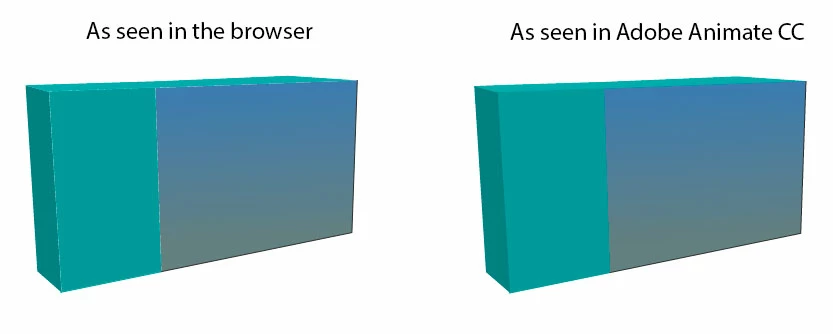
As I understand it, the problem is inherent to the way canvas works and not how Animate works...BUT, has anyone here enough knowledge about the issue, that they might be able to enlighten me: Is it at all possible, for Adobe Animate CC to solve this or work around this problem, so fills will behave in canvas exactly as they do in SWF? Or will this never be solved as "it's just how canvas works"?

PS. I prefer to draw stuff this way in Animate, as it makes it a lot easier and faster to animate the stuff I'm drawing. I know I could just use bitmaps, but that's not what I want to do because animation.

    This topic has been closed for replies.
    Correct answer UDESCO

    The rendering part of HTML5 canvas documents is handled by CreateJS library which in turn uses the native canvas APIs, so there's not much we can do from Animate CC side.

    The workarounds should be possible using some JSFL or run-time scripts to simplify the process.

    Please note, this problem is already handled in WebGL or AS3 based doctypes.

    3 replies

    Inspiring
    September 3, 2024

    Have you tried making each fill a draw object. The select all the objects and expand fill by say half a pixel or less in order to fill the gap?

    UDESCO
    Adobe Employee
    Adobe Employee
    January 6, 2017

    Hi,

    Its color bleeding issue that happens due to anti-aliasing technique used by canvas for rendering vector shapes.

    It becomes prominently visible when the two adjoining shapes have similar fill color and a contrast background color(white by default) which seeps through their boundary.

    To minimize the issue, you can use a background which has similar color to the region showing this issue.

    For complex graphics, workarounds suggested above can be used. (duplicate layer or bitmap object underneath the actual graphics.)

    Hope this helps!

    abnesherAuthor
    Participating Frequently
    January 6, 2017

    Hi Nipun,

    Thx, for the explanation!

    The question of this thread is:

    Is it possible for the developers of Animate CC to correct this canvas-behaviour at some point down the line? Or is beyond the scope of Animate CC to correct this issue, as it is related to how canvas works?

    Although the workarounds fix the issue, they are cumbersome to implement in a workflow, so I'd really appreciate it, if you could track down an answer for me.

    UDESCO
    Adobe Employee
    UDESCOCorrect answer
    Adobe Employee
    January 6, 2017

    The rendering part of HTML5 canvas documents is handled by CreateJS library which in turn uses the native canvas APIs, so there's not much we can do from Animate CC side.

    The workarounds should be possible using some JSFL or run-time scripts to simplify the process.

    Please note, this problem is already handled in WebGL or AS3 based doctypes.

    kglad
    Community Expert
    Community Expert
    January 5, 2017

    are those bitmaps and you're using spritesheets with low quality?

    because in my browser this is what shapes look like:

    abnesherAuthor
    Participating Frequently
    January 5, 2017

    No bitmaps, just screenshots of graphics I made with strokes and fills.

    In the 12 years I've worked with Flash, I've created many graphics by using the line-tool or pecncil tool, manipulating the vectors and then filling in the colors and gradients with the fill tool. The box to the right is from the SWF and the box on the left is the same graphics on canvas in the browser.

    The problem happens when using strokes.

    Here is another example I just made:

    I know this isn't a bug in Adobe Animate CC, I'm just VERY curious if it would be possible for Animate CC to circumvent this weird canvas-behaviour. Especially as my main method of doing fast graphics isnt doable anylonger when making HTML5 animations in Animate CC.

    I could ofcourse just use bitmaps, but this is in no way as flexible, as manipulating vectors...which is kind of the reason I would go back to using Flas..I mean, Animate.

    Here is a few links on the matter:

    graphics - How to avoid seams between filled areas in canvas? - Stack Overflow

    http://stackoverflow.com/questions/6828198/how-to-remove-the-space-between-fill-and-fill-on-html5-canvas


    http://diveintohtml5.it/canvas.html#paths (the technical stuff behind paths in canvas of which I understand nothing)

    Gaps between Fills in Canvas (Animate CC)

    kglad
    Community Expert
    Community Expert
    January 5, 2017

    i see your anti-aliasing problem, but don't know what you can do to resolve it.