March 4, 2019
Answered

Can't open MX FLA files in Animate

  • March 4, 2019
  • 1 reply
  • 1495 views

I have several FLA files I coded in Flash MX back in 2004, some with actionscript 1 and some without. Animate can open the ones without script but comes up with an error when trying to open the files with AS1.

Any way of opening the file?

m

This topic has been closed for replies.
Correct answer

Hi Mark

I dug deep into my archives and found Actionscript1 files from around 2004. Like yours made with Flash MX. I tried to open them with Animate 2019 (v19.0).  And if worked! Of course I got this message:
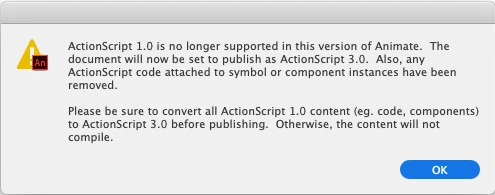
But otherwise my old FLAs opened without a problem. So it seems that something else is wrong with your old AS1 files. It is not AS1 itself which causes the error: ('Failed to open document'). Sorry that I made you download Flash Pro CS6. And a shame that I can't help you any further.

Klaus


I tried all the above, but there must be something wrong with the code / file. In the end, I recoded the whole thing from stratch, which had the benefit of getting familiar with AS3.

Thanks everyone for the advice and suggestions.

m

1 reply

kdmemory
Inspiring
March 4, 2019

Hi Mark

Can you paste the text of the error message here?

And i'm afraid you need to open the AS1 files in a Flash Pro version which still accepts AS1 files. And then remove all AS1 code and save them as new files and open them in contemporary Animate CC. You loose AS1 anyway.

According to this thread Does actionscript 1.0 work in flash cs6? the version you need and can still install besides your contemporary Animate version is Flash CS6.

Creative Cloud -> Apps -> Installed Apps -> Animate CC -> Managa -> Other Versions.

Klaus

March 4, 2019

I get: An error occurred opening file "/volume ... develop.fla"

I'm downloading Flash Pro now. Thanks for the heads up.

m

kdmemory
Inspiring
March 4, 2019

Hmmph. That doesn't tell a lot. The error message I mean.

