StevicNinja
Participating Frequently
November 14, 2020
Answered

Can you convert a scene into a symbol?

  • November 14, 2020
  • 3 replies
  • 698 views

Hey all, 

I made all of my animation layers for a character (head, legs, torso etc) in the "scene" instead of within it's own "graphic symbol". I cannot seem to be able to transfer all of the layers across to a symbol without losing everything. Tried googling to no avail. Noob mistake on my behalf. Does anyone know how to do this?


Also...The animation is JUST for this character which will be exported to a game. Is there a reason I would convert to a graphic symbol for that application? (I'm pursuing it because in all tutorials, that appears to be how it is done?). 


Any insight would be greatly appreciated.
Cheers!

    This topic has been closed for replies.
    Correct answer n. tilcheff

    Hi mate,


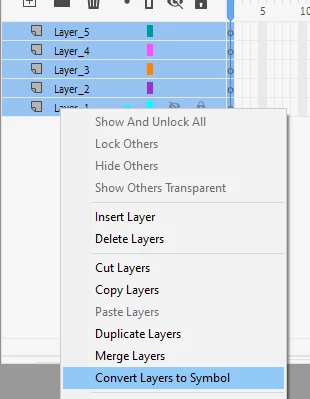
    They have just added in AA21 "Layers to Symbol", so you can use this.


    Or you can also use Timeline Block To Symbol if you are not on AA21.


    3 replies

    StevicNinja
    Participating Frequently
    November 29, 2020

    Just used TIMELINE TO SYMBOL. You guys are geniuses! You just saved me about 30 minutes.

    StevicNinja
    Participating Frequently
    November 14, 2020

    Solved: I simply created a new graphic symbol and re-distributed each symbol within that symbol (e.g. arms, legs) to new layers then deleted the layers off the main scene.

    n. tilcheff
    n. tilcheffCorrect answer
    Legend
    November 14, 2020

    Hi mate,


    They have just added in AA21 "Layers to Symbol", so you can use this.


    Or you can also use Timeline Block To Symbol if you are not on AA21.


    Nick - Character Designer and Animator, Flash user since 1998 | Member of the Flanimate Power Tools team - extensions for character animation
    StevicNinja
    Participating Frequently
    November 14, 2020

    That's perfect! I haven't been able to run AA21 on my old 2012 MacBook Pro without it crashing on startup - but that's good to know for my other comp! Cheers man 

    StevicNinja
    Participating Frequently
    November 14, 2020

    FYI: I haven't added any actual "animation" yet. Just the layer hierarchy.