

DigitalDesignDude
Inspiring
October 4, 2024
Question

Change Code Editor UI Colors?
  • October 4, 2024
  • 2 replies
  • 666 views


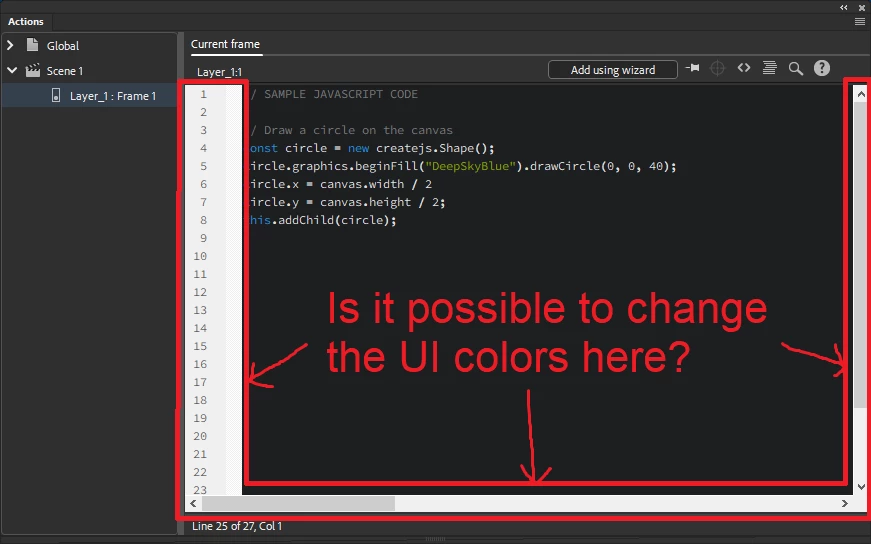
I'm running Animate on Windows 10 and I would like to apply dark mode coloring to Animate's code editor, but it appears I'm unable to customize the colors of the scroll bars and the line numbers area.

It seems those parts of the UI are not customizable through the following menus in Animate:


  • File > Preferences > Code Editor > Editing Options > Modify Text Coloring Button
  • File > Preferences > Interface > Color Theme > Dark


And it appears this has been a long-lasting issue, as Adobe Animate 2018 has this problem as well. 
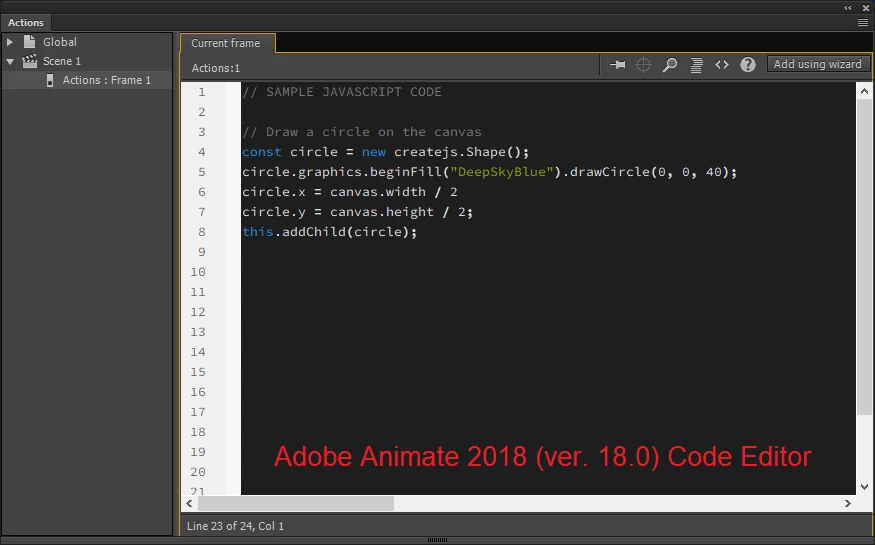
 

Nevertheless, I thank you for any other suggestions you may have for fixing this issue. I find it's more comfortable for my eyes to code completely in darkmode, and I wish to be able to do that while I write and test JSFL scripts directly from Animate. 


This topic has been closed for replies.

2 replies

DigitalDesignDude
Inspiring
October 9, 2024

This is more or less a workaround solution, but I'll share it in case it helps someone else.


I put together a Windows app that allows you to create a semi transparent overlay that you can place on top of the code editor:


Custom Screen Overlay Demo Vid - YouTube
Custom Screen Overlay App Page

Granted, this solution works better on a separate monitor where the code editor is always opened and isn't repositioned, but I hope it will tie me over until I come up with a better solution for my desired workflow.

There's also a number of alternative apps like f.lux and DimScreen which also could be used, but they dim the entire screen instead of a portion of it.

kglad
Community Expert
Community Expert
October 5, 2024

use a. external editor that suits your esthetics.

DigitalDesignDude
Inspiring
October 7, 2024

Can external editors edit code within certain timeline frames? 

That would be fantastic if there is a way to do that.

kglad
Community Expert
Community Expert
October 8, 2024

sure.  the easiest way for a novice would be to create code for frame n in your editor and then copy/paste it into animate.


a better way would be to use a loop and check for currentFrame and code accordingly.