
Error messages AS3
Hi, I tried to make scramble puzzle game written in AS3. But I got error messages with it. Is there someone help me please? Here's the code :
//Begin code
import flash.events.MouseEvent;
import flash.text.TextField;
// Define the dimensions of the puzzle
var numRows:int = 4;
var numCols:int = 4;
// Create an array to store the movie clips
var cards:Array = [];
// Create a variable to keep track of the completed puzzle
var puzzleCompleted:Boolean = false;
// Create a function to initialize the puzzle
function initPuzzle():void {
// Loop through rows and columns
for (var row:int = 0; row < numRows; row++) {
for (var col:int = 0; col < numCols; col++) {
// Get the instance name of the card
var cardInstanceName:String = "card_mc" + (row * numCols + col + 1);
// Get the card movie clip based on the instance name
var card:MovieClip = this[cardInstanceName];
card.x = col * card.width;
card.y = row * card.height;
card.addEventListener(MouseEvent.MOUSE_DOWN, onCardMouseDown);
card.addEventListener(MouseEvent.MOUSE_UP, onCardMouseUp);
cards.push(card);
}
}
// Shuffle the cards
shuffleCards();
}
// Create a function to shuffle the cards
function shuffleCards():void {
var numCards:int = numRows * numCols;
for (var i:int = 0; i < numCards; i++) {
var randomIndex:int = Math.floor(Math.random() * numCards);
var temp:MovieClip = cards[i];
cards[i] = cards[randomIndex];
cards[randomIndex] = temp;
}
// Rearrange the cards on the stage
for (var row:int = 0; row < numRows; row++) {
for (var col:int = 0; col < numCols; col++) {
var index:int = row * numCols + col;
var card:MovieClip = cards[index];
card.x = col * card.width;
card.y = row * card.height;
}
}
}
// Variables to store the card positions during drag and drop
var selectedCard:MovieClip;
var startPosition:Point;
// Create a function to handle card mouse down event
function onCardMouseDown(event:MouseEvent):void {
if (puzzleCompleted) {
return;
}
selectedCard = event.currentTarget as MovieClip;
startPosition = new Point(selectedCard.x, selectedCard.y);
selectedCard.startDrag();
selectedCard.parent.addChild(selectedCard); // Bring the selected card to the front
}
// Create a function to handle card mouse up event
function onCardMouseUp(event:MouseEvent):void {
if (puzzleCompleted) {
return;
}
selectedCard.stopDrag();
// Check if the card is dropped within a valid drop target
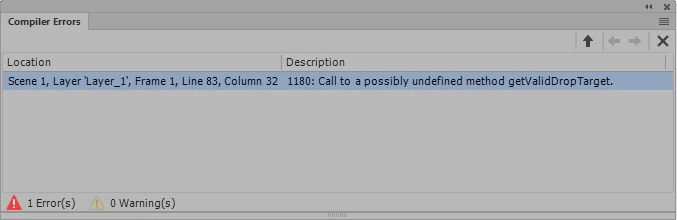
var dropTarget:MovieClip = getValidDropTarget(selectedCard);
if (dropTarget != null) {
// Swap the positions of the selected card and the drop target
var temp:Point = new Point(selectedCard.x, selectedCard.y);
selectedCard.x = dropTarget.x;
selectedCard.y = dropTarget.y;
dropTarget.x = temp.x;
dropTarget.y = temp.y;
// Check if the puzzle is completed
var completed:Boolean = checkPuzzleCompleted();
if (completed) {
puzzleCompleted = true;
showCongratulations();
}
} else {
// Move the selected card back to its original position
selectedCard.x = startPosition.x;
selectedCard.y = startPosition.y;
}
}
// Create a function to check if the puzzle is completed
function checkPuzzleCompleted():Boolean {
for (var i:int = 0; i < cards.length; i++) {
var card:MovieClip = cards[i];
var targetX:int = card.width * (i % numCols);
var targetY:int = card.height * Math.floor(i / numCols);
if (card.x != targetX || card.y != targetY) {
return false;
}
}
return true;
}
// Create a function to show the congratulations message
function showCongratulations():void {
var congratulations:TextField = new TextField();
congratulations.text = "Congratulations!";
congratulations.autoSize = TextFieldAutoSize.CENTER;
congratulations.x = stage.stageWidth / 2 - congratulations.width / 2;
congratulations.y = stage.stageHeight / 2 - congratulations.height / 2;
addChild(congratulations);
}
// Initialize the puzzle
initPuzzle();
//End code
Here's the error message :


 AdChoices