Participant
March 24, 2020
Answered

export animated SVG ?

  • March 24, 2020
  • 4 replies
  • 31069 views

I thought this is what animate is designed for. But may be i do smth wrong. I need to export a simple svg animation with tweens, but the farest result i could get to is a sequence of SVG files instead to be a single animated file.


Plz help, how to export my animation as a single SVG\HTML(with animation)\or anything I could use on my HTML page as animation (except SWF of course)?

Correct answer n. tilcheff

Here you go, mate:


Convert your AS3 file to Canvas:
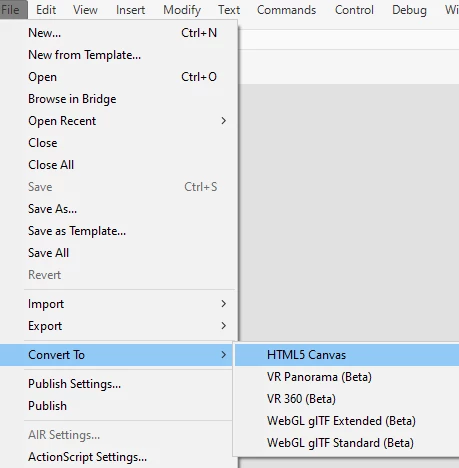
There are some limitations:

Color effects, radial gradients, animated masks - you will get warnings when you publish or things might not look like they should so you will have to figure out alternative ways of achieving the same results by trial and error.


These are the settings that will not export your vectors as bitmaps/spritesheet, i.e. will keep them vector:
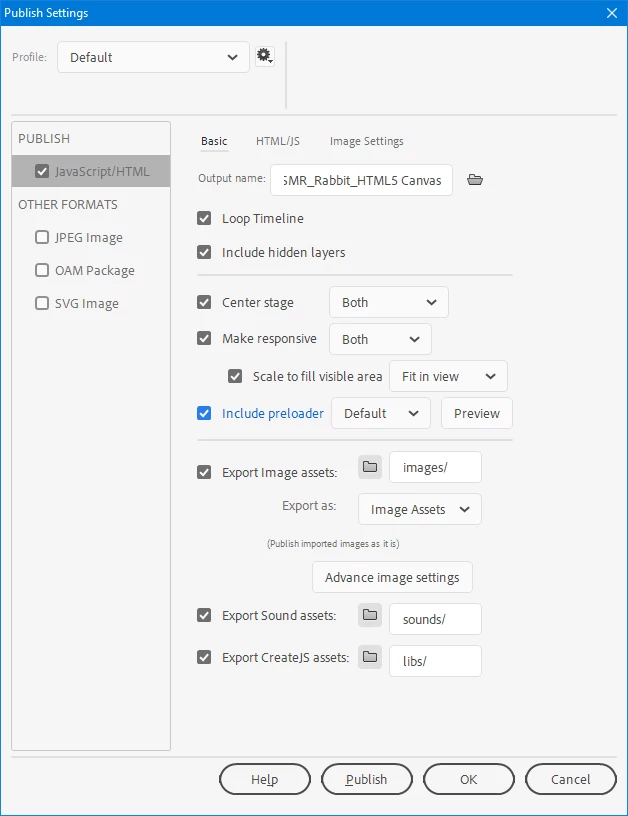
You can change the Export Image Assets > Export as to experiment with the other options.


You will end up with a HTML and JS files and an images folder that holds the preloader GIF.

If you open the HTML you will see that it calls 


<script src="https://code.createjs.com/1.0.0/createjs.min.js"></script>


I'd rather host a copy of createjs on my server, so put it somewhere and change that path.


Embed the HTML as an iFrame.

 

4 replies

federicom78591134
Participating Frequently
October 5, 2022

Hi there! then have you solved? I just tried to install the plugin but I don't see any changes in Adobe ANiomate

hectorch
Participating Frequently
September 28, 2022

I think Adobe Edge used to export SVG html5 animations... Adobe can we get this back? I want to animate SVG files (simple colors) but now you need to pay for some plug-in for after effects. We had Edge already please release it again don't update it leave it as a legacy app. Animate wants to export as Flash support. We all know not to run that anymore =D 

Joseph Labrecque
Community Expert
Community Expert
October 5, 2022

The Edge suite is completely dead and rotting - not coming back. 

_keyframer
Community Expert
Community Expert
September 9, 2022

You would thing "Animated SVG" would be its own dedicated doc type for Animate. I can't tell you how many clients and employers ask for this. I did find and still use an extension that works but it's really finnicky!

https://exchange.adobe.com/creativecloud.details.7232.animated-svg-exporter.html

Animator and content creator for Animate CC
federicom78591134
Participating Frequently
October 5, 2022

Hi Keyframer! I just tried to install that extension but I don't see any change in Adobe Animate 😞

n. tilcheff
Legend
March 24, 2020

Hi mate,


Animate can't export animated SVG. (There may be some extension that does it, but I've heard that it has been unsupported for a long time.)


What you can do is convert your file to HTML5/Canvas and export that without generating textures/spritesheets, i.e. the vectors will remain vector.

Then you can embed this html into your webpage as an iFrame.


Here is an example of such 'embeds' on our website:  http://flash-powertools.com/keeping-cycles-flexible-for-easy-re-timing-by-using-service-frame-and-working-two-levels-deep/


Nick - Character Designer and Animator, Flash user since 1998 | Member of the Flanimate Power Tools team - extensions for character animation
Exe2kAuthor
Participant
March 24, 2020

Thank u again, Nick. an iFrame is absolutley OK. Could u help me plz with publishing settings? A screenshot or smth. Because when i untick "Export image assets" - I get just blank html page with no animations.

n. tilcheff
n. tilcheffCorrect answer
Legend
March 25, 2020

Here you go, mate:


Convert your AS3 file to Canvas:

There are some limitations:

Color effects, radial gradients, animated masks - you will get warnings when you publish or things might not look like they should so you will have to figure out alternative ways of achieving the same results by trial and error.


These are the settings that will not export your vectors as bitmaps/spritesheet, i.e. will keep them vector:

You can change the Export Image Assets > Export as to experiment with the other options.


You will end up with a HTML and JS files and an images folder that holds the preloader GIF.

If you open the HTML you will see that it calls 


<script src="https://code.createjs.com/1.0.0/createjs.min.js"></script>


I'd rather host a copy of createjs on my server, so put it somewhere and change that path.


Embed the HTML as an iFrame.


Nick - Character Designer and Animator, Flash user since 1998 | Member of the Flanimate Power Tools team - extensions for character animation