
Participant
March 23, 2018
Answered

Has anyone experienced Google security concern with createjs.min.js hosted on code.createjs.com?

  • March 23, 2018
  • 4 replies
  • 1461 views

Hi everyone,

I've recently submitted my first set of html5 remarketing ads created in Adobe Animate to our SEO agency. They were submitted 6 months ago and have been running perfectly until I received the following message from them:

We noticed that the creatives provided were making calls to domain code.createjs.com which belongs to an open source code library. The communal development model of open-source libraries may pose a larger security concern for Google’s advertising ecosystem as malicious code might more easily be introduced. Could you please check with your designers just to make sure that there are no codes hidden?

Has anyone had this problem before? is code.create.com owned by Adobe? is there any need for concern? Should I copy the .js file and host it myself?

Any help/advice would be greatly appreciated as I'm being given quite a hard time by the agency and the client.

Thanks in advance!!
This topic has been closed for replies.
Correct answer Colin Holgate

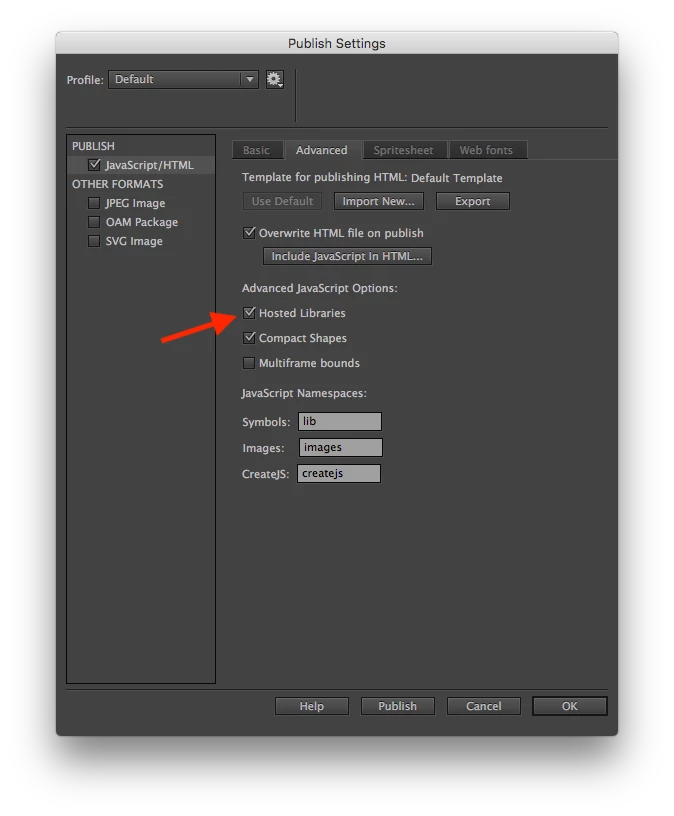
To expand on what kglad was saying, in Publish Settings there is an option to have Hosted Libraries:

If you uncheck that you will get a folder for the libraries when you publish, and you can put that folder on your server along with the other files. Then it won't have to access code.createjs.com.

4 replies

Participant
October 26, 2022

I'm seeing something that's possible suspicious but not sure how to know. It's on surge apps premium where it shows how this connected or something to me do reach me at 8033411862 or if this reply notifies me here would be fine also

normulaAuthor
Participant
March 26, 2018

Thanks for your answers. I get that I can host it elsewhere - but what if my hosting doesn't have SSL? instant rejection from Google.

Would it not be better for Adobe to host the Javascript on one of their SSL servers in a secure environment that complies with all 3rd party advertisers guidelines. That way auto export would be enough and there wouldn't be any issues. It would be a more 'complete' solution if it were all handled within the Creative Cloud suite.

I solved the issue by referencing one of the many other javascript repositories that host this .js file in one form or another. There are plenty around that aren't open source like the one Adobe choose to reference.

Colin Holgate
Colin HolgateCorrect answer
Inspiring
March 23, 2018

To expand on what kglad was saying, in Publish Settings there is an option to have Hosted Libraries:

If you uncheck that you will get a folder for the libraries when you publish, and you can put that folder on your server along with the other files. Then it won't have to access code.createjs.com.

kglad
Community Expert
Community Expert
March 23, 2018

yes, you can send the js file to be hosted on the same domain as the html.