
February 25, 2019
Answered

Having Mask Output Issues in Adobe Animate that don't happen in Flash CS3

  • February 25, 2019
  • 1 reply
  • 1960 views

The first issue is the swf output not matching what it's in the timeline of the program. It works correctly in Flash CS3 but I'm looking to stick to Animate if possible.

It's just two images, 2 layers, and 1 frame. If I do the same thing in Flash CS3, I get the left image and I don't understand why this is happening
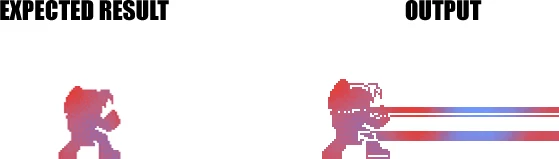
The second issue is figuring out how to attach the image that I want to use for the mask, to a specific object in the masking layer. For instance, if I move that graphic out of the image dimension for the layer attached to it, nothing is shown. So if I have motion going on this will be an issue. I'm assuming this could involve, instance names, and registration points, but I don't know how to apply this

This topic has been closed for replies.
Correct answer JoãoCésar17023019

I break apart the background that i use for the second layer, but I have to trace the bitmap in the first layer to get the silhouette. If I just break it apart, then there's just a full box shown of the mask instead of the full silhouette. I don't understand why it outputs differently when it looks fine in the timeline but i'll definitely report the issue now


In fact what I asked was if you got those images by tracing and/or breaking them apart. For example: the character was a bitmap in which you applied the trace command.

To get the silhouette, just select the character vector shape and fill it with only one color.

And I hope you get a response from the Animate CC team.

Regards,

JC

1 reply

JoãoCésar17023019
Community Expert
Community Expert
February 25, 2019

Hi.

I think we're gonna need to see your file.

Can you share it or at least part of it?

Regards,

JC

February 25, 2019

it's just 2 basic images on separate layers with nothing else besides clicking mask on the top layer,

If I go into CS3 and do the exact same thing, it works like it's supposed to

https://drive.google.com/open?id=1mLT4JFgeTrwBcTJdSEuW6HOcbqk2o84V

JoãoCésar17023019
Community Expert
Community Expert
February 25, 2019

Hi.

Thanks.

It can be a bug or maybe it has something to do with the origin of your artwork. Did you get that using trace or break apart?

Anyway, I did I test with a silhouette of your char and it was displayed correctly, without that glitch.

Can you please report this issue here:

Feature Request/Bug Report Form

?

Regards,

JC