
Participant
June 2, 2024
Answered

Having trouble exporting specific Animate file to video (file linked in post if needed)

  • June 2, 2024
  • 1 reply
  • 362 views

Hello,


My son uses Animate to make short videos and episodes of a little series he shares with his friends. He's never had a problem exporting any of his work to a video except for this specific file. I'm not familiar with how the program works but I thought I'd share the file on his behalf to see if anyone could try and see what's causing it to freeze during export, whether trying to covert to AVI, H264 or any other format. It always gets stuck at 20% on multiple devices as well. Here is a link to a Google Drive upload to the file. If anyone could help it would be greatly appreciated!
 

Animate File 

This topic has been closed for replies.
Correct answer Mario_CR

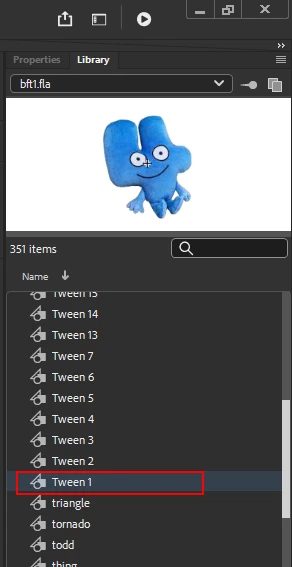
Go into the Library and delete the symbol "Tween 1", that seems to get rid of the rendering hang-up: 

There are a couple of user errors throughout this file:

  • Symbols named tween1, tween2, tween 3 etc are autogenerated symbols and should be avoided at all costs, this is a common beginner's mistake: https://youtu.be/NO2tcqbOx_U
  • All the symbols are placed on a single layer on the stage, this can cause errors with the looping of symbols (specially if more than one instance of the same symbol is placed on the same keyframe with different loop settings). It may be too late to try and fix this at this point but next time make sure that all symbols are placed on their own individual layer, never put two symbols on the same keyframe of the same layer.

1 reply

Mario_CR
Community Expert
Mario_CRCommunity ExpertCorrect answer
Community Expert
June 2, 2024

Go into the Library and delete the symbol "Tween 1", that seems to get rid of the rendering hang-up: 

There are a couple of user errors throughout this file:

  • Symbols named tween1, tween2, tween 3 etc are autogenerated symbols and should be avoided at all costs, this is a common beginner's mistake: https://youtu.be/NO2tcqbOx_U
  • All the symbols are placed on a single layer on the stage, this can cause errors with the looping of symbols (specially if more than one instance of the same symbol is placed on the same keyframe with different loop settings). It may be too late to try and fix this at this point but next time make sure that all symbols are placed on their own individual layer, never put two symbols on the same keyframe of the same layer.
Participant
June 2, 2024

Ok, ill try deleting the tweens