
【Help】Cannot Trigger Animation After Placing Component in Designated Area
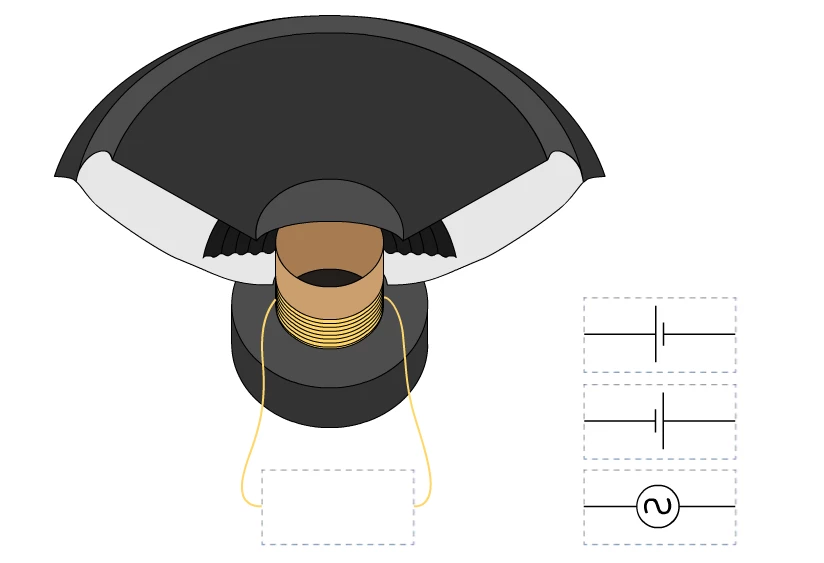
Hello everyone, thank you for clicking into my question. The following image shows the interactive device I am trying to create:
Below the speaker is a designated area for electrical connection, and to the right are three current components labeled 【ball_1】, 【ball_2】, and 【ball_3】. Users can drag the current components to the designated area and trigger their respective animation contents.
When I wrote the program for the 【ball_1】 component, it ran smoothly:
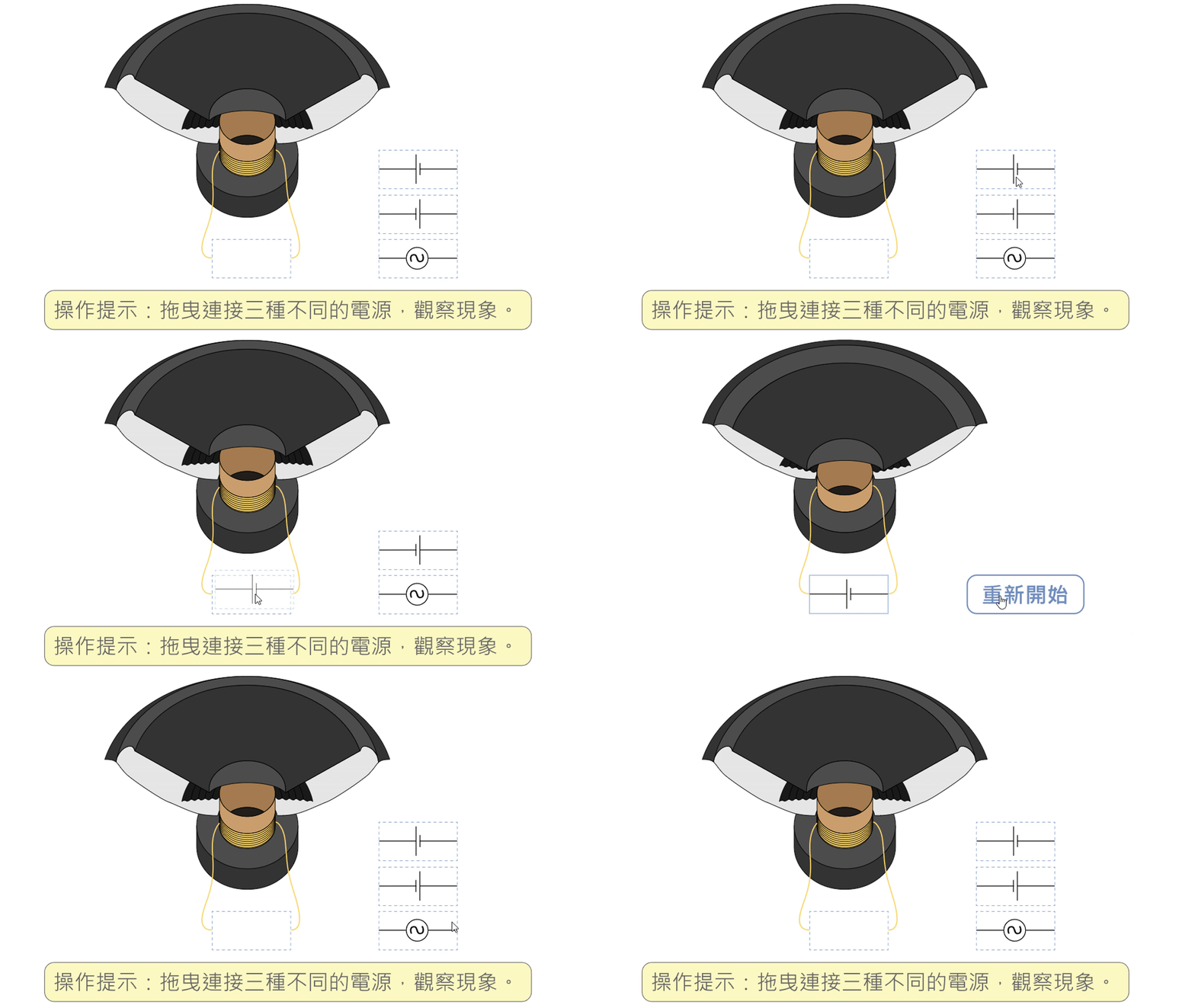
The following is my program code:
var root = this;
var ball_1 = root.ball_1;
var ball_2 = root.ball_2;
var ball_3 = root.ball_3;


//ball-1
function main()
{
	createjs.Touch.enable(stage);
	stage.mouseMoveOutside = true;

	root.stop();

	ball_1.dragAlpha = 0.5;
	ball_1.hitAlpha = 1;
	ball_1.missAlpha = 1;
	ball_1.hitFrame = 2;
	ball_1.missFrame = 1;
	ball_1.dropArea = { top: 640, right: 405, bottom: 700, left: 280 };
	ball_1.on("mousedown", onMouseDown1);
}

function onPressMove1(e)
{
	var target = e.currentTarget;

	target.x = stage.mouseX / stage.scaleX - target.offset.x;
	target.y = stage.mouseY / stage.scaleY - target.offset.y;
}


function onMouseDown1(e)
{
	var target = e.currentTarget;

	target.offset = { x: stage.mouseX / stage.scaleX - target.x, y: stage.mouseY / stage.scaleY - target.y };
	target.alpha = target.dragAlpha;
	target.pressMoveListener = ball_1.on("pressmove", onPressMove1);
	target.pressUpListener = ball_1.on("pressup", onPressUp1);
}

function onPressUp1(e)
{
	var target = e.currentTarget;
	var dropArea = target.dropArea;

    if (target.x > dropArea.left && target.x < dropArea.right && target.y > dropArea.top && target.y < dropArea.bottom)
	{
        root.gotoAndPlay(ball_1.hitFrame);
        target.alpha = target.hitAlpha;
    }
	else
	{
		target.alpha = target.missAlpha;
		//root.gotoAndPlay(ball_1.missFrame);
	}

	target.off("pressmove", target.pressMoveListener);
	target.off("pressup", target.pressUpListener);
}


if (!root.frame0Started)
{
	main();
	root.frame0Started = true;
}
However, after I wrote out the programs for 【ball_2】 and 【ball_3】, the button can no longer be operated properly. What is going on? I hope there are some smart people who can share their solutions with me. Thank you!
The following is my finaly program code:
var root = this;
var ball_1 = root.ball_1;
var ball_2 = root.ball_2;
var ball_3 = root.ball_3;


//ball-1
function main()
{
	createjs.Touch.enable(stage);
	stage.mouseMoveOutside = true;

	root.stop();

	ball_1.dragAlpha = 0.5;
	ball_1.hitAlpha = 1;
	ball_1.missAlpha = 1;
	ball_1.hitFrame = 2;
	ball_1.missFrame = 1;
	ball_1.dropArea = { top: 640, right: 405, bottom: 700, left: 280 };
	ball_1.on("mousedown", onMouseDown1);
}

function onPressMove1(e)
{
	var target = e.currentTarget;

	target.x = stage.mouseX / stage.scaleX - target.offset.x;
	target.y = stage.mouseY / stage.scaleY - target.offset.y;
}


function onMouseDown1(e)
{
	var target = e.currentTarget;

	target.offset = { x: stage.mouseX / stage.scaleX - target.x, y: stage.mouseY / stage.scaleY - target.y };
	target.alpha = target.dragAlpha;
	target.pressMoveListener = ball_1.on("pressmove", onPressMove1);
	target.pressUpListener = ball_1.on("pressup", onPressUp1);
}

function onPressUp1(e)
{
	var target = e.currentTarget;
	var dropArea = target.dropArea;

    if (target.x > dropArea.left && target.x < dropArea.right && target.y > dropArea.top && target.y < dropArea.bottom)
	{
        root.gotoAndPlay(ball_1.hitFrame);
        target.alpha = target.hitAlpha;
    }
	else
	{
		target.alpha = target.missAlpha;
		//root.gotoAndPlay(ball_1.missFrame);
	}

	target.off("pressmove", target.pressMoveListener);
	target.off("pressup", target.pressUpListener);
}

//ball-2
function main()
{
	createjs.Touch.enable(stage);
	stage.mouseMoveOutside = true;

	root.stop();

	ball_2.dragAlpha = 0.5;
	ball_2.hitAlpha = 1;
	ball_2.missAlpha = 1;
	ball_2.hitFrame = 2;
	ball_2.missFrame = 1;
	ball_2.dropArea = { top: 640, right: 405, bottom: 700, left: 280 };
	ball_2.on("mousedown", onMouseDown2);
}

function onPressMove2(e)
{
	var target = e.currentTarget;

	target.x = stage.mouseX / stage.scaleX - target.offset.x;
	target.y = stage.mouseY / stage.scaleY - target.offset.y;
}

function onMouseDown2(e)
{
	var target = e.currentTarget;

	target.offset = { x: stage.mouseX / stage.scaleX - target.x, y: stage.mouseY / stage.scaleY - target.y };
	target.alpha = target.dragAlpha;
	target.pressMoveListener = ball_2.on("pressmove", onPressMove2);
	target.pressUpListener = ball_2.on("pressup", onPressUp2);
}

function onPressUp2(e)
{
	var target = e.currentTarget;
	var dropArea = target.dropArea;

    if (target.x > dropArea.left && target.x < dropArea.right && target.y > dropArea.top && target.y < dropArea.bottom)
	{
        root.gotoAndPlay(ball_2.hitFrame);
        target.alpha = target.hitAlpha;
    }
	else
	{
		target.alpha = target.missAlpha;
	}

	target.off("pressmove", target.pressMoveListener);
	target.off("pressup", target.pressUpListener);
}

//ball-3
function main()
{
	createjs.Touch.enable(stage);
	stage.mouseMoveOutside = true;

	root.stop();

	ball_3.dragAlpha = 0.5;
	ball_3.hitAlpha = 1;
	ball_3.missAlpha = 1;
	ball_3.hitFrame = 2;
	ball_3.missFrame = 1;
	ball_3.dropArea = { top: 640, right: 405, bottom: 700, left: 280 };
	ball_3.on("mousedown", onMouseDown3);
}

function onPressMove3(e)
{
	var target = e.currentTarget;

	target.x = stage.mouseX / stage.scaleX - target.offset.x;
	target.y = stage.mouseY / stage.scaleY - target.offset.y;
}

function onMouseDown3(e)
{
	var target = e.currentTarget;

	target.offset = { x: stage.mouseX / stage.scaleX - target.x, y: stage.mouseY / stage.scaleY - target.y };
	target.alpha = target.dragAlpha;
	target.pressMoveListener = ball_3.on("pressmove", onPressMove3);
	target.pressUpListener = ball_3.on("pressup", onPressUp3);
}

function onPressUp3(e)
{
	var target = e.currentTarget;
	var dropArea = target.dropArea;

    if (target.x > dropArea.left && target.x < dropArea.right && target.y > dropArea.top && target.y < dropArea.bottom)
	{
        root.gotoAndPlay(ball_3.hitFrame);
        target.alpha = target.hitAlpha;
    }
	else
	{
		target.alpha = target.missAlpha;
	}

	target.off("pressmove", target.pressMoveListener);
	target.off("pressup", target.pressUpListener);
}


if (!root.frame0Started)
{
	main();
	root.frame0Started = true;
}


 AdChoices