
Answered
how do I find the coordinates of a figure relative to the scene ?
How to use JSFL to calculate the coordinates of the figure relative to the center of the scene, given that the figure is in the symbol and the symbol has its own center?
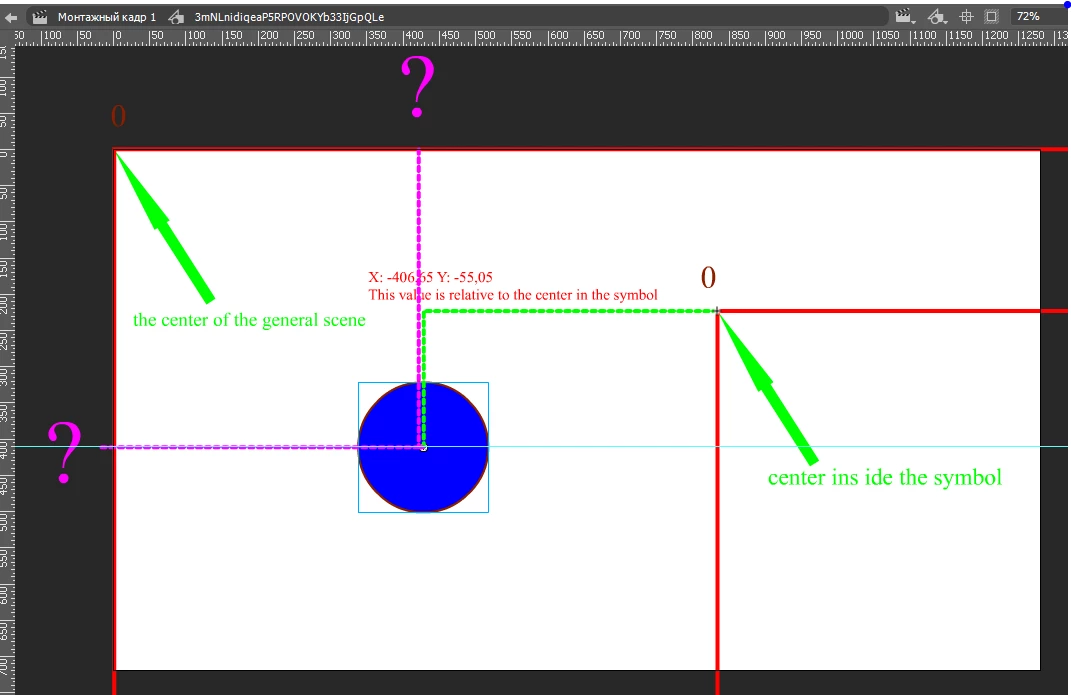

How to use JSFL to calculate the coordinates of the figure relative to the center of the scene, given that the figure is in the symbol and the symbol has its own center?
Hi,
To obtain the "screen" coordinates of a given element, you can multiply its matrix with the document.viewMatrix and then take the tx and ty of the resulting product. Alternatively, you can use the fl.Math.transformPoint() method.
// Method 1:
var doc = fl.getDocumentDOM();
var el = doc.selection[0];
var m = fl.Math.concatMatrix( el.matrix, doc.viewMatrix );
fl.trace( "x: " + m.tx + ", y: " + m.ty );


// Method 2:
var doc = fl.getDocumentDOM();
var el = doc.selection[0];
var pos = fl.Math.transformPoint( doc.viewMatrix, {x:el.matrix.tx, y:el.matrix.ty} );
fl.trace( "x: " + pos.x + ", y: " + pos.y );
Already have an account? Login
Enter your E-mail address. We'll send you an e-mail with instructions to reset your password.


 AdChoices