
Inspiring
July 3, 2022
Answered

How do I hold one drawing for multiple frames

  • July 3, 2022
  • 2 replies
  • 360 views

I'm creating an animation that has two layers, on the first layer there is a static drawing of a fence on frame one and on the second layer I have an animated character with multiple keyframes along the timeline. I need to hold the single drawing on the first layer for the duration of the timeline. I don't see a simple way to do this. I tried dragging the keyframe to happen over multiple frames - nope. I tried looking for an interpolation setting - nope. Do I actually have to copy and paste the single drawing for every frame for it to be held? What if I want to change the single drawing, will I have to copy and paste the drawing over again?

A bit confused on the workflow here, any advice?


Thanks.
    This topic has been closed for replies.
    Correct answer n. tilcheff

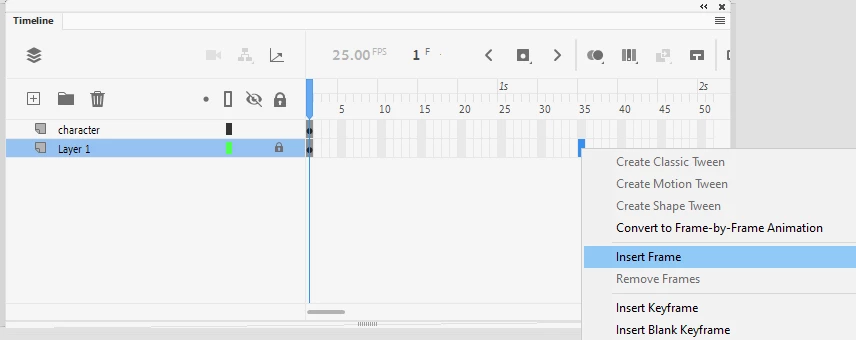
    Select an empty frame further down the timeline and press F5. This will extend the span of the last keyframe, i.e. your BG will be held.

    You can also right-click and choose from the context menu:

    There are also other ways...


    2 replies

    Community Expert
    July 7, 2022

    extend the frame by pressing F5.

    n. tilcheff
    n. tilcheffCorrect answer
    Legend
    July 3, 2022

    Select an empty frame further down the timeline and press F5. This will extend the span of the last keyframe, i.e. your BG will be held.

    You can also right-click and choose from the context menu:

    There are also other ways...


    Nick - Character Designer and Animator, Flash user since 1998 | Member of the Flanimate Power Tools team - extensions for character animation