
Legend
May 26, 2023
Answered

HTML5 Canvas single-frame movieclip code only executes once

  • May 26, 2023
  • 2 replies
  • 966 views

I've just started migrating our HTML5 Canvas applications from CreateJS 2015 to CreateJS 1.0, and I've already encountered what seems to be a critical regression in its behavior-- single-frame movieclips only execute the code on their root timeline once, the first time the movieclip is added to the stage. If the clip appears multiple times along the timeline, and/or the entire timeline loops, that code never executes again.


So before I start tearing my hair out trying to figure out how to fix this, I figured I'd ask here first to see if anyone else has already faced and resolved this problem.


I have discovered that listening for the "added" event can trigger code every time a single-frame clip pops onto the stage, but this feels like a bit of a circuitous hack.
This topic has been closed for replies.
Correct answer JoãoCésar17023019

Hi, Clay.


I reported this issue to the team in May 2021, but it was never addressed.


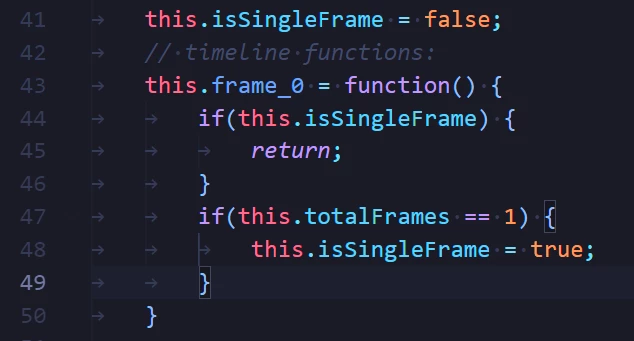
I think the reason is this conditional that Animate adds in the output:


I understand that this is needed to prevent the MC timeline to loop continuously.


But the drawback of this approach is that it prevents code added to the MC timeline from running again if a instance from this MC is re-added to the display list.


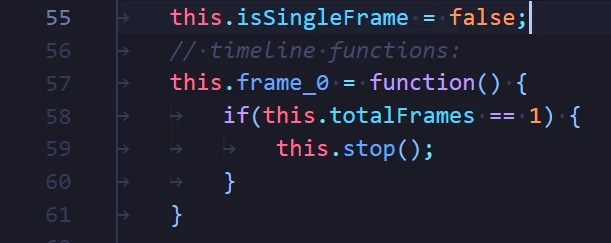
So... Wouldn't it be better if the exporter just added a stop method within the conditional that checks if the Movie Clip has only one frame? Like this?


In this way the timeline will stop but the code added by the user in the timeline will run again.


Regards,
JC

2 replies

Colin Holgate
Inspiring
May 27, 2023

In HTML5 Canvas movieclips are kept in memory, unlike in AS3. It may be that JC is right, and the team could do something about the problem. In the meantime you can do your own code so that when you go to a frame where a movieclip appears again, do your own reset code to get it back to the start of the movieclip.

ClayUUIDAuthor
Legend
May 27, 2023

You have misunderstood the problem. This isn't about the long-standing issue with Canvas movieclips not resetting when they return to the stage. This is about a newer issue where movieclips returning to the stage don't run their code. And this is something Adobe actually did intentionally. We can't even blame it on CreateJS 1.0.


Lord only knows what problem Adobe thought they were fixing by doing this. It seems to literally only make things worse. Now movieclips are actively prevented from running their own reset code.

JoãoCésar17023019
Community Expert
JoãoCésar17023019Community ExpertCorrect answer
Community Expert
May 26, 2023

Hi, Clay.


I reported this issue to the team in May 2021, but it was never addressed.


I think the reason is this conditional that Animate adds in the output:


I understand that this is needed to prevent the MC timeline to loop continuously.


But the drawback of this approach is that it prevents code added to the MC timeline from running again if a instance from this MC is re-added to the display list.


So... Wouldn't it be better if the exporter just added a stop method within the conditional that checks if the Movie Clip has only one frame? Like this?


In this way the timeline will stop but the code added by the user in the timeline will run again.


Regards,
JC

ClayUUIDAuthor
Legend
May 26, 2023

Thanks, I was afraid it was something like that. Good to know what the root of the problem is though.


Edit: Did a quick test, and manually setting this.isSingleFrame = false; in the frame code seems to work to override this behavior!

JoãoCésar17023019
Community Expert
Community Expert
May 26, 2023

You're welcome.


And glad that it worked!