
Inspiring
January 25, 2024
Answered

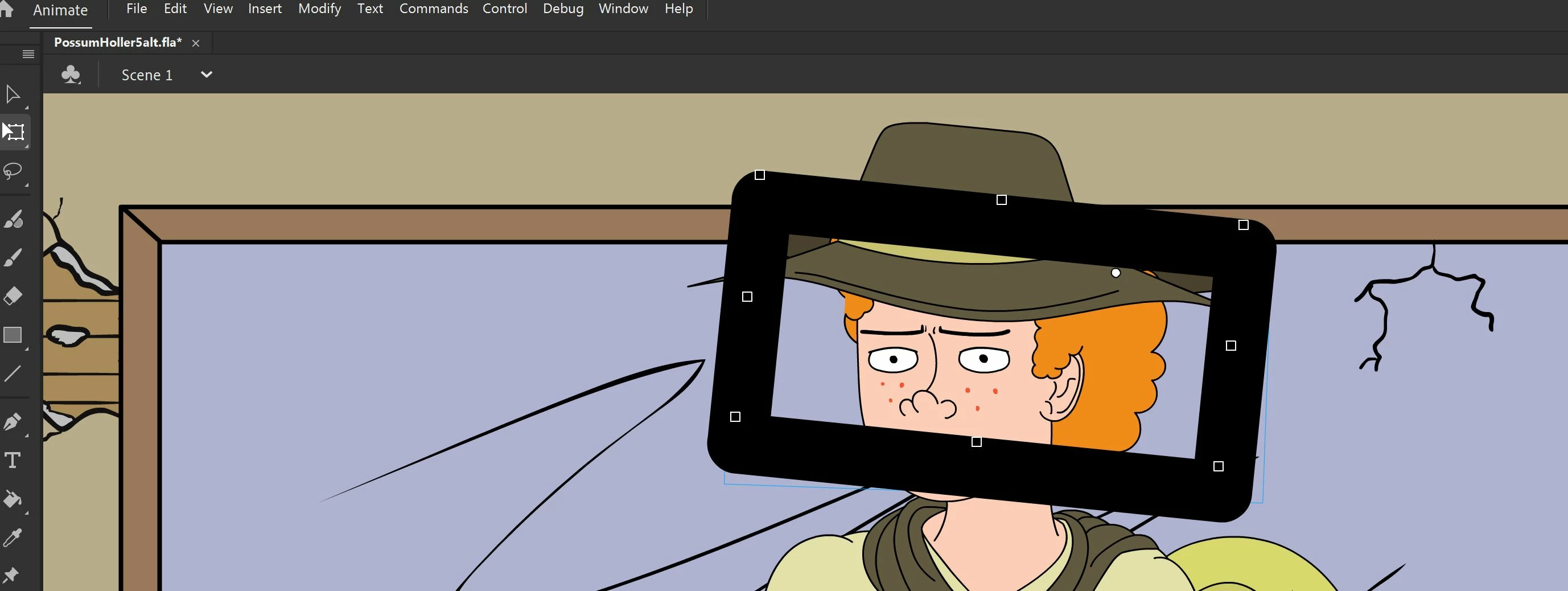
Huge black box appears when trying to move symbol with free transform tool.

  • January 25, 2024
  • 1 reply
  • 460 views

I'm trying to work on a video where I i need a puppet rig turned around which I did using the transform tool's "flip horizontally" option. One of the symbols of the rig did not flip properly like the rest and when i tried to use the free transform tool, it put a huge black box around the symbol. Not only that, but it doesn't respond when I try to move it. Also I tried moving the whole rig and it started forming grea bars in the area where I treid to move it and just kind of acting buggy. This has happened before when I once tried to use 2 pupet rigs at the same time. I have a decent computer with more than the minimum requrements but i swear it acts like its too much for the processer to handle. Any ideas how to fix this? 
    This topic has been closed for replies.
    Correct answer kglad

    no, it's just that animate can be wonky where starting with a problem and trying to fix it can be nearly impossible.  whereas going back a step or two and then doing the same thing that caused the problem, can i often bypass the problem (for reasons unknown to me).


    and if you go back a step or two and do things even slightly different, that virtually always works.

    1 reply

    kglad
    Community Expert
    Community Expert
    January 25, 2024

    see if you can by-pass the problem by copying the problematic shapes and pasting into a new symbol.

    RomanpenAuthor
    Inspiring
    January 26, 2024

    Yes, this actually worked.....I put them into a frame-by-frame symbol that was supposed to take over right after. I even put all the symbols on the same frame (i didn't need them to move) and it worked like a charm. Thanks!


    Is this some sort of issue where too many things in one scene overworks the processor or something? 

    kglad
    Community Expert
    kgladCommunity ExpertCorrect answer
    Community Expert
    January 26, 2024

    no, it's just that animate can be wonky where starting with a problem and trying to fix it can be nearly impossible.  whereas going back a step or two and then doing the same thing that caused the problem, can i often bypass the problem (for reasons unknown to me).


    and if you go back a step or two and do things even slightly different, that virtually always works.