Participating Frequently
February 10, 2023
Answered

I have a size set for stage in ActionScript 3.0, but more than the stage size shows

  • February 10, 2023
  • 1 reply
  • 243 views

I have made a background that is the exact size of my stage, but I when I hit "test", there is more space on the left and right than should be on my stage. I'm using ActionScript 3.0 and .swf files. I don't know what I did wrong. How do I make the animation only the size of the actual stage?

    This topic has been closed for replies.
    Correct answer JoãoCésar17023019

    Hi.


    It's because the default scaleMode value for the stage is "showAll", which means "that the entire application be visible in the specified area without distortion while maintaining the original aspect ratio of the application".

    What it means is tbat the Flash Player or the AIR runtime will resize the stage in way that it always fits proportionally inside of the window like your content was a single video file or bitmap.


    You can try to experiment with other scaleMode values, but you will probably want to stick with the default value, I think.
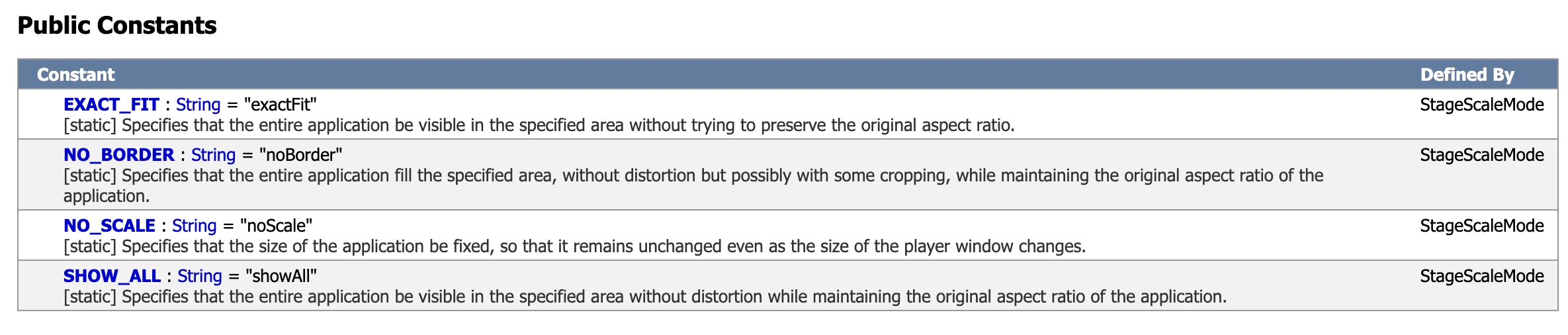
     

    https://help.adobe.com/en_US/FlashPlatform/reference/actionscript/3/flash/display/StageScaleMode.html


    Example of how to change the stage's scale mode:

    import flash.display.StageScaleMode;
    
    stage.scaleMode = StageScaleMode.NO_BORDER;


    Regards,

    JC

    1 reply

    JoãoCésar17023019
    Community Expert
    JoãoCésar17023019Community ExpertCorrect answer
    Community Expert
    February 10, 2023

    Hi.


    It's because the default scaleMode value for the stage is "showAll", which means "that the entire application be visible in the specified area without distortion while maintaining the original aspect ratio of the application".

    What it means is tbat the Flash Player or the AIR runtime will resize the stage in way that it always fits proportionally inside of the window like your content was a single video file or bitmap.


    You can try to experiment with other scaleMode values, but you will probably want to stick with the default value, I think.


    https://help.adobe.com/en_US/FlashPlatform/reference/actionscript/3/flash/display/StageScaleMode.html


    Example of how to change the stage's scale mode:

    import flash.display.StageScaleMode;
    
    stage.scaleMode = StageScaleMode.NO_BORDER;


    Regards,

    JC