
Issue with symbol transparency in rendering
Hi! I've been working on a webshow with a very small team of people, however I'm the only animator. Every so-often in I render an MP4 to check if animated symbols are showing properly since they don't play in previews, and that's all fine! But the problem comes in when it comes to one specific asset.
On it's own in the program, the symbol looks like this:


This is great to me. It looks exactly as it should and is the proper level of transparency.
However, when I actually render it into a video, the symbol shows like this.

At first glance it appears to have made one of my layers completely solid, but that isn't the case.
It's still transparent, just much less so.
Now, I'm still relatively new to Animate, I've only been using it for about 6 months, so I'm not sure if this is user error, a problem with Animate itself, or something else.
If this helps at all, the symbol's layers themselves look like this:
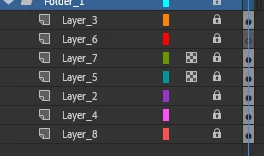
The problem layer in question is layer 5. Layer 7 is fine, despite also using layer opacity adjustments for transparency.
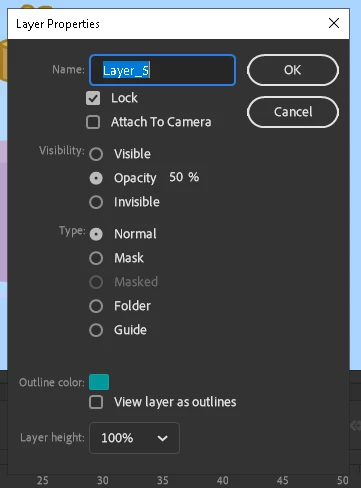
I also have several other symbols with transparency in them that use the same method, and they have had no problems whatsoever.
If anyone could give me pointers on what could be the issue here, I'd appreciate it as I do have a deadline.


 AdChoices