Answered
Loading images from local folder
I have images from a local folder that I would like to load into my flash presentation as an array.
I'm trying to do an Actionscript code. Is there anyway to do that?

I have images from a local folder that I would like to load into my flash presentation as an array.
I'm trying to do an Actionscript code. Is there anyway to do that?
how many files are there?
Alright.
Please try this:
import flash.display.Bitmap;
import flash.display.Loader;
import flash.display.LoaderInfo;
import flash.events.Event;
import flash.events.IOErrorEvent;
import flash.events.SecurityErrorEvent;
import flash.filesystem.File;
import flash.net.URLRequest;

var source:String = "./images"; // the source directory must be included in the AIR settings
var extensions:Vector.<String> = new <String>[ "bmp", "jpeg", "jpg", "png" ];
var parsedSource:String;
var foundImages:Array;
var loadedImages:Vector.<Bitmap>;

function main():void
{
	parsedSource = parsePath(source);

	foundImages = listDir(parsedSource).filter(function(element:*, index:int, arr:Array):Boolean
	{
		return extensions.indexOf(element.extension) > -1;
	});

	if (foundImages.length > 0)
	{
		loadedImages = new Vector.<Bitmap>();
		loadImages(foundImages);
	}
}

function parsePath(path:String):String
{
	const SEP:String = File.separator;

	var forwardReg:RegExp = /\//g;
	var backwardReg:RegExp = /\\/g;
	var path:String;

	path = path
		.replace(forwardReg, SEP)
		.replace(backwardReg, SEP);

	return path;
}

function loadImages(images:Array):void
{
	var i:uint;
	var total:uint = images.length;

	for (i = 0; i < total; i++)
		loadImage(images[i]);
}

function listDir(dir:String):Array
{
	var desktop:File = File.applicationDirectory.resolvePath(dir);
	return desktop.getDirectoryListing();
}

function loadImage(file:File):void
{
	var loader:Loader = new Loader();

	loader.contentLoaderInfo.addEventListener(Event.COMPLETE, completeHandler);
	loader.contentLoaderInfo.addEventListener(IOErrorEvent.IO_ERROR, ioErrorHandler);
	loader.contentLoaderInfo.addEventListener(SecurityErrorEvent.SECURITY_ERROR, securityErrorHandler);
	loader.load(new URLRequest(file.url));
}

function completeHandler(e:Event):void
{
	e.currentTarget.removeEventListener(e.type, arguments.callee);

	loadedImages.push(Bitmap((e.currentTarget as LoaderInfo).content));

	if (loadedImages.length == foundImages.length)
		displayImageGrid(loadedImages);
}

function ioErrorHandler(e:IOErrorEvent):void
{
	trace(e);
	e.currentTarget.removeEventListener(e.type, arguments.callee);
}

function securityErrorHandler(e:SecurityError):void
{
	trace(e);
}

function displayImageGrid(images:Vector.<Bitmap>):void
{
	var i:uint;
	var total:uint = images.length;
	var image:Bitmap;
	var baseWidth:uint = 256;
	var baseHeight:uint = 384;
	var gapX:int = 10;
	var gapY:int = 10;
	var columns:uint = uint(stage.stageWidth / (baseWidth + gapX));

	for (i = 0; i < total; i++)
	{
		image = images[i];
		image.width = baseWidth;
		image.scaleY = image.scaleX;
		image.x = gapX + (i % columns) * (baseWidth + gapX);
		image.y = gapY + int(i / columns) * (baseHeight + gapY);
		image.smoothing = true;
		addChild(image);
	}
}

main();
And please notice that the source directory must be included in the AIR settings.
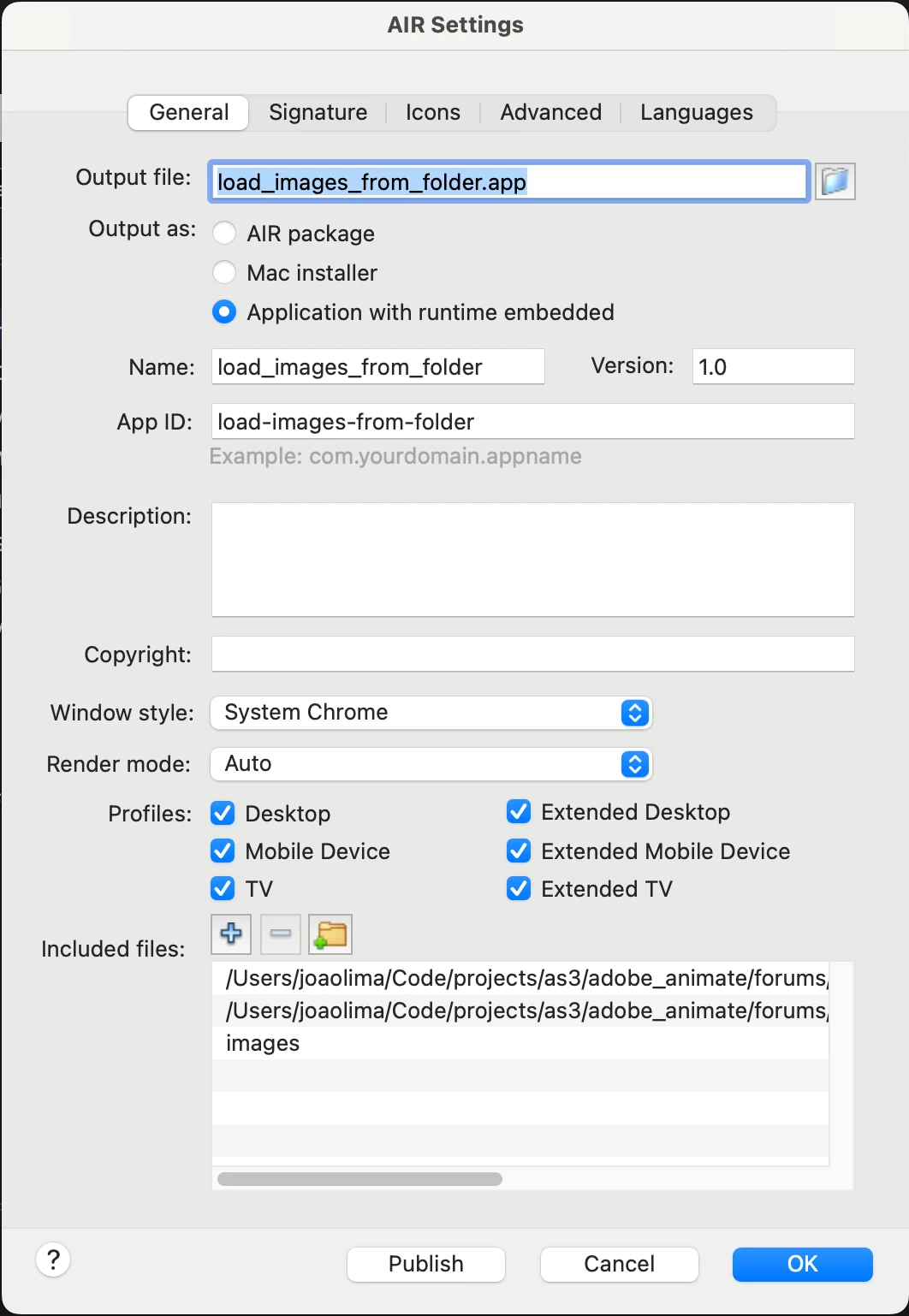
I hope this helps.
Regards,
JC
Already have an account? Login
Enter your E-mail address. We'll send you an e-mail with instructions to reset your password.


 AdChoices