

lidiya_127
Inspiring
April 4, 2021
Answered

Masking problems

  • April 4, 2021
  • 1 reply
  • 1528 views

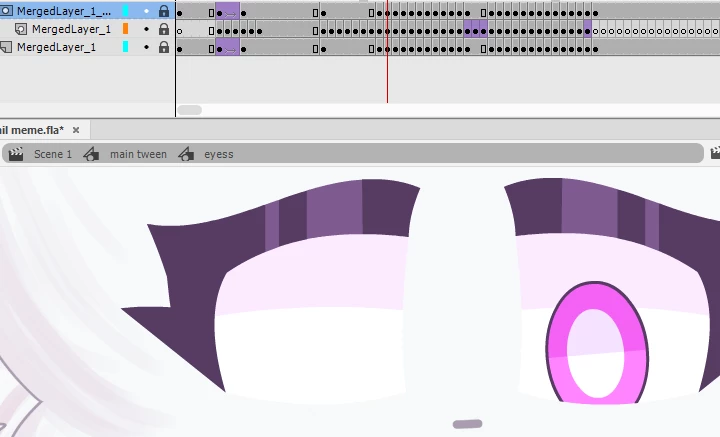
So I made an eye animation, and the pupils kind of go out of the eye so I decided to use clipping mask, the pupils are animated as they are supposed to be without clipping mask but when I turn it on the left pupil dissappears for the part where its supposed to be animated, even though it shows up fine when clipping mask is off, please help.
 

This topic has been closed for replies.
Correct answer n. tilcheff

If your mask consists of two separate ovals, make sure they are broken apart and appear as shapes, not separate Drawing Objects (or even one Drawing object).
Go inside the mask symbol, Break Apart, deselect, exit symbol. All should be fine now.


1 reply

n. tilcheff
Legend
April 4, 2021


You can also download and study some production quality sample rigs from here: https://flash-powertools.com/tag/free-download/


Nick - Character Designer and Animator, Flash user since 1998 | Member of the Flanimate Power Tools team - extensions for character animation
lidiya_127
Inspiring
April 5, 2021

I did these, but the left iris frames are disappearing for no reason when masking is on for the whites, while when masking is off the irises show up just fine. 

n. tilcheff
n. tilcheffCorrect answer
Legend
April 5, 2021

If your mask consists of two separate ovals, make sure they are broken apart and appear as shapes, not separate Drawing Objects (or even one Drawing object).
Go inside the mask symbol, Break Apart, deselect, exit symbol. All should be fine now.


Nick - Character Designer and Animator, Flash user since 1998 | Member of the Flanimate Power Tools team - extensions for character animation