
Inspiring
September 6, 2023
Answered

Need some help moving an animation.

  • September 6, 2023
  • 3 replies
  • 383 views

I'm finishing up an animation and I'm getting ready to export the file, but I realized last minute that the character's arms go past the stage canvas on top, meaning it won't export that part of the character animation. I tried adjusting the stage's size so it can fit, but when I make the stage taller in height, it only creates space downards when I want space to be created upwards. Is it possible to do the thing that Adobe Illustrator does and just adjust the canvas size by dragging the size manualley? 


If that's not an option, I've been also trying to use the "edit multiple frames" button but it only move one frame instead of the entire animation when I drag it towards the center.


Any help is greatly appreciated!
    This topic has been closed for replies.
    Correct answer JoãoCésar17023019

    Hi.


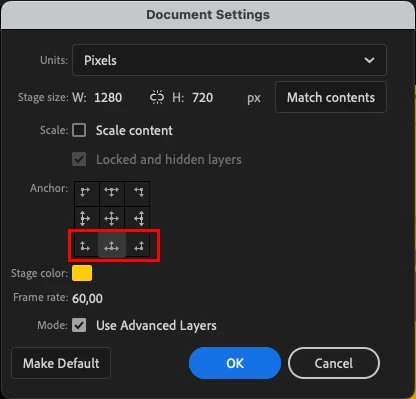
    Have you tried changing the anchor to the bottom when scaling the stage?


    Also, if you need to edit multiple frames, make sure to select all instances on stage (Ctrl/Cmd + A) after activating the feature.


    Regards,

    JC

    3 replies

    JoãoCésar17023019
    Community Expert
    JoãoCésar17023019Community ExpertCorrect answer
    Community Expert
    September 6, 2023

    Hi.


    Have you tried changing the anchor to the bottom when scaling the stage?


    Also, if you need to edit multiple frames, make sure to select all instances on stage (Ctrl/Cmd + A) after activating the feature.


    Regards,

    JC

    Inspiring
    September 6, 2023

    Thank you as well! I'll note the edit mutiple frames feature for the future!

    Inspiring
    September 6, 2023

    Also one more thing to add, the character in the animation will be exported as a png and there's no background in it so don't worry about the readjusted canvas size ruining the background.

    Mario_CR
    Community Expert
    Community Expert
    September 6, 2023

    Hello, if you click on "More settings" you can anchor the scaling to the bottom of the stage.


    Inspiring
    September 6, 2023

    Oh my gosh that was fast! And it worked! Thank you so much you!