
Nested animations and Buttons not working together
My issue is a bit complicated, and i couldn't find anyone with a similar problem here:
My Project has a lot of nested movieclips. The point is, you're supposed to be able to pick multiple options, which then have their own multiple options. For example, you can pick between the type of furniture, the size, and the color.
The hierarchy of the clips looks like this:
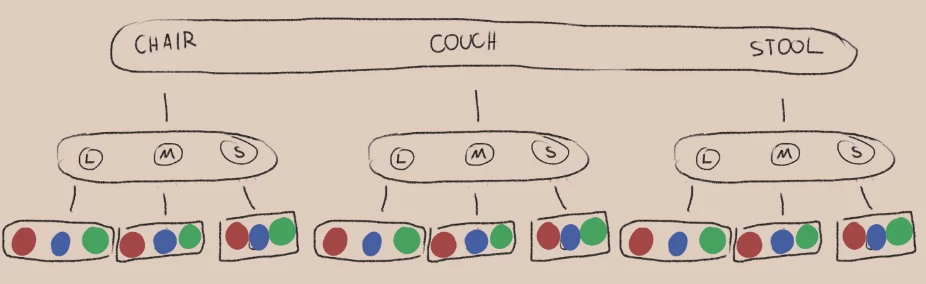
Each timeline has a short script with this.stop(); on a separate layer,
In the main script each timeline has a gotoAndStop(); that specifies the "default" frame i want it to start on.
It works fine by default, but when i try to select other options, the "default" returns to 0, and the next button i press makes everything play through their timelines once.
I'm guessing that pressing the buttons overrides the stop() and gotoandstop(), but i don't know how to prevent that.
Does anyone else know what to do?


 AdChoices