
Object follows wrong path after adding keyframe
I want to make an animation in which a nurse walks through a hospital ward and stops at different beds.
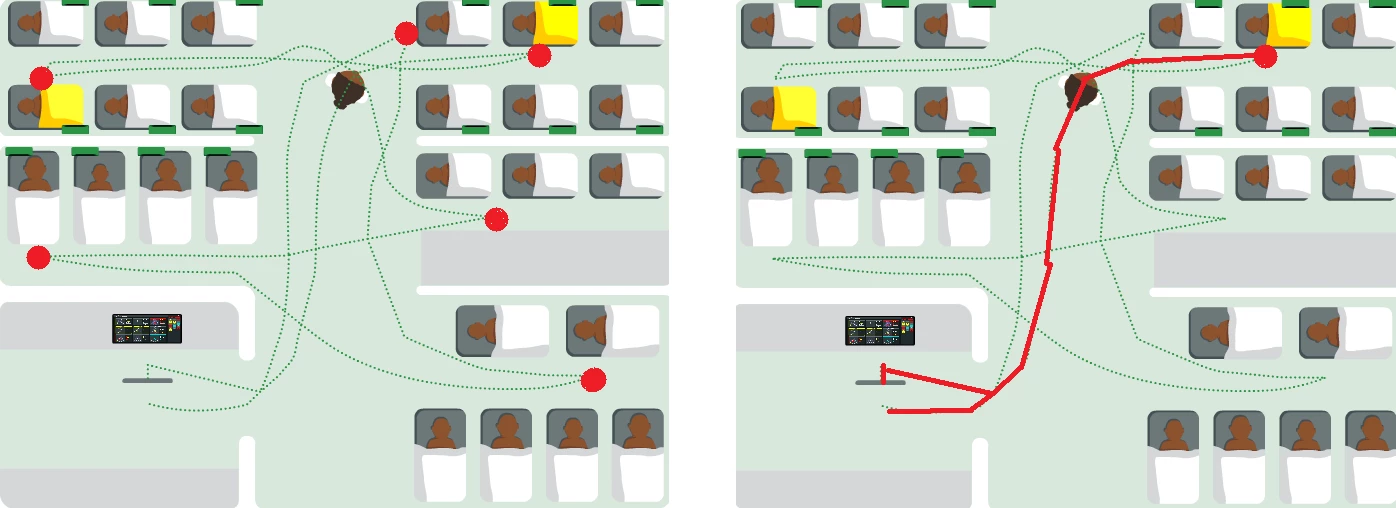
I followed this tutorial: https://www.youtube.com/watch?v=30cHqTXdDgg. I made an object follow a path, but after I add a keyframe, at the bed where I want the nurse to slow down, the object doesn't follow the correct path anymore, but follows the shortest path to the end point. The path the object follows does interact quite some times (I can't get rid of this). Before adding the keyframe the object did follow the path just fine.
Underneith shows on the left the guide path with the dots where the nurse should stop. On the right, marked in red, the path is shown that the object follows after I add the keyframe.
What is the simplest method of solving this or making the animation that I want. I do see the option of making different paths but this seems quite a lot of work, expecially is the animation becomes more extensive. I also want to have the nurse walk in a similar pace the whole time so I don't want to guess with timing on when the object needs to be were.


 AdChoices