

Multoman
Inspiring
November 20, 2022
Answered

Передать массив из js в as3

  • November 20, 2022
  • 1 reply
  • 726 views

I have 3 symbol movie clips (Ant 11, Ant 20, Ant 30). They have to appear on stage. Instances of 3 symbols are written in an array. If the array is written to AS, then everything works well. If the array is written to JS, then the array in AS is transmitted incorrectly and the movie clip scene (And 11, And 20, And 30) does not appear. How to fix it? The array must always be in the JS file. I hope I explained it clearly, I attach the source code and a video demonstrating the problem

JS Code:


function callMyPanel(panelName, arg) 
{	
    if (fl.swfPanels.length > 0)
	{ 
        for (i = 0; i < fl.swfPanels.length; i++)
		{ 
			if (fl.swfPanels[i].name == panelName)
			{
				fl.swfPanels[i].call("callSWF", arg); 
				break; 
			} 
        } 
    } 
    else 
        fl.trace("no panels"); 
}


images = ['Ant11', 'Ant20', 'Ant30'];


callMyPanel("ABCD", images.join(", "));


 AS Code: 


stage.scaleMode = StageScaleMode.NO_SCALE

function fromJSFL(arg: String): void {
	
	/*var images:Array = [Ant11, Ant20, Ant30];*/
	var images:Array = arg.split(",");


makeGrid();
 
function makeGrid():void {
    var gridContainer:Sprite = new Sprite();
    // numObjects is the number of objects in the array
    var numObjects:int = images.length;
    var numCols:int = 5;
    var column:int = 0;
    var row:int = 0;
    var gap:Number = 2;
    var cell:DisplayObject;
    for (var i:int = 0; i < numObjects; i++) {
        column = i % numCols;
        row = int(i / numCols);
        // get corresponding object from the array
        cell = images[i];
        cell.x = (cell.width + gap) * column;
        cell.y = (cell.height + gap) * row;
        gridContainer.addChild(cell);
        trace(i, "\tcolumn =", column, "row =", row);
    }
    gridContainer.x = gridContainer.y = 20;
    addChild(gridContainer);
}
	
}

ExternalInterface.addCallback('callSWF', fromJSFL);
MMExecute('fl.runScript(fl.configURI + "/WindowSWF/ABCD.jsfl");');


 Video demonstrating the problem:

https://drive.google.com/file/d/1rjlKbxSwpJptQlmgF4hz2e4sTP0Uu67s/view?usp=sharing


Source file:

https://drive.google.com/file/d/1ivwrsV2DLnqaNCUSHsxj9FEEcVv6FSuV/view?usp=sharing
This topic has been closed for replies.
Correct answer kglad

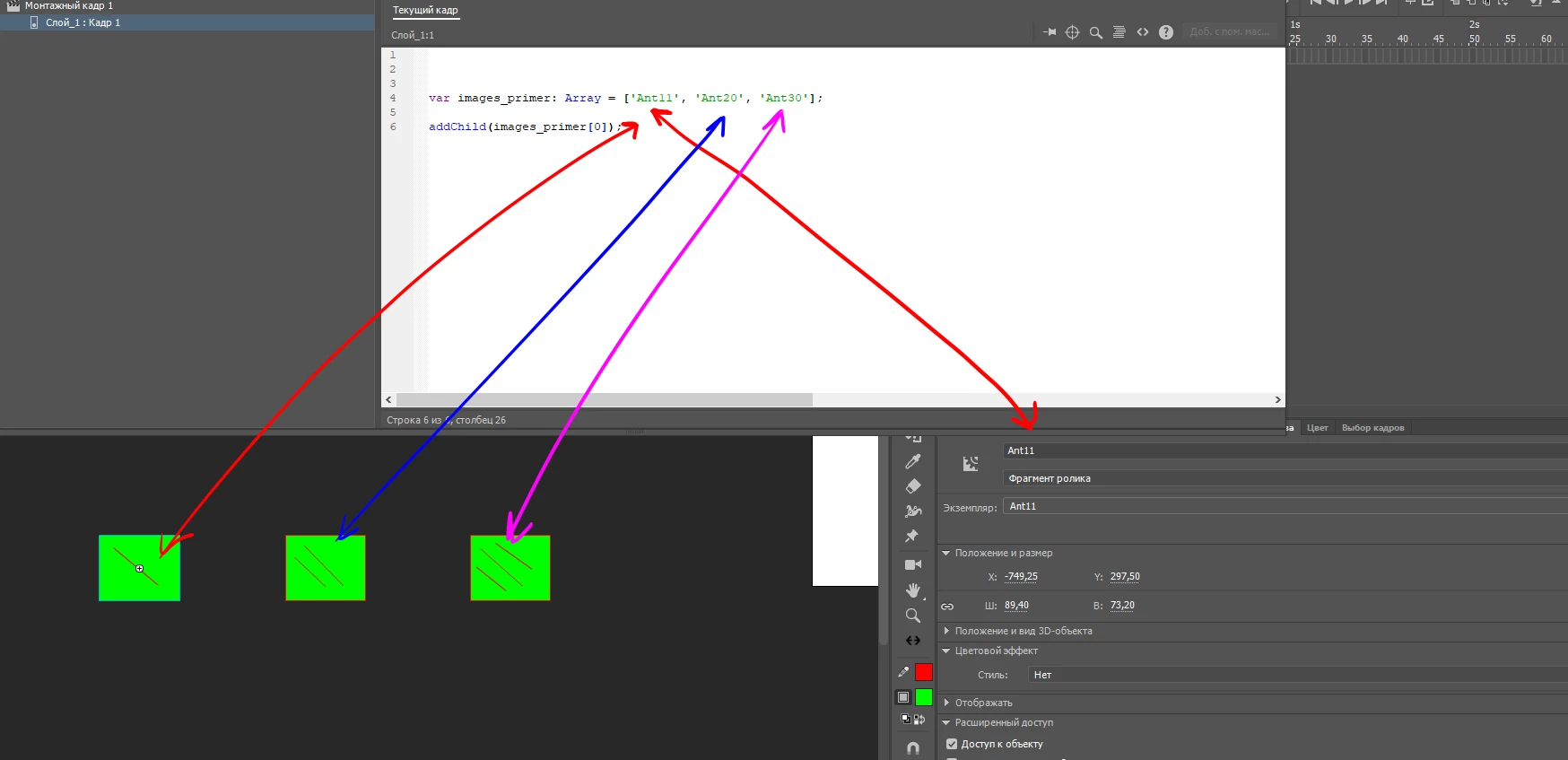
Unfortunately, it didn't help me. Maybe I asked the wrong question. When trying to add symbol MC (Ant 11) to the scene, an error occurs. All elements in the array must be a string (This is the main condition!). How do I convert a string to a property (I don't know exactly how it is called correctly, it is written in the instance name (Shown in the picture))?

var images_primer: Array = ['Ant11', 'Ant20', 'Ant30'];
addChild(images_primer[0]);

 An error is issued:  TypeError: Error #1034: Type Coercion failed: cannot convert "Ant11" to flash.display.DisplayObject.
at ABCD_fla::MainTimeline/frame1()


well, i certainly helped you.  you'll need to unnest those anonymous functions.


however, fixing that error won't fix other errors.


to that end, use array notation to coerce strings to objects:


addChild(this["Ant11"]);


or


addChild(this[images_primer[0]]);

1 reply

kglad
Community Expert
Community Expert
November 20, 2022

don't nest anonymous functions and be carefully about making variables local to functions:


stage.scaleMode = StageScaleMode.NO_SCALE;

var images:Array;


function fromJSFL(arg: String): void {
/*var images:Array = [Ant11, Ant20, Ant30];*/
images = arg.split(",");
makeGrid();

}

function makeGrid():void {
var gridContainer:Sprite = new Sprite();
// numObjects is the number of objects in the array
var numObjects:int = images.length;
var numCols:int = 5;
var column:int = 0;
var row:int = 0;
var gap:Number = 2;
var cell:DisplayObject;
for (var i:int = 0; i < numObjects; i++) {
column = i % numCols;
row = int(i / numCols);
// get corresponding object from the array
cell = images[i];
cell.x = (cell.width + gap) * column;
cell.y = (cell.height + gap) * row;
gridContainer.addChild(cell);
trace(i, "\tcolumn =", column, "row =", row);
}
gridContainer.x = gridContainer.y = 20;
addChild(gridContainer);
}


Multoman
MultomanAuthor
Inspiring
November 20, 2022

The array(images) is located in another file (JS). During operation, it is assumed that the array will change. I need it to be imported into the AS file without changes (As I understand now it is imported with string values, this is wrong, so the code does not work). How do I fix this?

kglad
Community Expert
Community Expert
November 20, 2022

use the same code as you were using before in your jsfl (not js) file and the same code to call your jsfl file.


i just showed how to fix the problem you're seeing by unnesting makeGrid() from fromJSFL().