Known Participant
Aug 4, 2023 11:59 PM UTC
Answered

Personagem anda para onde clico com o mouse

Olá!

Sou iniciante e entendo pouco de javascript, mas tenho tentado através de tutoriais.

Como eu poderia fazer, em javascript, com que meu personagem ande até o local em que clico?

Já  vi como fazer um objeto parado aparecer onde clico, mas na prática ele apareceu longe do lugar clicado, não sei como corrigir e nem se esse seria o caminho para fazer um personagem andar...

Podem me ajudar?

Obrigada!

This topic is closed to new replies. Start a new post to keep the conversation going.
kglad
kgladCorrect answer
Community Expert
Aug 6, 2023 9:50 PM UTC

Yes, Davi is the instance name.
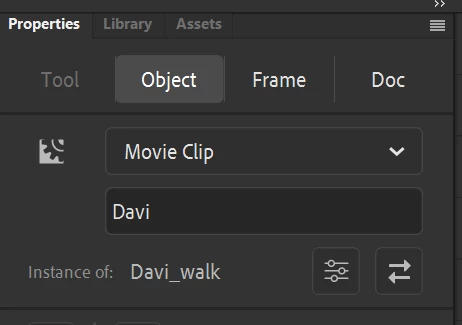


stage.addEventListener("stagemousemove",mouseMoveF.bind(this))
 
var tickFF = tickF.bind(this);
var mouseDownFF = mouseDownF.bind(this);
// speed 
var v = 10;
// movement vector  
var dir = 0;
// mouse click point 
var clickPoint = new createjs.Point();
var angle, nextX, nextY, deltaY, prevPoint;
 
function mouseMoveF(e){
if(!stage.hasEventListener("stagemousedown")){
stage.addEventListener("stagemousedown", mouseDownFF);
}
}
 
function mouseDownF(e) {
stage.removeEventListener("stagemousedown", mouseDownFF);
clickPoint.x = e.stageX/stage.scaleX;
clickPoint.y = e.stageY/stage.scaleY;
 
angle = Math.atan2(clickPoint.y - this.Davi.y, clickPoint.x - this.Davi.x);
dir = angle >= 0 ? -1 : 1;
createjs.Ticker.addEventListener("tick", tickFF);
}
 
function tickF(e){
nextX = this.Davi.x + v * Math.cos(angle);
nextY = this.Davi.y + v * Math.sin(angle);
 
deltaY = clickPoint.y - nextY;
if (deltaY/Math.abs(deltaY) == dir) {
this.Davi.x = clickPoint.x;
this.Davi.y = clickPoint.y;
createjs.Ticker.removeEventListener("tick", tickFF);
} else {
this.Davi.x = nextX;
this.Davi.y = nextY;
}
prevPoint = clickPoint;
}


10 replies

kglad
Community Expert
Community Expert
Aug 5, 2023 2:42 PM UTC
here's code to get the mouse position:
 
stage.addEventListener("mousedown", mouseF.bind(this));
var pt =  new createjs.Point();
 
function mouseF(e) {
pt.x = e.stageX/stage.scaleX
pt.y = e.stageY/stage.scaleY;
}
Translate
Known Participant
Aug 6, 2023 12:45 AM UTC

Obrigada pelo código. Ainda não consigo entender como usá-lo... sou iniciante. Como ligo isso ao meu personagem?

Translate
kglad
Community Expert
Community Expert
Aug 6, 2023 12:52 AM UTC

what's your character instance name?

Translate

