


Inspiring
December 28, 2022
Question

please help with assigning commands from a class - easelJS/animate cc/html5

  • December 28, 2022
  • 3 replies
  • 915 views

Hi team,

So I have a tutorial (paid) but I am trying to understand something that I don't know what is going on.. I am (trying to be) running the interaction from a game.js file where all the code will be stored.  I think I have worked out how to set up a web server and run the project as an index file (otherwise the interactions being read from the game.js file do not work)- this seems like a PITA but I have it working now.

So I have started a new project.  I have a movie clip that has two frames in it (off and on) and the switch moves depending on if the light is off or on.  Then I have a button instance name gobutt that can be used to call the lightAndSwitch movie clip to be on or off - 

here is the code
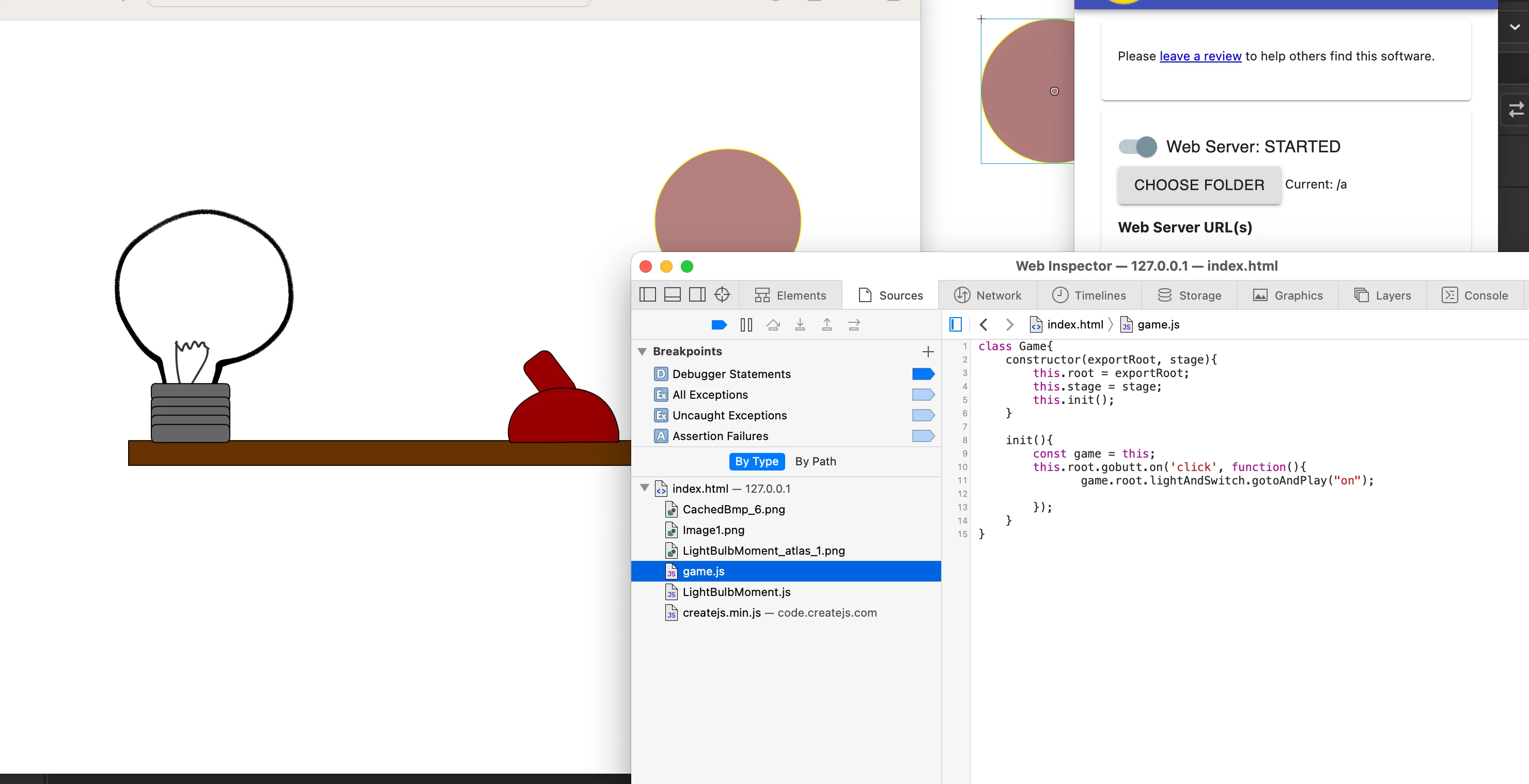
So its all connected - no errors being thrown, but it doesn't work!

This is the same pathway as the example given (That works) but I am changing something by making my own project.  How do I address the button and the movie clip from the game.js file?

class Game{
    constructor(exportRoot, stage){
        this.root = exportRoot;
        this.stage = stage;
        this.init();
    }
    
    init(){
        const game = this;
        this.root.gobutt.on('click', function(){
               game.root.lightAndSwitch.gotoAndPlay("on");
            
        });
    }
}

Thanks for your help

sub

    This topic has been closed for replies.

    3 replies

    JoãoCésar17023019
    Community Expert
    Community Expert
    December 29, 2022

    Hi again.


    Instantiate the Game class in the main timeline (in an action frame) and not the in the index.html.

    Inspiring
    December 29, 2022

    ok guys I am really trying to make this happen, what tutorials do you recommend? I want to teach a class how to do this.  I have a little money if it needs payment.  What am I searching for here- is it specific to easelJS and animate cc?  I dont understand all the variation in what I am seeing when I try to search

    Inspiring
    December 29, 2022

    well, classes don't really make as much sense in a non-object oriented language like javascript like they do in c++, for example.


    bottomline: it's not clear what you are trying to achieve.


    Ok teaching a beginning class on intro to coding and a class that has to create a website - (just been given this class- I taught media and HPE last year) - I am an artist and very visual- I have done some AS3 coding in Flash.   I want to be able to get the kids that "think this is crap and dont like to code" to be able to draw something cool - and then make it do stuff with code.  I thought that using Animate (school already has adobe cc for media) would be a great way to allow an arts focus for STEAM and allow a different pathway for kids that are more into drawing and design (like me?)

    But just finding the getting started so hard (what I have been told to do is just get kids to follow notebook++ > website tutorials instead but this would not be exciting as what animate could do

    kglad
    Community Expert
    Community Expert
    December 28, 2022

    (and you should probably check for a different tutorial.)

    Inspiring
    December 28, 2022

    Ah yes you were right, here is the updated code with the line added - now I think its working, but still any tips will be helpful.  What tuts do you suggest?  


    <!DOCTYPE html>
    <!--
    	NOTES:
    	1. All tokens are represented by '$' sign in the template.
    	2. You can write your code only wherever mentioned.
    	3. All occurrences of existing tokens will be replaced by their appropriate values.
    	4. Blank lines will be removed automatically.
    	5. Remove unnecessary comments before creating your template.
    -->
    <html>
    <head>
    <meta charset="UTF-8">
    <meta name="authoring-tool" content="Adobe_Animate_CC">
    <title>javaTest</title>
    <!-- write your code here -->
    <style>
      #animation_container {
    	position:absolute;
    	margin:auto;
    	left:0;right:0;
    	top:0;bottom:0;
      }
    </style>
    <script src="https://code.createjs.com/1.0.0/createjs.min.js"></script>
    <script src="x-javaTest.js"></script>
    <script src="game.js"></script>
    <script>
    var canvas, stage, exportRoot, anim_container, dom_overlay_container, fnStartAnimation, game;
    function init() {
    	canvas = document.getElementById("canvas");
    	anim_container = document.getElementById("animation_container");
    	dom_overlay_container = document.getElementById("dom_overlay_container");
    	var comp=AdobeAn.getComposition("A21967C6DB7943FE8681899B44492054");
    	var lib=comp.getLibrary();
    	handleComplete({},comp);
    }
    function handleComplete(evt,comp) {
    	//This function is always called, irrespective of the content. You can use the variable "stage" after it is created in token create_stage.
    	var lib=comp.getLibrary();
    	var ss=comp.getSpriteSheet();
    	exportRoot = new lib.javaTest();
    	stage = new lib.Stage(canvas);	
    	//Registers the "tick" event listener.
    	fnStartAnimation = function() {
              game = new Game(stage, exportRoot, lib);
    		stage.addChild(exportRoot);
    		createjs.Ticker.framerate = lib.properties.fps;
    		createjs.Ticker.addEventListener("tick", stage);
    	}	    
    	//Code to support hidpi screens and responsive scaling.
    	AdobeAn.makeResponsive(true,'both',true,1,[canvas,anim_container,dom_overlay_container]);	
    	AdobeAn.compositionLoaded(lib.properties.id);
    	fnStartAnimation();
    }
        function handleTick(event) {
                if (game === undefined) game = new Game(exportRoot, stage);
        }
    </script>
    <!-- write your code here -->
    </head>
    <body onload="init();" style="margin:0px;">
    	<div id="animation_container" style="background-color:rgba(255, 255, 255, 1.00); width:960px; height:640px">
    		<canvas id="canvas" width="960" height="640" style="position: absolute; display: block; background-color:rgba(255, 255, 255, 1.00);"></canvas>
    		<div id="dom_overlay_container" style="pointer-events:none; overflow:hidden; width:960px; height:640px; position: absolute; left: 0px; top: 0px; display: block;">
    		</div>
    	</div>
    </body>
    </html>


    JoãoCésar17023019
    Community Expert
    Community Expert
    December 28, 2022

    Hi.


    Where are you instantiating the Game class?


    You should have a line somewhere in the main timeline like this:

    const game = new Game(exportRoot, stage);
    // or const game = new Game(this, stage);


    Please let us know.


    Regards,

    JC

    Inspiring
    December 28, 2022

    Hey thanks JC!

    Here is the new code - I think I am getting somewhere

    <!DOCTYPE html>
    <!--
    	NOTES:
    	1. All tokens are represented by '$' sign in the template.
    	2. You can write your code only wherever mentioned.
    	3. All occurrences of existing tokens will be replaced by their appropriate values.
    	4. Blank lines will be removed automatically.
    	5. Remove unnecessary comments before creating your template.
    -->
    <html>
    <head>
    <meta charset="UTF-8">
    <meta name="authoring-tool" content="Adobe_Animate_CC">
    <title>javaTest</title>
    <!-- write your code here -->
    <style>
      #animation_container {
    	position:absolute;
    	margin:auto;
    	left:0;right:0;
    	top:0;bottom:0;
      }
    </style>
    <script src="https://code.createjs.com/1.0.0/createjs.min.js"></script>
    <script src="x-javaTest.js"></script>
    <script src="game.js"></script>
    <script>
    var canvas, stage, exportRoot, anim_container, dom_overlay_container, fnStartAnimation, game;
    function init() {
    	canvas = document.getElementById("canvas");
    	anim_container = document.getElementById("animation_container");
    	dom_overlay_container = document.getElementById("dom_overlay_container");
    	var comp=AdobeAn.getComposition("A21967C6DB7943FE8681899B44492054");
    	var lib=comp.getLibrary();
    	handleComplete({},comp);
    }
    function handleComplete(evt,comp) {
    	//This function is always called, irrespective of the content. You can use the variable "stage" after it is created in token create_stage.
    	var lib=comp.getLibrary();
    	var ss=comp.getSpriteSheet();
    	exportRoot = new lib.javaTest();
    	stage = new lib.Stage(canvas);	
    	//Registers the "tick" event listener.
    	fnStartAnimation = function() {
              game = new Game(stage, exportRoot, lib);
    		stage.addChild(exportRoot);
    		createjs.Ticker.framerate = lib.properties.fps;
    		createjs.Ticker.addEventListener("tick", stage);
    	}	    
    	//Code to support hidpi screens and responsive scaling.
    	AdobeAn.makeResponsive(true,'both',true,1,[canvas,anim_container,dom_overlay_container]);	
    	AdobeAn.compositionLoaded(lib.properties.id);
    	fnStartAnimation();
    }
        function handleTick(event) {
                if (game === undefined) game = new Game(exportRoot, stage);
        }
    </script>
    <!-- write your code here -->
    </head>
    <body onload="init();" style="margin:0px;">
    	<div id="animation_container" style="background-color:rgba(255, 255, 255, 1.00); width:960px; height:640px">
    		<canvas id="canvas" width="960" height="640" style="position: absolute; display: block; background-color:rgba(255, 255, 255, 1.00);"></canvas>
    		<div id="dom_overlay_container" style="pointer-events:none; overflow:hidden; width:960px; height:640px; position: absolute; left: 0px; top: 0px; display: block;">
    		</div>
    	</div>
    </body>
    </html>