Known Participant
December 19, 2018
Answered

Plotting graphs using AS3

  • December 19, 2018
  • 2 replies
  • 2205 views

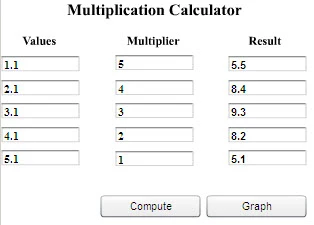
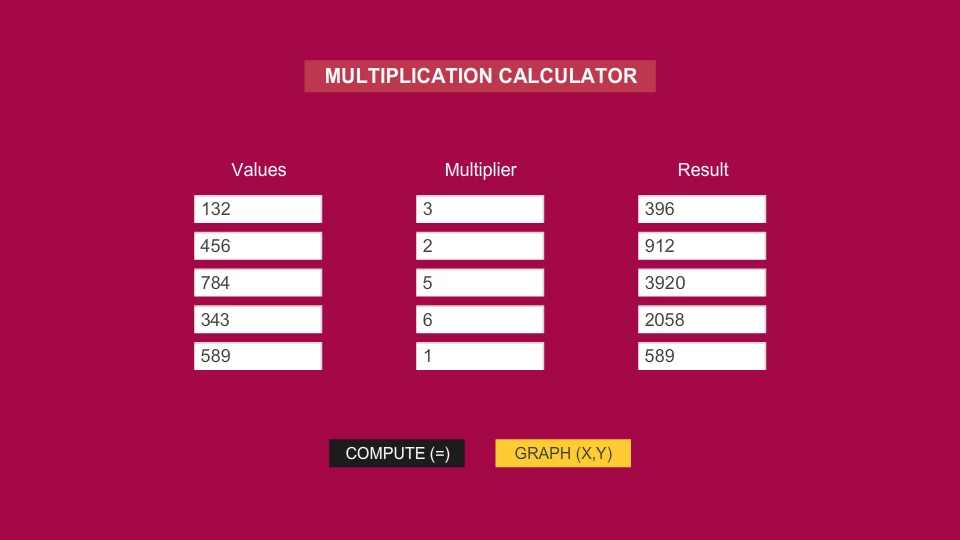
Hi, I am new to Actionscript 3. I have been learning how to code in AS3 on the go from forums on the net and from Youtube videos, so if anything I've said in this post is inappropriate as far as coding in AS3 is concerned, I apologize for the same. I am trying to create a graph as shown in the image with the inputs on the X-axis and the result on the Y-axis. I have also attached a screenshot of the inputs and resulting outputs. I have coded most of it, but I cannot figure out how to actually plot the graph corresponding to the input and resulting output values. I also want to improve the code given below for the "x" and "y" position of the text boxes (xtBox and ytBox, respectively), the horizontal and vertical markers (hLine and vLine respectively), and the "x" and "y" text labels (xLabel and yLabel, respectively). "x" and "y" arrays have to be sorted in ascending order, the maximum value has to be divided by the length of the array to display the numerical text on the axis with even distribution (as we used to do while taking units for plotting of graphs in math class in school). It would also be great if someone could tell me how to shrink the code, if at all it can be reduced (I have done the best I could using arrays). I use Adobe Flash CS6 on a Windows 7 32-bit machine.

Calculating the result
Graph
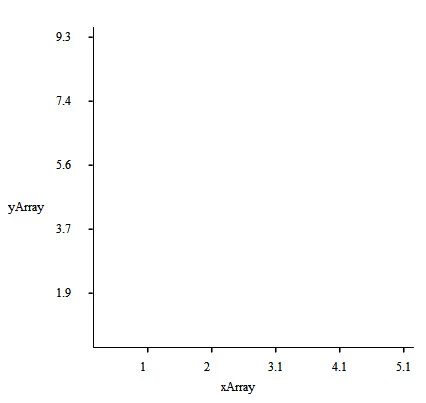
The code is given below:

//Creating the graph

graph.addEventListener(MouseEvent.CLICK, graphBtn);

function graphBtn(event:MouseEvent):void

{

     gotoAndStop(2);

     var spBoard:Sprite = new Sprite();

     addChild(spBoard);

     spBoard.x = 0;

     spBoard.y = 0;

     var nSize:Number = 320;

     //var nPoints:Number = 320;

     var shAxes:Shape = new Shape();

     spBoard.addChild(shAxes);

     drawAxes();

     function drawAxes():void

     {

          shAxes.graphics.clear();

          shAxes.graphics.lineStyle(1,0x000000);

          //Draw y-axis

          shAxes.graphics.moveTo(0,0);

          shAxes.graphics.lineTo(0,nSize);

          //Draw x-axis

          shAxes.graphics.moveTo(0,nSize);

          shAxes.graphics.lineTo(nSize,nSize);

     }

     //Input on X-axis//

     var xXPos = spBoard.x+44;

     var xYPos = spBoard.y+nSize+10;

     var vxXPos = spBoard.x+54;

     var vyYPos = spBoard.y+nSize+3;

     var inputArray:Array = [];

     for (i=0; i<textInputs.length; i++)

     {

          inputArray.push(Number(textInputs.text));

     }

     inputArray.sort(Array.NUMERIC);

     var xlastValue = inputArray[4]/inputArray.length;

     trace (xlastValue);

     var xtempArray:Array = [Math.round((xlastValue)*10)/10,Math.round((xlastValue*2)*10)/10,Math.round((xlastValue*3)*10)/10,Math.round((xlastValue*4)*10)/10,Math.round((xlastValue*5)*10)/10];

     trace (xtempArray);

     for (i=0; i<inputArray.length; i++)

     {

          var xArray:Array = xtempArray;

          var xtBox = new (TextField);

          xtBox.text = String(xArray);

          spBoard.addChild(xtBox);

          xtBox.x = xXPos;

          xXPos+=64;

          xtBox.y = xYPos;

          var vLine = new (VLine);

          spBoard.addChild(vLine);

          vLine.x = vxXPos;

          vxXPos+=64;

          vLine.y = vyYPos;

     }

     var xLabel = new (TextField);

     xLabel.text = String("xArray");

     spBoard.addChild(xLabel);

     xLabel.x = 125;

     xLabel.y = nSize+30;

     trace("X Array: "+xArray);

     //Result on Y-axis//

     var yXPos = spBoard.x-40;

     var yYPos = spBoard.y;

     var hxXPos = spBoard.x-3;

     var hyYPos = spBoard.y+10;

     var resultArray:Array = [];

     for (i=0; i<textOutputs.length; i++)

     {

          resultArray.push(Number(textOutputs.text));

     }

     resultArray.sort(Array.NUMERIC);

     var ylastValue = resultArray[4]/resultArray.length;

     trace (ylastValue);

     var ytempArray:Array = [Math.round(ylastValue*10)/10,Math.round((ylastValue*2)*10)/10,Math.round((ylastValue*3)*10)/10,Math.round((ylastValue*4)*10)/10,Math.round((ylastValue*5)*10)/10];

     trace (ytempArray);

     ytempArray.reverse();

     for (i=0; i<resultArray.length; i++)

     {

          var yArray:Array = ytempArray;

          var ytBox = new (TextField);

          ytBox.text = String(yArray);

          spBoard.addChild(ytBox);

          ytBox.x = yXPos;

          ytBox.y = yYPos;

          yYPos+=64;

          var hLine = new (HLine);

          spBoard.addChild(hLine);

          hLine.x = hxXPos;

          hLine.y = hyYPos;

          hyYPos+=64;

     }

     var yLabel = new (TextField);

     yLabel.text = String("yArray");

     spBoard.addChild(yLabel);

     yLabel.x = -88;

     yLabel.y = 170;

     trace("Y Array: "+yArray);

}
This topic has been closed for replies.
Correct answer JoãoCésar17023019

Hi.

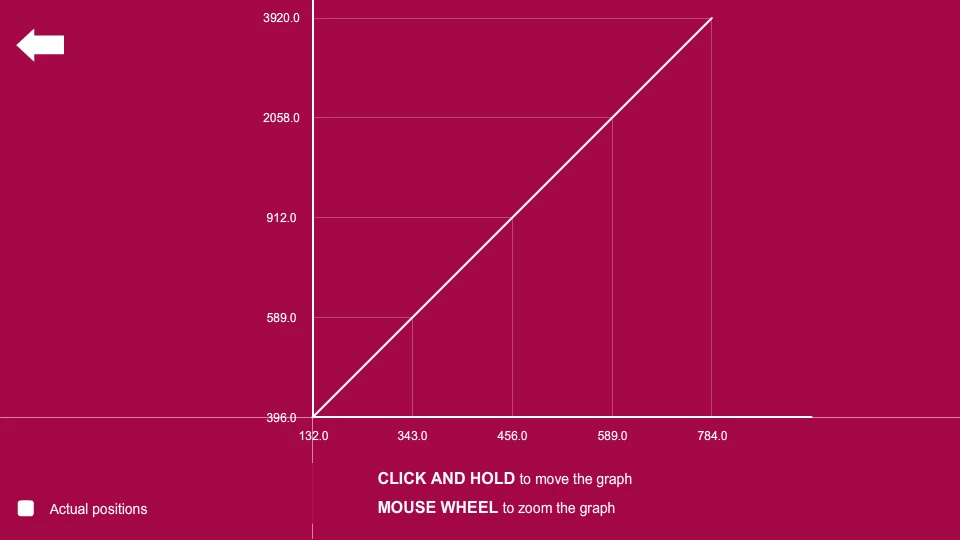
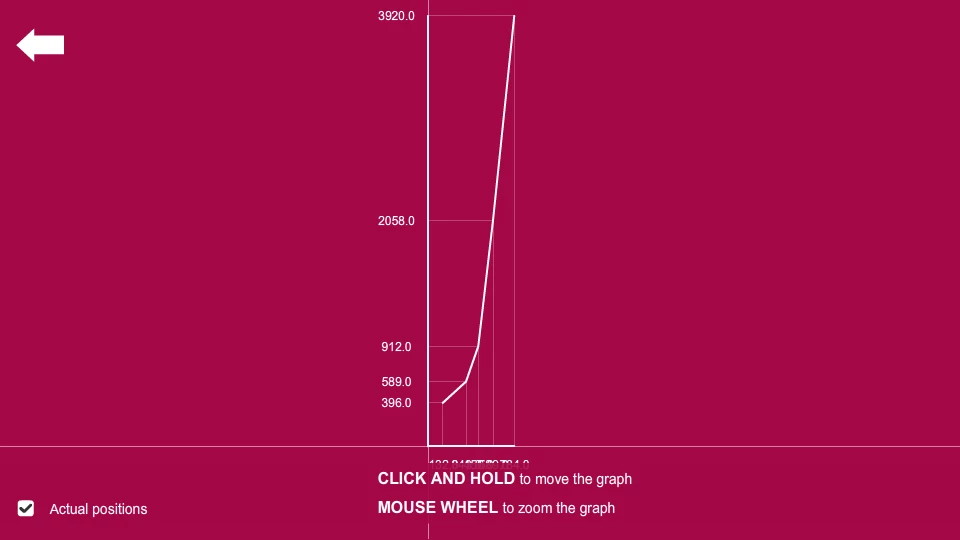
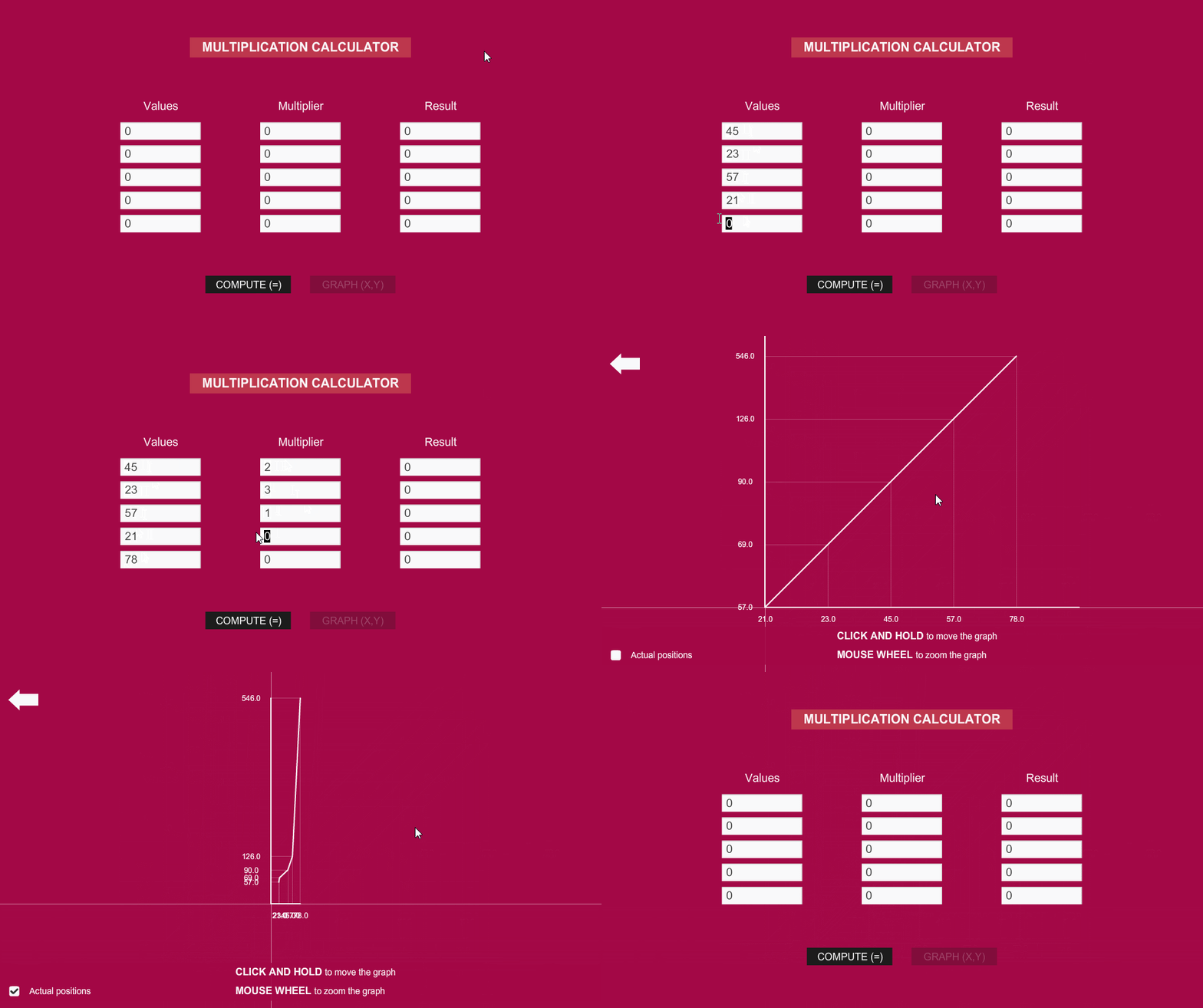
I have a working sample here. Please notice that you can move and zoom the graph.

I just cannot promise a small code and possibly this example will not solve all of your problems.

My goal here is only to get you started.

Preview:

AS3 code:

[FRAME 1 / Calculator]

import flash.events.MouseEvent;

import flash.text.TextField;

import flash.display.MovieClip;

var actualPositions:Boolean = false;

var fixedOffset:Number = 100;

var markerSize:uint = 10;

var graphScale:Number = 1;

var minZoom:Number = 0.01;

var zoomIncrement:Number = 0.05;

var multiplicandsList:Vector.<Number> = new Vector.<Number>();

var resultsList:Vector.<Number> = new Vector.<Number>();

function multiply(e:MouseEvent):void

{

     multiplicandsList.splice(0, multiplicandsList.length);

     resultsList.splice(0, resultsList.length);

     for (var i:int = results.numChildren - 1; i >= 0; i--)

     {

          var multiplicand:Number = Number((multiplicands.getChildAt(i) as MovieClip).txt.text);

          var multiplier:Number = Number((multipliers.getChildAt(i) as MovieClip).txt.text);

          var result:Number;

          var resultText:TextField;

     if (isNaN(multiplicand) || isNaN(multiplier))

          return;

     resultText = (results.getChildAt(i) as MovieClip).txt;

     result = multiplicand * multiplier;

     resultText.text = String(result);

     multiplicandsList.push(multiplicand);

     resultsList.push(result);

     graphButton.alpha = 1;

     graphButton.mouseEnabled = true;

     }

}

function generateGraph(e:MouseEvent):void

{

     if (multiplicandsList.length == 0 || resultsList.length == 0)

          return;

     gotoAndStop(2);

}

function setCalculator():void

{

     stop();

     graphButton.alpha = 0.25;

     graphButton.mouseEnabled = false;

     computeButton.addEventListener(MouseEvent.CLICK, multiply);

     graphButton.addEventListener(MouseEvent.CLICK, generateGraph);

}

setCalculator();

[FRAME 2 / Graph]

import flash.display.Sprite;

import flash.display.DisplayObject;

import flash.events.MouseEvent;

import flash.text.TextFieldAutoSize;

import flash.geom.Rectangle;

var graph:Sprite;

var xValues:Vector.<Number>;

var yValues:Vector.<Number>;

var styles:Object =

{

     strong:

     {

          tickness:2,

          color:0xFFFFFF,

          alpha:1

     },

     regular:

     {

          tickness:0.1,

          color:0xFFFFFF,

          alpha:0.5

     },

     thin:

     {

          tickness:0.25,

          color:0xFFFFFF,

          alpha:0.25

     }

};

function goBack(e:MouseEvent):void

{

     if (graph.stage)

     {

          removeChild(graph);

          graph = null;

          stage.removeEventListener(MouseEvent.MOUSE_DOWN, moveGraph);

          stage.removeEventListener(MouseEvent.MOUSE_UP, releaseGraph);

          stage.removeEventListener(MouseEvent.MOUSE_WHEEL, drawGraphic);

     }

     gotoAndStop(1);

}

function setGraph():void

{

     xValues = multiplicandsList.sort(Array.NUMERIC);

     yValues = resultsList.sort(Array.NUMERIC);

     graph = new Sprite();

     graph.x = stage.stageWidth * 0.5;

     graph.y = stage.stageHeight * 0.5;

     addChildAt(graph, 0);

     drawGraphic(null);

     graphUI.checkButton.icon.visible = actualPositions;

     graphUI.checkButton.addEventListener(MouseEvent.CLICK, checkHandler);

     backButton.addEventListener(MouseEvent.CLICK, goBack);

     stage.addEventListener(MouseEvent.MOUSE_DOWN, moveGraph);

     stage.addEventListener(MouseEvent.MOUSE_UP, releaseGraph);

     stage.addEventListener(MouseEvent.MOUSE_WHEEL, drawGraphic);

}

function checkHandler(e:MouseEvent):void

{

     actualPositions = !actualPositions;

     e.currentTarget.icon.visible = actualPositions;

     drawGraphic(null);

}

function moveGraph(e:MouseEvent):void

{

     graph.startDrag(false, new Rectangle(0, 0, stage.stageWidth, stage.stageHeight));

}

function releaseGraph(e:MouseEvent):void

{

     stopDrag();

}

function drawGraphic(e:MouseEvent):void

{

     var tempXValues:Vector.<Number> = new Vector.<Number>();

     var tempYValues:Vector.<Number> = new Vector.<Number>();

     var resultPositions:Array = [];

     var textFieldsX:Vector.<OutputValue> = new Vector.<OutputValue>();

     var textFieldsY:Vector.<OutputValue> = new Vector.<OutputValue>();

     var scaledOffset:Number = fixedOffset * graphScale;

     var i:uint

     var total:uint;

     graph.graphics.clear();

     while (graph.numChildren > 0)

          graph.removeChildAt(0);

     if (e)

     {

          graphScale += (e.delta / 3) * zoomIncrement;

          graphScale = Math.max(minZoom, graphScale);

     }

     tempXValues = tempXValues.concat(xValues);

     tempYValues = tempYValues.concat(yValues);

     tempXValues.forEach(function(element:*, index:int, vec:Vector.<Number>):void

     {

          tempXValues[index] *= graphScale;

     });

     tempYValues.forEach(function(element:*, index:int, vec:Vector.<Number>):void

     {

          tempYValues[index] *= graphScale;

     });

     graph.graphics.lineStyle(styles.regular.tickness, styles.regular.color, styles.regular.alpha);

     graph.graphics.moveTo(-stage.stageWidth, 0);

     graph.graphics.lineTo(stage.stageWidth, 0);

     graph.graphics.moveTo(0, -stage.stageHeight);

     graph.graphics.lineTo(0, stage.stageHeight);

     graph.graphics.lineStyle(styles.strong.tickness, styles.strong.color, styles.strong.alpha);

     graph.graphics.moveTo(0, 0);

     graph.graphics.lineTo(actualPositions ? tempXValues[0] : scaledOffset * tempXValues.length, 0);

     graph.graphics.moveTo(0, 0);

     graph.graphics.lineTo(actualPositions ? tempXValues[tempXValues.length - 1] : scaledOffset * tempXValues.length, 0);

     graph.graphics.moveTo(0, 0);

     graph.graphics.lineTo(0, -(actualPositions ? tempYValues[0] : scaledOffset * tempYValues.length));

     graph.graphics.moveTo(0, 0);

     graph.graphics.lineTo(0, -(actualPositions ? tempYValues[tempYValues.length - 1] : scaledOffset * tempYValues.length));

     graph.graphics.lineStyle(styles.thin.tickness, styles.thin.color, styles.thin.alpha);

     resultPositions[0] = [];

     resultPositions[1] = [];

     for (i = 0, total = tempXValues.length; i < total; i++)

     {

          resultPositions[0] =

          {

               x0:actualPositions ? tempXValues : scaledOffset * i,

               y0:0,

               x1:actualPositions ? tempXValues : scaledOffset * i,

               y1:actualPositions ? -tempYValues : -scaledOffset * i

          };

          graph.graphics.moveTo(resultPositions[0].x0, resultPositions[0].y0);

          graph.graphics.lineTo(resultPositions[0].x1, resultPositions[0].y1);

          textFieldsX.unshift(new OutputValue());

          textFieldsX[0].x = actualPositions ? tempXValues : scaledOffset * i;

          textFieldsX[0].y = markerSize + textFieldsX[0].height * 0.5;

          textFieldsX[0].txt.autoSize = TextFieldAutoSize.CENTER;

          textFieldsX[0].txt.text = String((tempXValues / graphScale).toFixed(1));

          graph.addChild(textFieldsX[0]);

     }

     for (i = 0, total = tempYValues.length; i < total; i++)

     {

          resultPositions[1] =

          {

               x0:0,

               y0:actualPositions ? -tempYValues : -scaledOffset * i,

               x1:actualPositions ? tempXValues : scaledOffset * i,

               y1:actualPositions ? -tempYValues : -scaledOffset * i

          };

          graph.graphics.moveTo(resultPositions[1].x0, resultPositions[1].y0);

          graph.graphics.lineTo(resultPositions[1].x1, resultPositions[1].y1);

          textFieldsY.unshift(new OutputValue());

          textFieldsY[0].x = -markerSize - textFieldsY[0].width * 0.5;

          textFieldsY[0].y = actualPositions ? -tempYValues : -scaledOffset * i;

          textFieldsY[0].txt.autoSize = TextFieldAutoSize.CENTER;

          textFieldsY[0].txt.text = String((tempYValues / graphScale).toFixed(1));

          graph.addChild(textFieldsY[0]);

     }

     for (i = 0, total = resultPositions[1].length; i < total; i++)

     {

          graph.graphics.lineStyle(styles.strong.tickness, styles.strong.color, styles.strong.alpha);

          if (i < resultPositions[1].length - 1)

          {

               graph.graphics.moveTo(resultPositions[1].x1, resultPositions[1].y1);

               graph.graphics.lineTo(resultPositions[1][i + 1].x1, resultPositions[1][i + 1].y1);

          }

     }

}

setGraph();

FLA download:

animate_cc_as3_text_inputs_to_graph.zip - Google Drive

I hope this helps.

Regards,

JC

2 replies

JoãoCésar17023019
Community Expert
JoãoCésar17023019Community ExpertCorrect answer
Community Expert
December 20, 2018

Hi.

I have a working sample here. Please notice that you can move and zoom the graph.

I just cannot promise a small code and possibly this example will not solve all of your problems.

My goal here is only to get you started.

Preview:

AS3 code:

[FRAME 1 / Calculator]

import flash.events.MouseEvent;

import flash.text.TextField;

import flash.display.MovieClip;

var actualPositions:Boolean = false;

var fixedOffset:Number = 100;

var markerSize:uint = 10;

var graphScale:Number = 1;

var minZoom:Number = 0.01;

var zoomIncrement:Number = 0.05;

var multiplicandsList:Vector.<Number> = new Vector.<Number>();

var resultsList:Vector.<Number> = new Vector.<Number>();

function multiply(e:MouseEvent):void

{

     multiplicandsList.splice(0, multiplicandsList.length);

     resultsList.splice(0, resultsList.length);

     for (var i:int = results.numChildren - 1; i >= 0; i--)

     {

          var multiplicand:Number = Number((multiplicands.getChildAt(i) as MovieClip).txt.text);

          var multiplier:Number = Number((multipliers.getChildAt(i) as MovieClip).txt.text);

          var result:Number;

          var resultText:TextField;

     if (isNaN(multiplicand) || isNaN(multiplier))

          return;

     resultText = (results.getChildAt(i) as MovieClip).txt;

     result = multiplicand * multiplier;

     resultText.text = String(result);

     multiplicandsList.push(multiplicand);

     resultsList.push(result);

     graphButton.alpha = 1;

     graphButton.mouseEnabled = true;

     }

}

function generateGraph(e:MouseEvent):void

{

     if (multiplicandsList.length == 0 || resultsList.length == 0)

          return;

     gotoAndStop(2);

}

function setCalculator():void

{

     stop();

     graphButton.alpha = 0.25;

     graphButton.mouseEnabled = false;

     computeButton.addEventListener(MouseEvent.CLICK, multiply);

     graphButton.addEventListener(MouseEvent.CLICK, generateGraph);

}

setCalculator();

[FRAME 2 / Graph]

import flash.display.Sprite;

import flash.display.DisplayObject;

import flash.events.MouseEvent;

import flash.text.TextFieldAutoSize;

import flash.geom.Rectangle;

var graph:Sprite;

var xValues:Vector.<Number>;

var yValues:Vector.<Number>;

var styles:Object =

{

     strong:

     {

          tickness:2,

          color:0xFFFFFF,

          alpha:1

     },

     regular:

     {

          tickness:0.1,

          color:0xFFFFFF,

          alpha:0.5

     },

     thin:

     {

          tickness:0.25,

          color:0xFFFFFF,

          alpha:0.25

     }

};

function goBack(e:MouseEvent):void

{

     if (graph.stage)

     {

          removeChild(graph);

          graph = null;

          stage.removeEventListener(MouseEvent.MOUSE_DOWN, moveGraph);

          stage.removeEventListener(MouseEvent.MOUSE_UP, releaseGraph);

          stage.removeEventListener(MouseEvent.MOUSE_WHEEL, drawGraphic);

     }

     gotoAndStop(1);

}

function setGraph():void

{

     xValues = multiplicandsList.sort(Array.NUMERIC);

     yValues = resultsList.sort(Array.NUMERIC);

     graph = new Sprite();

     graph.x = stage.stageWidth * 0.5;

     graph.y = stage.stageHeight * 0.5;

     addChildAt(graph, 0);

     drawGraphic(null);

     graphUI.checkButton.icon.visible = actualPositions;

     graphUI.checkButton.addEventListener(MouseEvent.CLICK, checkHandler);

     backButton.addEventListener(MouseEvent.CLICK, goBack);

     stage.addEventListener(MouseEvent.MOUSE_DOWN, moveGraph);

     stage.addEventListener(MouseEvent.MOUSE_UP, releaseGraph);

     stage.addEventListener(MouseEvent.MOUSE_WHEEL, drawGraphic);

}

function checkHandler(e:MouseEvent):void

{

     actualPositions = !actualPositions;

     e.currentTarget.icon.visible = actualPositions;

     drawGraphic(null);

}

function moveGraph(e:MouseEvent):void

{

     graph.startDrag(false, new Rectangle(0, 0, stage.stageWidth, stage.stageHeight));

}

function releaseGraph(e:MouseEvent):void

{

     stopDrag();

}

function drawGraphic(e:MouseEvent):void

{

     var tempXValues:Vector.<Number> = new Vector.<Number>();

     var tempYValues:Vector.<Number> = new Vector.<Number>();

     var resultPositions:Array = [];

     var textFieldsX:Vector.<OutputValue> = new Vector.<OutputValue>();

     var textFieldsY:Vector.<OutputValue> = new Vector.<OutputValue>();

     var scaledOffset:Number = fixedOffset * graphScale;

     var i:uint

     var total:uint;

     graph.graphics.clear();

     while (graph.numChildren > 0)

          graph.removeChildAt(0);

     if (e)

     {

          graphScale += (e.delta / 3) * zoomIncrement;

          graphScale = Math.max(minZoom, graphScale);

     }

     tempXValues = tempXValues.concat(xValues);

     tempYValues = tempYValues.concat(yValues);

     tempXValues.forEach(function(element:*, index:int, vec:Vector.<Number>):void

     {

          tempXValues[index] *= graphScale;

     });

     tempYValues.forEach(function(element:*, index:int, vec:Vector.<Number>):void

     {

          tempYValues[index] *= graphScale;

     });

     graph.graphics.lineStyle(styles.regular.tickness, styles.regular.color, styles.regular.alpha);

     graph.graphics.moveTo(-stage.stageWidth, 0);

     graph.graphics.lineTo(stage.stageWidth, 0);

     graph.graphics.moveTo(0, -stage.stageHeight);

     graph.graphics.lineTo(0, stage.stageHeight);

     graph.graphics.lineStyle(styles.strong.tickness, styles.strong.color, styles.strong.alpha);

     graph.graphics.moveTo(0, 0);

     graph.graphics.lineTo(actualPositions ? tempXValues[0] : scaledOffset * tempXValues.length, 0);

     graph.graphics.moveTo(0, 0);

     graph.graphics.lineTo(actualPositions ? tempXValues[tempXValues.length - 1] : scaledOffset * tempXValues.length, 0);

     graph.graphics.moveTo(0, 0);

     graph.graphics.lineTo(0, -(actualPositions ? tempYValues[0] : scaledOffset * tempYValues.length));

     graph.graphics.moveTo(0, 0);

     graph.graphics.lineTo(0, -(actualPositions ? tempYValues[tempYValues.length - 1] : scaledOffset * tempYValues.length));

     graph.graphics.lineStyle(styles.thin.tickness, styles.thin.color, styles.thin.alpha);

     resultPositions[0] = [];

     resultPositions[1] = [];

     for (i = 0, total = tempXValues.length; i < total; i++)

     {

          resultPositions[0] =

          {

               x0:actualPositions ? tempXValues : scaledOffset * i,

               y0:0,

               x1:actualPositions ? tempXValues : scaledOffset * i,

               y1:actualPositions ? -tempYValues : -scaledOffset * i

          };

          graph.graphics.moveTo(resultPositions[0].x0, resultPositions[0].y0);

          graph.graphics.lineTo(resultPositions[0].x1, resultPositions[0].y1);

          textFieldsX.unshift(new OutputValue());

          textFieldsX[0].x = actualPositions ? tempXValues : scaledOffset * i;

          textFieldsX[0].y = markerSize + textFieldsX[0].height * 0.5;

          textFieldsX[0].txt.autoSize = TextFieldAutoSize.CENTER;

          textFieldsX[0].txt.text = String((tempXValues / graphScale).toFixed(1));

          graph.addChild(textFieldsX[0]);

     }

     for (i = 0, total = tempYValues.length; i < total; i++)

     {

          resultPositions[1] =

          {

               x0:0,

               y0:actualPositions ? -tempYValues : -scaledOffset * i,

               x1:actualPositions ? tempXValues : scaledOffset * i,

               y1:actualPositions ? -tempYValues : -scaledOffset * i

          };

          graph.graphics.moveTo(resultPositions[1].x0, resultPositions[1].y0);

          graph.graphics.lineTo(resultPositions[1].x1, resultPositions[1].y1);

          textFieldsY.unshift(new OutputValue());

          textFieldsY[0].x = -markerSize - textFieldsY[0].width * 0.5;

          textFieldsY[0].y = actualPositions ? -tempYValues : -scaledOffset * i;

          textFieldsY[0].txt.autoSize = TextFieldAutoSize.CENTER;

          textFieldsY[0].txt.text = String((tempYValues / graphScale).toFixed(1));

          graph.addChild(textFieldsY[0]);

     }

     for (i = 0, total = resultPositions[1].length; i < total; i++)

     {

          graph.graphics.lineStyle(styles.strong.tickness, styles.strong.color, styles.strong.alpha);

          if (i < resultPositions[1].length - 1)

          {

               graph.graphics.moveTo(resultPositions[1].x1, resultPositions[1].y1);

               graph.graphics.lineTo(resultPositions[1][i + 1].x1, resultPositions[1][i + 1].y1);

          }

     }

}

setGraph();

FLA download:

animate_cc_as3_text_inputs_to_graph.zip - Google Drive

I hope this helps.

Regards,

JC

Known Participant
December 20, 2018

Thank you very much for your help. I will refer to your work and see how i can apply it to my code and will get back to you as to how i progress or if i have any further questions.

JoãoCésar17023019
Community Expert
Community Expert
December 20, 2018

You're welcome!

Please don't hesitate to ask if you have any questions.

Regards,

JC

Ned Murphy
Legend
December 19, 2018

One option for dealing with the graphing is to make use of a movieclip object for the graph such that its 0,0 origin is placed at a convenient location - namely the lower left corner of what you show.  That way you can plant points/lines on the graph relative to a 0,0 origin and whatever scaling of values is needed to represent the values the graph covers.  For instance, your positioning of 1 on the x-axis looks to be about 100 pixels from the origin, so the position of a point representing xArray = 1 would be .x=100 (or 100 times the value of xArray)

Edit:  For the above described scenario you will need to negate the y axis values since in Flash the y values increase as you move downwards.

Known Participant
December 20, 2018

Thanks for your reply. I did think of creating a new movieclip for graphing. However, I could not figure out how to pass the input and resulting values (which are stored as arrays) from the movieclip where the calculation is done to a movieclip which will implement graphing. Can you guide me with some code that will allow me to pass the values of these arrays?

Ned Murphy
Legend
December 20, 2018

What could be done, assuming you are using timeline-based coding, is to have all of your code in the main timeline, or at least the arrays you are filling.  Then the children can all share access to the data from a similar vantage point.  If you put all the code in the main timeline you start using the movieclips more literally as display objects, where the main timeline code dictates what each displays.  You just modify the code to be targeting the movieclips for the various textfields you create and data you fill them with.