
DrewRothman
Inspiring
August 25, 2022
Answered

Position changes when size changes?

  • August 25, 2022
  • 1 reply
  • 2101 views

I'm working on making a few objects "pop up" on my stage. I'm keyframing a scale change from 1x1 up to full size. I notice that when I go to the "Position and Size" on the Object panel and set the W and H to 1x1, it also changes the X and Y coordinates. When I'm dealing with smallish objects or quick scale-ups, this seems to result in a visible "jump" between the final frame of the tween and the ending keyframe. Anyone know why this happens?
    This topic has been closed for replies.
    Correct answer kglad

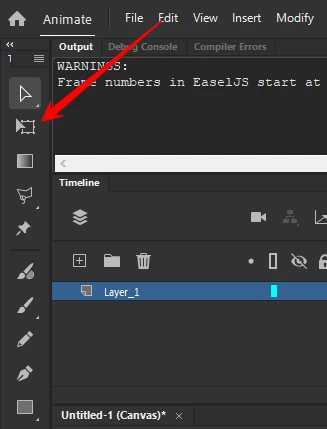
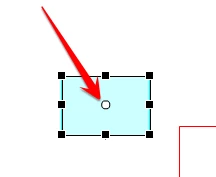
    probably because of the location of the object's transform point.  you probably (but not necessarily) want this to be the object's upper left.  you can change the transform point by clicking the "free transform tool"* and moving the object's open circle**:


    *


    **


    p.s. after learning how to control the transform point, you may find it easier to recreate your tween rather than edit your tween.


    1 reply

    kglad
    Community Expert
    kgladCommunity ExpertCorrect answer
    Community Expert
    August 25, 2022

    probably because of the location of the object's transform point.  you probably (but not necessarily) want this to be the object's upper left.  you can change the transform point by clicking the "free transform tool"* and moving the object's open circle**:


    *


    **


    p.s. after learning how to control the transform point, you may find it easier to recreate your tween rather than edit your tween.


    DrewRothman
    Inspiring
    August 25, 2022

    No, the transform point isn't the issue... it's 'bottom-center'. I've made a video to show what I'm seeing.

    1. I verify the transform point
    2. I set an endpoint keyframe
    3. I set a starting point keyframe
    4. I scale the starting point to 1x1 and set the Y coordinate to the bottom of the stage.
    5. I add a classic tween.


    The resulting animation seems to slide to the left and then pop back to the right on the final frame.


    kglad
    Community Expert
    Community Expert
    August 25, 2022

    i can't tell what you're doing, but it looks problematic and related to your transform point:


    1. double click your object.

    2. make it's reg point bottom center

    3. add it to a keyframe in its own layer on the main timeline

    4. check/move the transform point to bottom center

    5. add another keyframe further down the main timeline layer

    6. set the object's w x h to 1 x1 on the initial keyframe

    7. add a classic tween

    8. test