
Publishing HTML canvas to multiple resolutions
Hi all, I'm using Animate to create a canvas animation from a sequence of images. These images show a 6-sided die being "thrown" and coming to rest. The image sequence was rendered in 3DS Max at a huge resolution to allow for large retina displays. I batch-converted the sequence in Photoshop to transparent PNGs, which allowed me to create much smaller "isolated" images of the die and then I painstakingly placed each one by hand in Animate, using the original full-size image images as a guide. I hope that all makes sense!
I have 2 questions really. The first is: how can I publish the project at multiple resolutions? I don't mean "Make responsive" - I understand what that does but I actually want to generate different resolution texture atlas files for different devices, so that I don't have to load and render the enormous versions on small devices. There's a "Resolution" setting in the Publish Setting dialog which I thought might do this, but changing it doesn't seem to have any effect on my texture files, and I can't find any help on it in the Animate help pages:
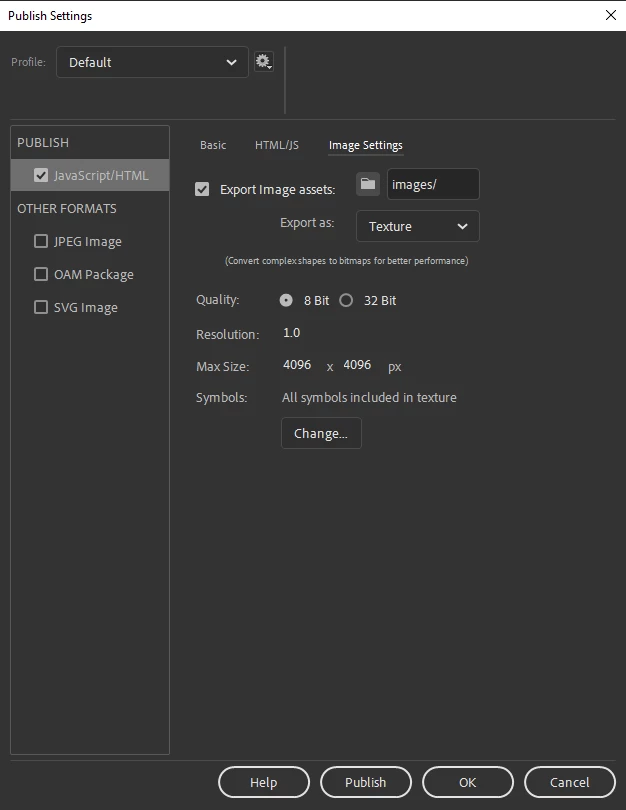
My second question is, how can I force the output to render using WebGL instead of a HTML Canvas? Or does it do that already?
Thanks so mych for any help


 AdChoices