


John Hepworth
Inspiring
August 13, 2025
Answered

Repairing corrupted FLA file and/or converting SWF to mpeg

  • August 13, 2025
  • 2 replies
  • 390 views

1 )Animate crashed and my project got corrupted.


I am on mac, and tried the process of zipping the file and then unarchiving it using archive utility


All my lovely assets are there, just waiting to be uncorrupted.


Can anyone walk me through the next few steps?

I believe I need to create a new animate project and then copy these assets into it in the finder?


Or could animate recognize and import any of them directly?
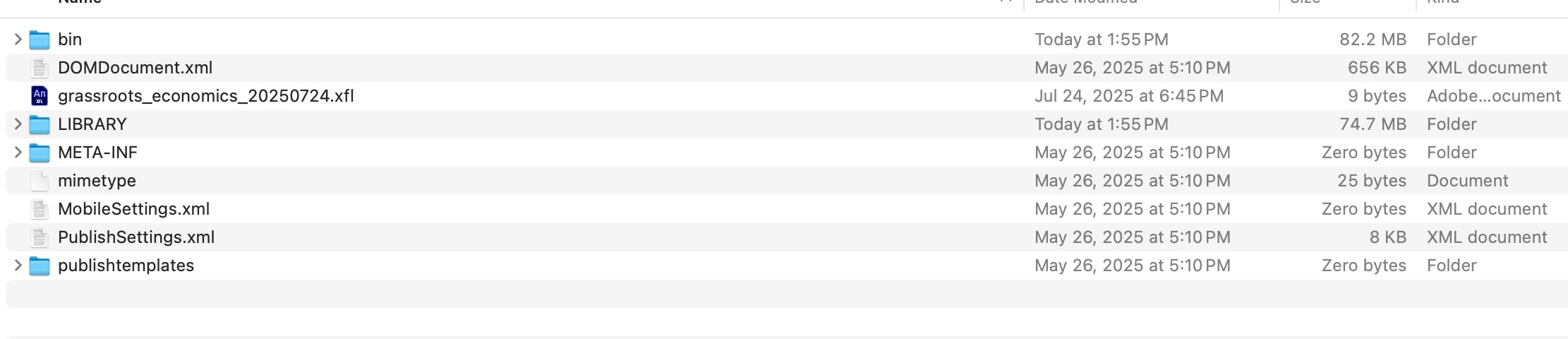


2) I somehow have an SWF of my last animation that plays fine, but can't seem to convert it into an mpeg or other format for editing...I've tried VLC, handbrake...


Any help appreciated.

    Correct answer John Hepworth

    SOLVED: (EDIT....5 minutes late)


    I changed the .fla to zip on my corrupted file.


    I used archive utility to extract it, it gave me the file structure in the post above.


    I @#$%^& around quite a bit trying to make a 'clean' project, copy the assets into it, recompress it, rename it .fla


    NOTHING


    eventually something from Merlin AI suggested opening the .xfl file directly, and, fingers crossed...it's all back.MOST of it's back...I still lost 'several' hours, if not the day....SO any help converting the SWF still appreciated

    2 replies

    John Hepworth
    John HepworthAuthorCorrect answer
    Inspiring
    August 13, 2025

    SOLVED: (EDIT....5 minutes late)


    I changed the .fla to zip on my corrupted file.


    I used archive utility to extract it, it gave me the file structure in the post above.


    I @#$%^& around quite a bit trying to make a 'clean' project, copy the assets into it, recompress it, rename it .fla


    NOTHING


    eventually something from Merlin AI suggested opening the .xfl file directly, and, fingers crossed...it's all back.MOST of it's back...I still lost 'several' hours, if not the day....SO any help converting the SWF still appreciated

    John Hepworth
    Inspiring
    August 13, 2025

    so this feels like it would take someone who knows what they're doing a finite time, and me several days:


    THE ISSUE: -- the data is in the file and the corruption is finite

    THE SOLUTION: one or several scripts to automate pulling the good out of the bad


    Merlin AI - started to come up with some JSFl...but it's beyond my capacities to attempt it...


    ANYONE?


    /**
    * Exports every symbol in the library to its own .swf file.
    * @9397041 {String} destFolderURI - e.g. "file:///C:/Temp/Exports/"
    */
    function exportAllLibrarySymbols(destFolderURI) {
    var doc = fl.getDocumentDOM();
    if (!doc) { alert("No open document."); return; }

    var lib = doc.library;
    var items = lib.items;
    for (var i = 0; i < items.length; i++) {
    var name = items[i].name;
    // sanitize filename
    var safeName = name.replace(/[^a-z0-9_\-]/gi, "_");
    var outURI = destFolderURI + safeName + ".swf";
    lib.exportSymbol(name, outURI);
    fl.trace("Exported " + name + " → " + outURI);
    }
    }

    // Example usage:
    exportAllLibrarySymbols("file:///C:/Temp/MyFLA/Symbols/");

    /**
    * Finds and replaces text in every frame’s ActionScript.
    * @9397041 {String|RegExp} findPattern
    * @9397041 {String} replacementText
    */
    function batchReplaceInFrameScripts(findPattern, replacementText) {
    var doc = fl.getDocumentDOM();
    var timeline = doc.getTimeline();
    var layers = timeline.layers;

    for (var li = 0; li < layers.length; li++) {
    var layer = layers[li];
    var frames = layer.frames;
    for (var fi = 0; fi < frames.length; fi++) {
    var frame = frames[fi];
    var scriptText = frame.script;
    if (scriptText && scriptText.search(findPattern) !== -1) {
    var newText = scriptText.replace(findPattern, replacementText);
    frame.script = newText;
    fl.trace(
    "Replaced in layer “" + layer.name + "”, frame " + (fi+1)
    );
    }
    }
    }
    }

    // Example usage: rename oldFunc() → newFunc()
    batchReplaceInFrameScripts(/oldFunc$/g, "newFunc(");

    kglad
    Community Expert
    Community Expert
    August 13, 2025

    to repair a corrupted fla


    rename the fla to a rar

    open with winrar

    repair the rar

    rename the repaired rar to a fla

    try to open the repaired fla with an


    John Hepworth
    Inspiring
    August 13, 2025

    I'm on mac and looked into this a little but didn't get very far.


    What worked partially for me was as I describe below....renaming is as a zip, extracting it to it's folders, then open the xfl in animate...

    thanks though!