
Rigging Character - Bone Tool Issue
Hello,
I am new to these forums so if I have broken a rule then I apologies in advance.
So, my issue is when ever I adjust the symbol position connected to the armature it will move a symbol on the other side of the character.
To elaborate, I have created a character in Adobe Illustrator CS5.1 and have exported each body part as Flash Layers (e.g Upper Arm, Lower Arm, Torso etc.), I have then Imported those to Flash Professional CS5.5 and connected them using the bone tool, but when ever I line up the leg the arms adjust as well as the eye and this is the problem as I everytime I change one it changes the other ending in an endless cycle of me getting more and more frustrated.
I wish to know how I can stop this.
Here I have screen shots of before and after moving the arm, look at the eye and mouth:
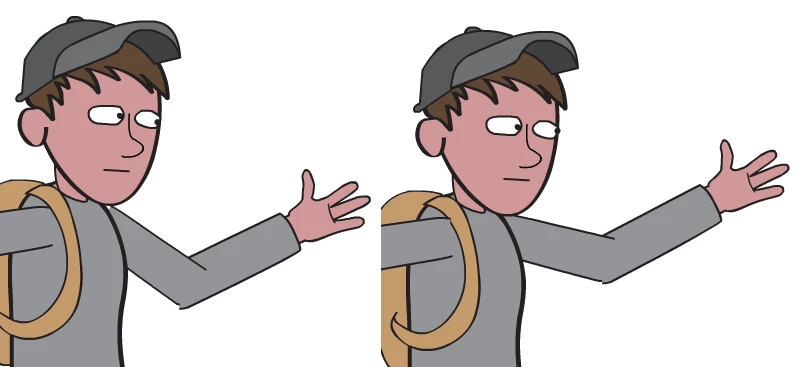
Before - Left, After - Right
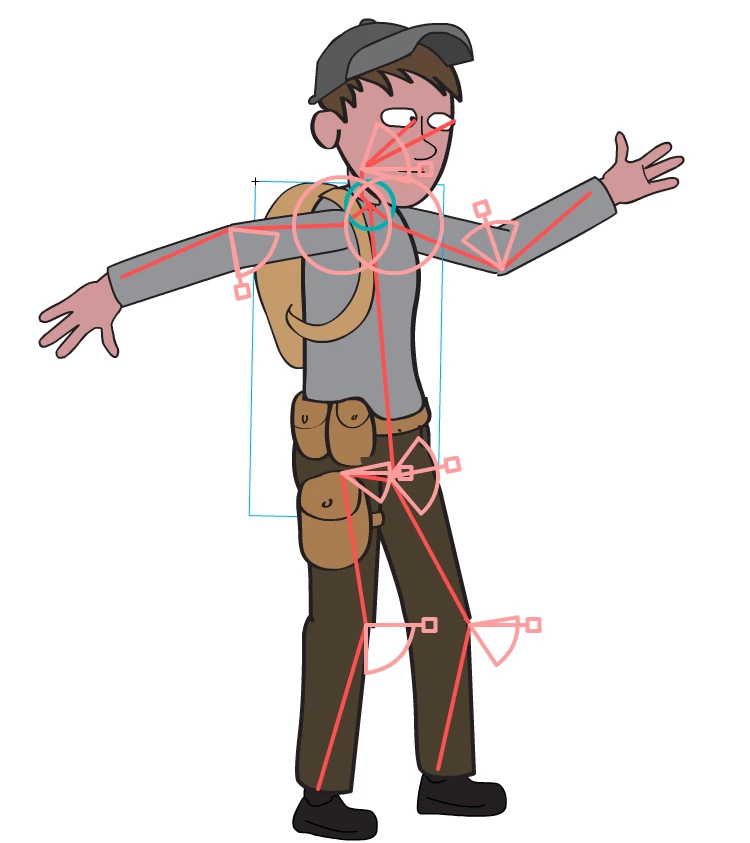
The rig of my character
My system and software versions:
Processor: Intel(R) Core(TM) i5-2430M CPU @ 2.40GHz (4 CPUs), ~2.4GHz
Memory: 8192MB RAM
Operating System: Windows 7 Ultimate 64-bit (6.1, Build 7601) Service Pack 1
Card name: NVIDIA GeForce GTX 570M
Adobe Flash Professioan CS5.5
Adobe Illustrator CS5.1
If needed, request the files.
Thank you for any support,
Jordan


 AdChoices