
Participant
March 18, 2025
Question

Specific Character is Pixelated/Blurred after Export

  • March 18, 2025
  • 1 reply
  • 646 views

On the surface, everything looked fine when animating and previewing, but once I exported, one of my characters turned pixelated and poor quality. It'd make sense if it was the whole animation, but no, it's just that character. I have two characters in the animation, and only one of the seems to be affected with this bug. Here's a before and after:
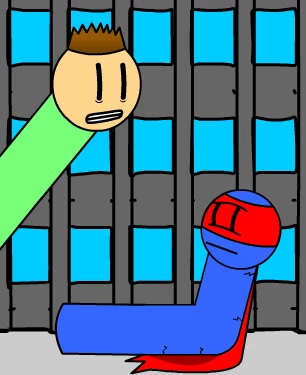
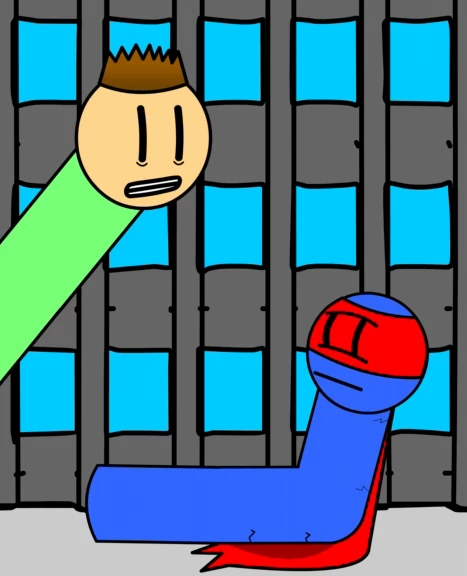
 

I have no idea what's going on. I tried many ways of exporting (Including doing a PNG Sequence). Is there a way to fix this, or am I screwed?


    1 reply

    n. tilcheff
    Legend
    March 18, 2025

    What's specific about this area:

    Is it masked?

    Are there any bitmap textures?

    Any filters or frame effects used?


    Nick - Character Designer and Animator, Flash user since 1998 | Member of the Flanimate Power Tools team - extensions for character animation
    Participant
    March 18, 2025

    None of the above. From what I can tell, the mask, cape, eyes, and cracks are the only parts affected. One theory I had is that it has something to do with the way all the parts are parented, but that wouldn't explain why the other character looks fine.


    I'm thinking about converting him into one bitmap layer and tracing it so that hopefully it'll be fixed, but I'm not very sure it will help.

    n. tilcheff
    Legend
    March 18, 2025

    Does it look pixelated if you publish a SWF preview / export a static PNG or only on the video?

    Just as a test you can try to change the red color to green or some shade of blue. H.264 often has issues with bright reds.


    Nick - Character Designer and Animator, Flash user since 1998 | Member of the Flanimate Power Tools team - extensions for character animation